Starting with the release of Strategy ONE (March 2024), dossiers are also known as dashboards.
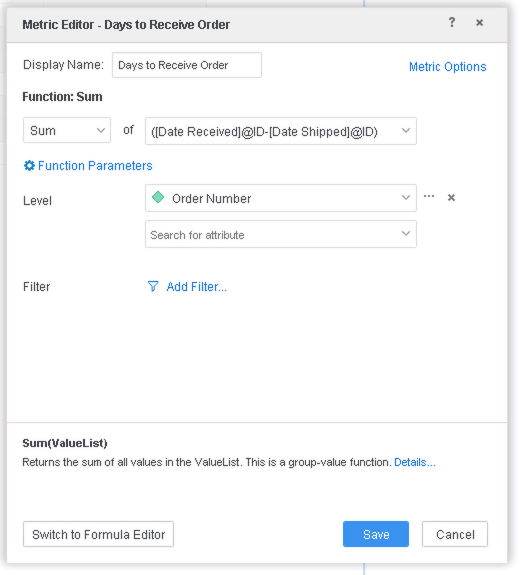
We will use the mock data below. Order Number is A3, Date Shipped and Date Received are A1 and A2. Note how the first two rows have the same values for Date Shipped and Date Received.
iserver.requestTimeout Tables Accessed: STATE_SUBCATEG_MNTH_SLS LU_MONTH SQL Statements: ... select a12.YEAR_ID YEAR_ID, sum(a11.TOT_COST) WJXBFS1 from STATE_SUBCATEG_MNTH_SLS a11 join LU_MONTH a12 on (a11.MONTH_ID = a12.MONTH_ID) group by a12.YEAR_ID Tables Accessed: LU_QUARTER QTR_CATEGORY_SLS SQL Statements: ... select a12.YEAR_ID YEAR_ID, sum(a11.TOT_COST) WJXBFS1 from QTR_CATEGORY_SLS a11 join LU_QUARTER a12 on (a11.QUARTER_ID = a12.QUARTER_ID) group by a12.YEAR_ID SAP HANA DatatypeStrategy DatatypeAlphanum(n)VarChar(n)BigInt Big IntegerBinaryBinary(1)BooleanBinary(1)Char(n)Char(n)Char Varying(n)VarChar(n)DateDateDayDateDateDecimal(p,s)Decimal(p,s)DoubleDoubleFloat(n)If n>24 Double If n<=24 Real IntegerInteger(10)LongDateTimeStampNchar(n)NChar (n)Numeric(p,s)Decimal(p,s)NVarChar(n)NVarChar(n)RealRealSecondDateTimeStampShortText(n)VarChar(n)SmallIntInteger(5)TextLongVarChar(n)TimeTimeTimeStampTimeStampTinyIntInteger(3)VarBinary(n)VarBin(n)VarChar(n)VarChar(n)Order NumberDate ShippedDate Received11/1/191/5/1921/1/191/5/1931/1/191/14/19 | iserver.requestTimeout Tables Accessed: STATE_SUBCATEG_MNTH_SLS LU_MONTH SQL Statements: ... select a12.YEAR_ID YEAR_ID, sum(a11.TOT_COST) WJXBFS1 from STATE_SUBCATEG_MNTH_SLS a11 join LU_MONTH a12 on (a11.MONTH_ID = a12.MONTH_ID) group by a12.YEAR_ID Tables Accessed: LU_QUARTER QTR_CATEGORY_SLS SQL Statements: ... select a12.YEAR_ID YEAR_ID, sum(a11.TOT_COST) WJXBFS1 from QTR_CATEGORY_SLS a11 join LU_QUARTER a12 on (a11.QUARTER_ID = a12.QUARTER_ID) group by a12.YEAR_ID SAP HANA DatatypeStrategy DatatypeAlphanum(n)VarChar(n)BigInt Big IntegerBinaryBinary(1)BooleanBinary(1)Char(n)Char(n)Char Varying(n)VarChar(n)DateDateDayDateDateDecimal(p,s)Decimal(p,s)DoubleDoubleFloat(n)If n>24 Double If n<=24 Real IntegerInteger(10)LongDateTimeStampNchar(n)NChar (n)Numeric(p,s)Decimal(p,s)NVarChar(n)NVarChar(n)RealRealSecondDateTimeStampShortText(n)VarChar(n)SmallIntInteger(5)TextLongVarChar(n)TimeTimeTimeStampTimeStampTinyIntInteger(3)VarBinary(n)VarBin(n)VarChar(n)VarChar(n)Order NumberDate ShippedDate Received11/1/191/5/1921/1/191/5/1931/1/191/14/19 | iserver.requestTimeout Tables Accessed: STATE_SUBCATEG_MNTH_SLS LU_MONTH SQL Statements: ... select a12.YEAR_ID YEAR_ID, sum(a11.TOT_COST) WJXBFS1 from STATE_SUBCATEG_MNTH_SLS a11 join LU_MONTH a12 on (a11.MONTH_ID = a12.MONTH_ID) group by a12.YEAR_ID Tables Accessed: LU_QUARTER QTR_CATEGORY_SLS SQL Statements: ... select a12.YEAR_ID YEAR_ID, sum(a11.TOT_COST) WJXBFS1 from QTR_CATEGORY_SLS a11 join LU_QUARTER a12 on (a11.QUARTER_ID = a12.QUARTER_ID) group by a12.YEAR_ID SAP HANA DatatypeStrategy DatatypeAlphanum(n)VarChar(n)BigInt Big IntegerBinaryBinary(1)BooleanBinary(1)Char(n)Char(n)Char Varying(n)VarChar(n)DateDateDayDateDateDecimal(p,s)Decimal(p,s)DoubleDoubleFloat(n)If n>24 Double If n<=24 Real IntegerInteger(10)LongDateTimeStampNchar(n)NChar (n)Numeric(p,s)Decimal(p,s)NVarChar(n)NVarChar(n)RealRealSecondDateTimeStampShortText(n)VarChar(n)SmallIntInteger(5)TextLongVarChar(n)TimeTimeTimeStampTimeStampTinyIntInteger(3)VarBinary(n)VarBin(n)VarChar(n)VarChar(n)Order NumberDate ShippedDate Received11/1/191/5/1921/1/191/5/1931/1/191/14/19 |
iserver.requestTimeout Tables Accessed: STATE_SUBCATEG_MNTH_SLS LU_MONTH SQL Statements: ... select a12.YEAR_ID YEAR_ID, sum(a11.TOT_COST) WJXBFS1 from STATE_SUBCATEG_MNTH_SLS a11 join LU_MONTH a12 on (a11.MONTH_ID = a12.MONTH_ID) group by a12.YEAR_ID Tables Accessed: LU_QUARTER QTR_CATEGORY_SLS SQL Statements: ... select a12.YEAR_ID YEAR_ID, sum(a11.TOT_COST) WJXBFS1 from QTR_CATEGORY_SLS a11 join LU_QUARTER a12 on (a11.QUARTER_ID = a12.QUARTER_ID) group by a12.YEAR_ID SAP HANA DatatypeStrategy DatatypeAlphanum(n)VarChar(n)BigInt Big IntegerBinaryBinary(1)BooleanBinary(1)Char(n)Char(n)Char Varying(n)VarChar(n)DateDateDayDateDateDecimal(p,s)Decimal(p,s)DoubleDoubleFloat(n)If n>24 Double If n<=24 Real IntegerInteger(10)LongDateTimeStampNchar(n)NChar (n)Numeric(p,s)Decimal(p,s)NVarChar(n)NVarChar(n)RealRealSecondDateTimeStampShortText(n)VarChar(n)SmallIntInteger(5)TextLongVarChar(n)TimeTimeTimeStampTimeStampTinyIntInteger(3)VarBinary(n)VarBin(n)VarChar(n)VarChar(n)Order NumberDate ShippedDate Received11/1/191/5/1921/1/191/5/1931/1/191/14/19 | iserver.requestTimeout Tables Accessed: STATE_SUBCATEG_MNTH_SLS LU_MONTH SQL Statements: ... select a12.YEAR_ID YEAR_ID, sum(a11.TOT_COST) WJXBFS1 from STATE_SUBCATEG_MNTH_SLS a11 join LU_MONTH a12 on (a11.MONTH_ID = a12.MONTH_ID) group by a12.YEAR_ID Tables Accessed: LU_QUARTER QTR_CATEGORY_SLS SQL Statements: ... select a12.YEAR_ID YEAR_ID, sum(a11.TOT_COST) WJXBFS1 from QTR_CATEGORY_SLS a11 join LU_QUARTER a12 on (a11.QUARTER_ID = a12.QUARTER_ID) group by a12.YEAR_ID SAP HANA DatatypeStrategy DatatypeAlphanum(n)VarChar(n)BigInt Big IntegerBinaryBinary(1)BooleanBinary(1)Char(n)Char(n)Char Varying(n)VarChar(n)DateDateDayDateDateDecimal(p,s)Decimal(p,s)DoubleDoubleFloat(n)If n>24 Double If n<=24 Real IntegerInteger(10)LongDateTimeStampNchar(n)NChar (n)Numeric(p,s)Decimal(p,s)NVarChar(n)NVarChar(n)RealRealSecondDateTimeStampShortText(n)VarChar(n)SmallIntInteger(5)TextLongVarChar(n)TimeTimeTimeStampTimeStampTinyIntInteger(3)VarBinary(n)VarBin(n)VarChar(n)VarChar(n)Order NumberDate ShippedDate Received11/1/191/5/1921/1/191/5/1931/1/191/14/19 | iserver.requestTimeout Tables Accessed: STATE_SUBCATEG_MNTH_SLS LU_MONTH SQL Statements: ... select a12.YEAR_ID YEAR_ID, sum(a11.TOT_COST) WJXBFS1 from STATE_SUBCATEG_MNTH_SLS a11 join LU_MONTH a12 on (a11.MONTH_ID = a12.MONTH_ID) group by a12.YEAR_ID Tables Accessed: LU_QUARTER QTR_CATEGORY_SLS SQL Statements: ... select a12.YEAR_ID YEAR_ID, sum(a11.TOT_COST) WJXBFS1 from QTR_CATEGORY_SLS a11 join LU_QUARTER a12 on (a11.QUARTER_ID = a12.QUARTER_ID) group by a12.YEAR_ID SAP HANA DatatypeStrategy DatatypeAlphanum(n)VarChar(n)BigInt Big IntegerBinaryBinary(1)BooleanBinary(1)Char(n)Char(n)Char Varying(n)VarChar(n)DateDateDayDateDateDecimal(p,s)Decimal(p,s)DoubleDoubleFloat(n)If n>24 Double If n<=24 Real IntegerInteger(10)LongDateTimeStampNchar(n)NChar (n)Numeric(p,s)Decimal(p,s)NVarChar(n)NVarChar(n)RealRealSecondDateTimeStampShortText(n)VarChar(n)SmallIntInteger(5)TextLongVarChar(n)TimeTimeTimeStampTimeStampTinyIntInteger(3)VarBinary(n)VarBin(n)VarChar(n)VarChar(n)Order NumberDate ShippedDate Received11/1/191/5/1921/1/191/5/1931/1/191/14/19 |
iserver.requestTimeout Tables Accessed: STATE_SUBCATEG_MNTH_SLS LU_MONTH SQL Statements: ... select a12.YEAR_ID YEAR_ID, sum(a11.TOT_COST) WJXBFS1 from STATE_SUBCATEG_MNTH_SLS a11 join LU_MONTH a12 on (a11.MONTH_ID = a12.MONTH_ID) group by a12.YEAR_ID Tables Accessed: LU_QUARTER QTR_CATEGORY_SLS SQL Statements: ... select a12.YEAR_ID YEAR_ID, sum(a11.TOT_COST) WJXBFS1 from QTR_CATEGORY_SLS a11 join LU_QUARTER a12 on (a11.QUARTER_ID = a12.QUARTER_ID) group by a12.YEAR_ID SAP HANA DatatypeStrategy DatatypeAlphanum(n)VarChar(n)BigInt Big IntegerBinaryBinary(1)BooleanBinary(1)Char(n)Char(n)Char Varying(n)VarChar(n)DateDateDayDateDateDecimal(p,s)Decimal(p,s)DoubleDoubleFloat(n)If n>24 Double If n<=24 Real IntegerInteger(10)LongDateTimeStampNchar(n)NChar (n)Numeric(p,s)Decimal(p,s)NVarChar(n)NVarChar(n)RealRealSecondDateTimeStampShortText(n)VarChar(n)SmallIntInteger(5)TextLongVarChar(n)TimeTimeTimeStampTimeStampTinyIntInteger(3)VarBinary(n)VarBin(n)VarChar(n)VarChar(n)Order NumberDate ShippedDate Received11/1/191/5/1921/1/191/5/1931/1/191/14/19 | iserver.requestTimeout Tables Accessed: STATE_SUBCATEG_MNTH_SLS LU_MONTH SQL Statements: ... select a12.YEAR_ID YEAR_ID, sum(a11.TOT_COST) WJXBFS1 from STATE_SUBCATEG_MNTH_SLS a11 join LU_MONTH a12 on (a11.MONTH_ID = a12.MONTH_ID) group by a12.YEAR_ID Tables Accessed: LU_QUARTER QTR_CATEGORY_SLS SQL Statements: ... select a12.YEAR_ID YEAR_ID, sum(a11.TOT_COST) WJXBFS1 from QTR_CATEGORY_SLS a11 join LU_QUARTER a12 on (a11.QUARTER_ID = a12.QUARTER_ID) group by a12.YEAR_ID SAP HANA DatatypeStrategy DatatypeAlphanum(n)VarChar(n)BigInt Big IntegerBinaryBinary(1)BooleanBinary(1)Char(n)Char(n)Char Varying(n)VarChar(n)DateDateDayDateDateDecimal(p,s)Decimal(p,s)DoubleDoubleFloat(n)If n>24 Double If n<=24 Real IntegerInteger(10)LongDateTimeStampNchar(n)NChar (n)Numeric(p,s)Decimal(p,s)NVarChar(n)NVarChar(n)RealRealSecondDateTimeStampShortText(n)VarChar(n)SmallIntInteger(5)TextLongVarChar(n)TimeTimeTimeStampTimeStampTinyIntInteger(3)VarBinary(n)VarBin(n)VarChar(n)VarChar(n)Order NumberDate ShippedDate Received11/1/191/5/1921/1/191/5/1931/1/191/14/19 | iserver.requestTimeout Tables Accessed: STATE_SUBCATEG_MNTH_SLS LU_MONTH SQL Statements: ... select a12.YEAR_ID YEAR_ID, sum(a11.TOT_COST) WJXBFS1 from STATE_SUBCATEG_MNTH_SLS a11 join LU_MONTH a12 on (a11.MONTH_ID = a12.MONTH_ID) group by a12.YEAR_ID Tables Accessed: LU_QUARTER QTR_CATEGORY_SLS SQL Statements: ... select a12.YEAR_ID YEAR_ID, sum(a11.TOT_COST) WJXBFS1 from QTR_CATEGORY_SLS a11 join LU_QUARTER a12 on (a11.QUARTER_ID = a12.QUARTER_ID) group by a12.YEAR_ID SAP HANA DatatypeStrategy DatatypeAlphanum(n)VarChar(n)BigInt Big IntegerBinaryBinary(1)BooleanBinary(1)Char(n)Char(n)Char Varying(n)VarChar(n)DateDateDayDateDateDecimal(p,s)Decimal(p,s)DoubleDoubleFloat(n)If n>24 Double If n<=24 Real IntegerInteger(10)LongDateTimeStampNchar(n)NChar (n)Numeric(p,s)Decimal(p,s)NVarChar(n)NVarChar(n)RealRealSecondDateTimeStampShortText(n)VarChar(n)SmallIntInteger(5)TextLongVarChar(n)TimeTimeTimeStampTimeStampTinyIntInteger(3)VarBinary(n)VarBin(n)VarChar(n)VarChar(n)Order NumberDate ShippedDate Received11/1/191/5/1921/1/191/5/1931/1/191/14/19 |
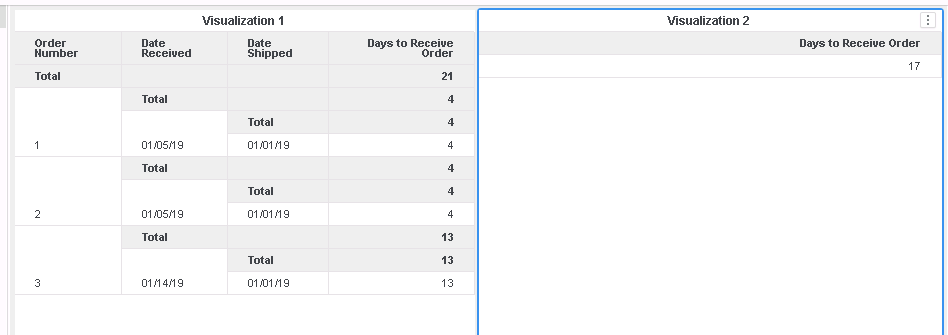
This is a known defect in Strategy 10.11. When the metric is alone on a visualization, it displays the aggregated value of all of its rows, so in this case where the value is incorrect, it indicates that the sum was calculated incorrectly.
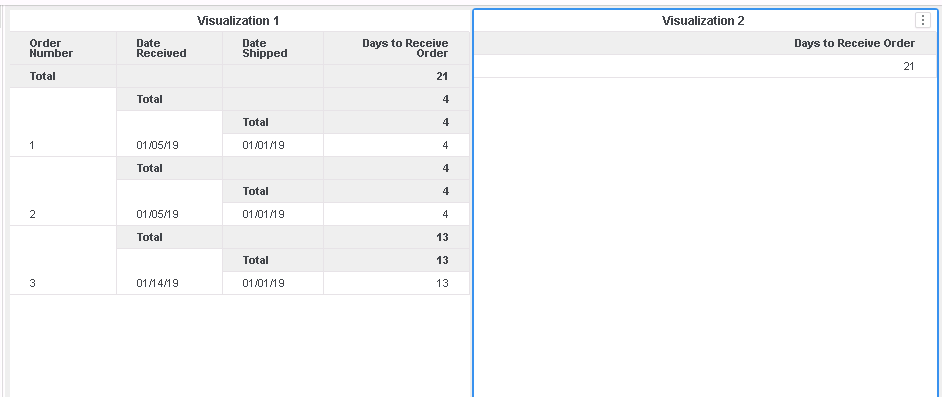
In the new fix, Data Engine does not let the visualization interfere with the level at which metrics are calculated at. In other words, the metric will always calculate at the level it is defined at, even when it is alone in a visualization. Furthermore, aggregated metrics do not disregard duplicate combinations of data when leveled.
Note:
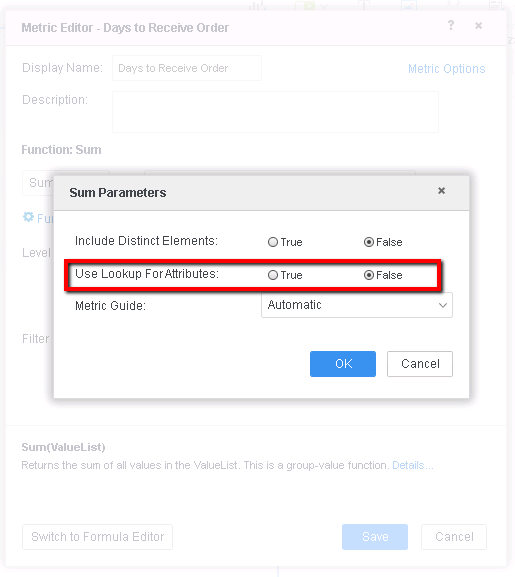
1) If after the upgrade and Data Engine Version change, the issue still exists, it is mostly likely that the derived metric has "Use Lookup For Attributes" set to True. When it is set to True, the Engine will treat the duplicate attribute tuples as same element in the Lookup table, and when aggregating it, only counts once. So the issue may persist.
2) In Strategy 2019 with Data Engine set to 10, user may observe null in similar metric. It is due to some a change on datetime datatype that was put only in Data Engine version 11 to avoid regression. To fix the issue, set Data Engine Version setting to 11.
Strategy Internal Reference number for this technical note is KB483240 and DE86726.
