EducationSoftwareStrategy.com
StrategyCommunity

Knowledge Base

Product

Community

Knowledge Base

TopicsBrowse ArticlesDeveloper Zone

Product

Download SoftwareProduct DocumentationSecurity Hub

Education

Tutorial VideosSolution GalleryEducation courses

Community

GuidelinesGrandmastersEvents
x_social-icon_white.svglinkedin_social-icon_white.svg
Strategy logoCommunity

© Strategy Inc. All Rights Reserved.

LegalTerms of UsePrivacy Policy
  1. Home
  2. Topics

KB483245: An empty grid with an attribute and no data is displayed.


Community Admin

• Strategy


When the feature flag "Defect fixes that may impact Data, SQL, MDX, CSI" is on, a Grid with totals enabled that contains an attribute and a derived metric made with the NullToZero function will return data when there is no data to show.

Starting with the release of Strategy ONE (March 2024), dossiers are also known as dashboards.

Symptoms

  • Grid with totals enabled returns data when there is no data to show (because of a filter or the condition on the metric).
    • Grid contains an attribute and a derived metric made with the NullToZero function.
  • Feature flag "Defect fixes that may impact Data, SQL, MDX, CSI" is turned ON.

Steps to Reproduce

  • To see the issue, ensure that the Feature flag "Defect fixes that may impact Data, SQL, MDX, CSI" is turned ON: 
ka0PW0000001JX3YAM_0EM2R000000lnnw.jpeg
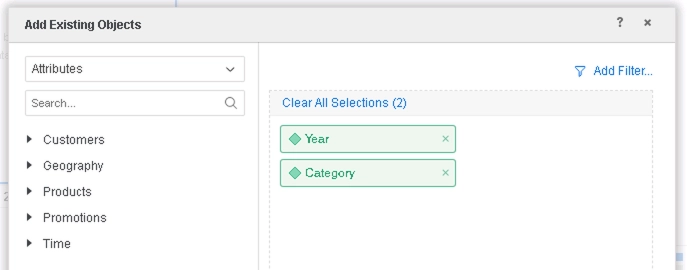
  • Create a new dossier, and add data. We use Strategy Tutorial objects: 
ka0PW0000001JX3YAM_0EM2R000000ln0z.jpeg
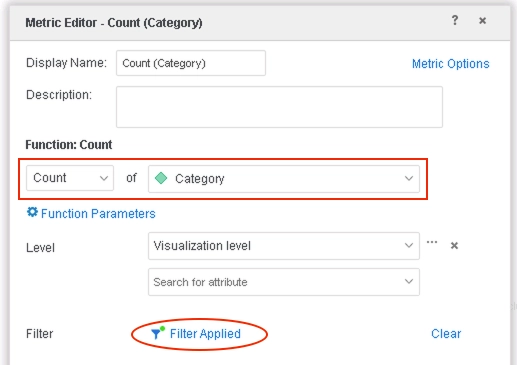
  • Create a derived metric Count(Category) with the following definition: 
ka0PW0000001JX3YAM_0EM2R000000ln19.jpeg
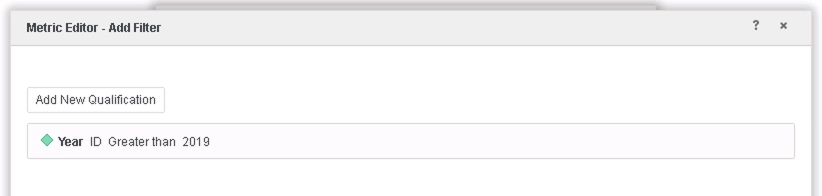
    • Add a filter using Year that will exclude all data: 
ka0PW0000001JX3YAM_0EM2R000000lnlq.jpeg
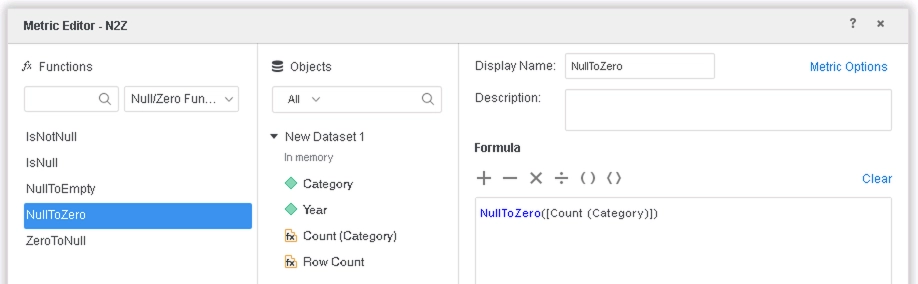
  • Create another metric NullToZero using Count(Category): 
ka0PW0000001JX3YAM_0EM2R000000ln1O.jpeg
  • Drag Year and NullToZero to a Grid visualization. Note how no data is returned.
  • Show totals.


Note how a grid is returned with the total when there are no rows of data:
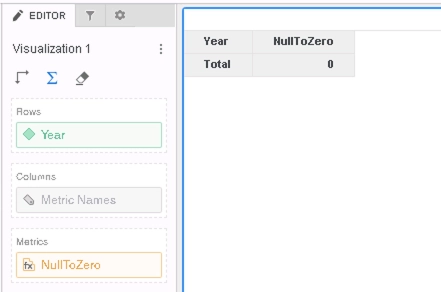
ka0PW0000001JX3YAM_0EM2R000000lnoB.jpeg

Cause


This is a known issue in Strategy 10.11.

  • Turning on totals returns a row for the total, even though there are not rows of data to show.

Solution

  • Upgrade to Strategy 11.0 or above. We recommend the latest version.
  • Set Data Engine Version setting to 11 or above.
    • Starting with 11.0, the feature flag "Defect fixes that may impact Data, SQL, MDX, CSI" is deprecated and replaced with the Data Engine Version setting, where ON is equivalent to Version 11.
    • The project level setting Data Engine Version can only be enabled through Workstation. For more details on enabling the setting, see Change Data Engine Version.


In the new fix, a Grid with totals enabled will not return data when there are no rows of data to show. Instead, an error message can be seen instead. For the example above, the Grid visualization will now return:
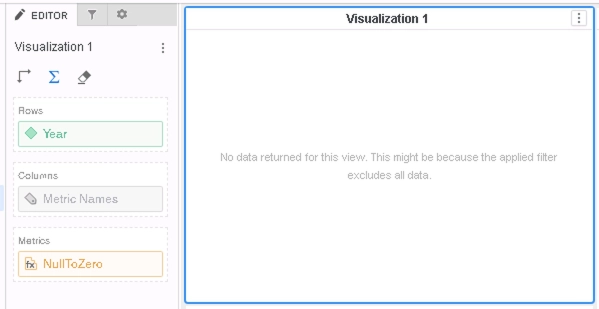
ka0PW0000001JX3YAM_0EM2R000000ln1T.jpeg

Strategy Internal Reference number for this technical note is KB483245 and DE96012.


Comment

0 comments

Details

Knowledge Article

Published:

May 1, 2019

Last Updated:

March 21, 2024