EducationSoftwareStrategy.com
StrategyCommunity

Knowledge Base

Product

Community

Knowledge Base

TopicsBrowse ArticlesDeveloper Zone

Product

Download SoftwareProduct DocumentationSecurity Hub

Education

Tutorial VideosSolution GalleryEducation courses

Community

GuidelinesGrandmastersEvents
x_social-icon_white.svglinkedin_social-icon_white.svg
Strategy logoCommunity

© Strategy Inc. All Rights Reserved.

LegalTerms of UsePrivacy Policy
  1. Home
  2. Topics

KB483248: Cascading filter does not work as expected.


Community Admin

• Strategy


A selector or filter visualization made with a Derived Element that targets another selector does not filter the options for the second selector.

Starting with the release of Strategy ONE (March 2024), dossiers are also known as dashboards.
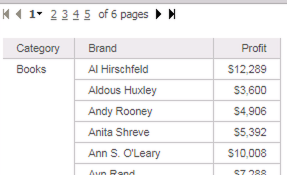
Symptoms

  • Cascading filters (2 or more selectors or filter visualizations where one targets another)
  • The control source for the selector that is filtering the other is a Derived Element.
  • The selector being filtered does not change when the selections of the first is changed.

Glossary

  • Derived Element

Steps to Reproduce

  1. Open Strategy Web.
  2. Create a new Dossier. You can also reproduce this issue in a Document.
  3. Add a dataset. You can use a report or Intelligent Cube. Here, we use Strategy Tutorial objects to create a report: 
ka0PW0000001JY1YAM_0EM2R000000lZsD.jpeg
  • Add Category, Brand, and Profit  to a Grid visualization.
  • Create a new Derived Element Category(Group):
    1. Right-click Category on the Grid > Create Groups > Select "Books" and "Electronics" to form "Group 1".
  • Add a filter visualization, and drag Brand to it.
    1. In later versions of Strategy, you may be shown options for the filter. Select "Element/Value Filter".
    2. Select the Grid visualization as its target.
  • Add a second filter visualization, and drag Category(Group) to it.
    1. Select the previously created filter visualization as its target.
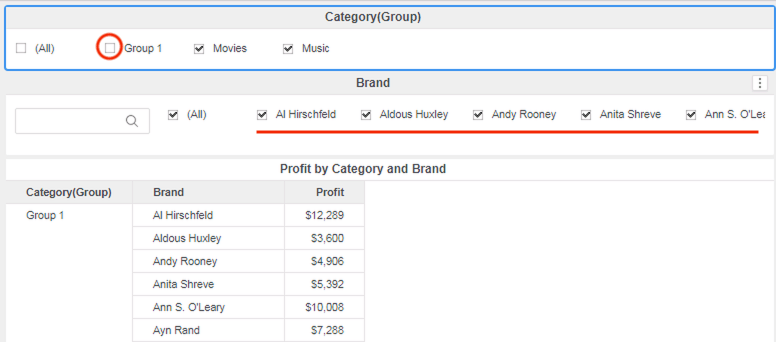
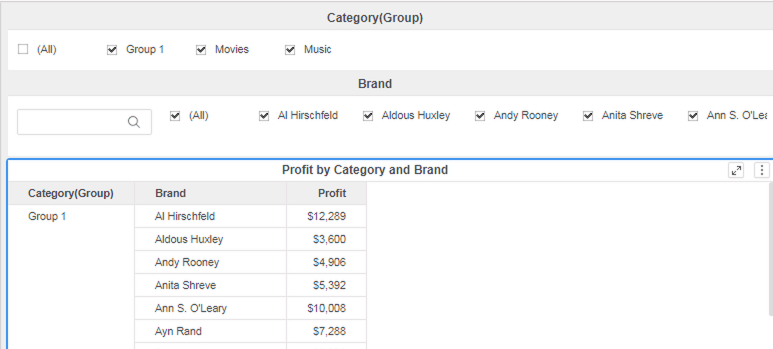
  • At this point, you should have a set of cascading filters and a Grid: 
ka0PW0000001JY1YAM_0EM2R000000lZux.jpeg
  • Change the selections for the Category(Group) filter, and observe how the values for the Brand filter do NOT change. Since we unselected "Group 1", the Brand filter shouldn't show "Al Hirschfeld" anymore, yet it does.
ka0PW0000001JY1YAM_0EM2R000000lZvH.jpeg

Cause

  • The filter for Category(Group) on Brand is not applied because there is no relation existing between the two attributes.
    • This stems from the relation between Category and Category(Group) being many to many (as opposed to one to many, which would create a relation between Category(Group) and Brand).

Solution

  • Upgrade to Strategy 11.0 or above. We recommend the latest version.
  • Set Data Engine Version setting to 11.
    • The project level setting Data Engine Version can only be enabled through Workstation. For more details on enabling the setting, see Change Data Engine Version.


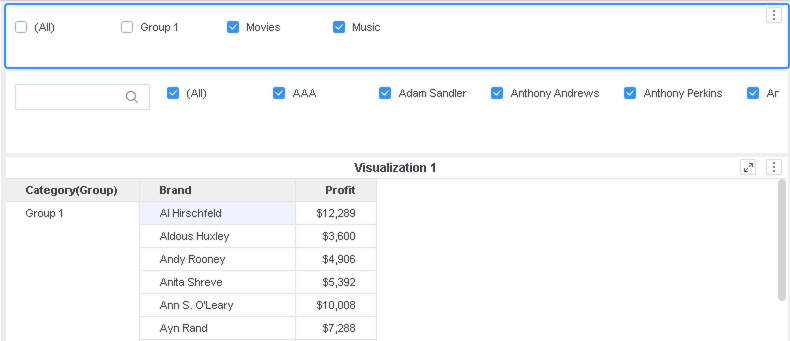
In the new fix, we change the current logic to create a relation between the two attributes in the filter visualizations. This resolves the inconsistency seen between using a Derived Attribute vs. a Derived Attribute as a filter/ selector. Regardless of the attribute, cascading filters will work properly.
Unselecting "Group 1" in the example above will now result in:
ka0PW0000001JY1YAM_0EM2R000000lZw5.jpeg

Strategy Internal Reference number for this technical note is  KB483248 and DE99310.


Comment

0 comments

Details

Knowledge Article

Published:

May 1, 2019

Last Updated:

March 21, 2024