EducationSoftwareStrategy.com
StrategyCommunity

Knowledge Base

Product

Community

Knowledge Base

TopicsBrowse ArticlesDeveloper Zone

Product

Download SoftwareProduct DocumentationSecurity Hub

Education

Tutorial VideosSolution GalleryEducation courses

Community

GuidelinesGrandmastersEvents
x_social-icon_white.svglinkedin_social-icon_white.svg
Strategy logoCommunity

© Strategy Inc. All Rights Reserved.

LegalTerms of UsePrivacy Policy
  1. Home
  2. Topics

KB483524: Wrong fact table is picked for join when the relationship between attributes is well defined in Connect Live datasets


Community Admin

• Strategy


The wrong fact table is picked to join when the relationship between attributes is well defined in "Connect Live" datasets because the logical table size is not accounted for when choosing which fact table to join.

Starting with the release of Strategy ONE (March 2024), dossiers are also known as dashboards.
Symptoms

  • Using a dataset made in "Connect Live" mode
    • Contains 2 or more fact tables with relationships between the attributes defined
  • Fact table with the smallest logical table size is NOT being used in the join path

Glossary

  • Connect Live - mode of data access that retrieves results directly from the data source
  • Logical table size -  determines which table to use to answer a query when multiple logical tables would provide the same data
    • See here for an example of how Strategy assigns logical table sizes based on an algorithm that takes into account the number of attribute columns and the various levels at which they exist in their respective hierarchies.

Steps to Reproduce

  • Open Strategy Web.
  • Create a new dataset. We use Strategy Tutorial objects.
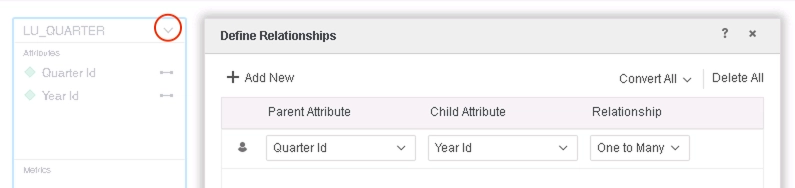
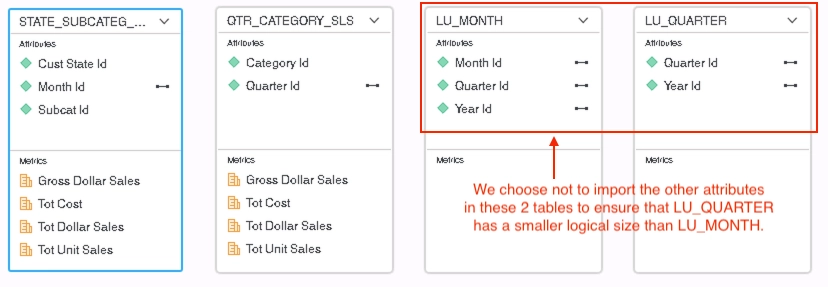
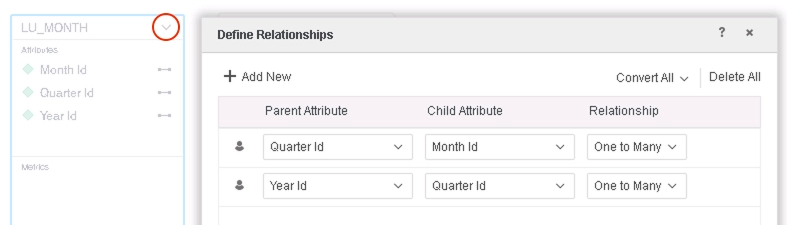
    • Add the following tables, do not import certain attributes, and define these relationships: 
ka0PW0000001JXxYAM_0EM2R000000lX4V.jpeg
ka0PW0000001JXxYAM_0EM2R000000lX54.jpeg
ka0PW0000001JXxYAM_0EM2R000000lX59.jpeg
    • Save the dataset in "Connect Live" mode.
  • Create a new dossier using the dataset you just created:
    • Add Year Id and Tot Cost to a Grid visualization.
    • Inspect "Query Details" (Right-click the three dots > Query Details).


The data returned is correct, but looking at the SQL executed, the wrong fact table is used in the join path. As the relationships between attributes has been defined, we expect LU_QUARTER to be used because it has a smaller logical table size than LU_MONTH.
 

iserver.requestTimeout
The XML call's socket default read timeoutConfigDefaults.propertiesdocument.polling.timeoutThe maximum waiting time when polling a job on a server. This only works for a document or dossier instance. When polling the result, you may send multiple requests to the server. This value is the total time of all of these requests. Each single request timeout value is set by iserver.requestTimeout.ConfigDefaults.propertiesisAliveRequestTimeoutMillisThe socket read request timeout value when the Auth Filter sends a GetFolderID XML API request to an Intelligence server nodesys_defaults.xmlisAliveCheckIntervalMillisThe time interval of the check when the Auth Filter sends a GetFolderID XML API request to an Intelligence server nodesys_defaults.xmlBefore fixAfter fix


Tables Accessed:
STATE_SUBCATEG_MNTH_SLS          
LU_MONTH    

SQL Statements:
...
select a12.YEAR_ID  YEAR_ID,
sum(a11.TOT_COST)  WJXBFS1
from STATE_SUBCATEG_MNTH_SLS a11      
join LU_MONTH a12  
on (a11.MONTH_ID = a12.MONTH_ID)
group by a12.YEAR_ID


Tables Accessed:
LU_QUARTER
QTR_CATEGORY_SLS 

SQL Statements:
...
select a12.YEAR_ID  YEAR_ID,
sum(a11.TOT_COST)  WJXBFS1
from QTR_CATEGORY_SLS a11
join LU_QUARTER a12         
on (a11.QUARTER_ID = a12.QUARTER_ID)
group by a12.YEAR_ID

iserver.requestTimeout
The XML call's socket default read timeoutConfigDefaults.propertiesdocument.polling.timeoutThe maximum waiting time when polling a job on a server. This only works for a document or dossier instance. When polling the result, you may send multiple requests to the server. This value is the total time of all of these requests. Each single request timeout value is set by iserver.requestTimeout.ConfigDefaults.propertiesisAliveRequestTimeoutMillisThe socket read request timeout value when the Auth Filter sends a GetFolderID XML API request to an Intelligence server nodesys_defaults.xmlisAliveCheckIntervalMillisThe time interval of the check when the Auth Filter sends a GetFolderID XML API request to an Intelligence server nodesys_defaults.xmlBefore fixAfter fix


Tables Accessed:
STATE_SUBCATEG_MNTH_SLS          
LU_MONTH    

SQL Statements:
...
select a12.YEAR_ID  YEAR_ID,
sum(a11.TOT_COST)  WJXBFS1
from STATE_SUBCATEG_MNTH_SLS a11      
join LU_MONTH a12  
on (a11.MONTH_ID = a12.MONTH_ID)
group by a12.YEAR_ID


Tables Accessed:
LU_QUARTER
QTR_CATEGORY_SLS 

SQL Statements:
...
select a12.YEAR_ID  YEAR_ID,
sum(a11.TOT_COST)  WJXBFS1
from QTR_CATEGORY_SLS a11
join LU_QUARTER a12         
on (a11.QUARTER_ID = a12.QUARTER_ID)
group by a12.YEAR_ID


Cause


This is a known defect in Strategy 11.0 and earlier when using data from a "Connect Live" dataset as the current algorithm for calculating the join path for "Connect Live" datasets treats all fact tables as if they have the SAME cost.
 

  • The well-defined relationships between attributes is not accounted for in calculations. In other words, the logical table size does not play a role in deciding which table is used in the join.

Solution

  • Upgrade to Strategy 2019 Upgrade 1 or later. We recommend the latest version.
  • Set Data Engine Version setting to 11 or above.
    • The project level setting Data Engine Version can only be enabled through Workstation. For more details on enabling the setting, see Change Data Engine Version.


In the new fix, Data Engine modifies the algorithm to generate the join path between tables for data from "Connect Live" datasets to choose the join table based on both logical and physical table size.
We want to use the table with the smallest logical table size because it has a higher level of aggregation, and the performance of accessing a table with a higher level of aggregation is usually better than accessing a table with a lower level. This aligns with current behavior for other datasets not made in "Connect Live" mode.
Strategy Internal Reference number for this technical note is KB483524 and DE123584.


Comment

0 comments

Details

Knowledge Article

Published:

August 1, 2019

Last Updated:

March 21, 2024