EducationSoftwareStrategy.com
StrategyCommunity

Knowledge Base

Product

Community

Knowledge Base

TopicsBrowse ArticlesDeveloper Zone

Product

Download SoftwareProduct DocumentationSecurity Hub

Education

Tutorial VideosSolution GalleryEducation courses

Community

GuidelinesGrandmastersEvents
x_social-icon_white.svglinkedin_social-icon_white.svg
Strategy logoCommunity

© Strategy Inc. All Rights Reserved.

LegalTerms of UsePrivacy Policy
  1. Home
  2. Topics

KB483574: Visualization Using Data from Multiple Datasets Does Not Return Data Because the Maximum Number of Intermediate Rows is Exceeded


Community Admin

• Strategy


In MicroStrategy 2021 with Data Engine Version set to 11, a large intermediate table generated from a cross join may return more rows that can be supported, leading to no data returned. An error message of "The number of intermediate rows %1 exceeds the maximum number of intermediate rows %2 retrieved per document or dossier view" is seen instead.

Starting with the release of Strategy ONE (March 2024), dossiers are also known as dashboards.

Symptoms

  • Dossier contains two or more datasets with common (linked) attributes and defined attribute relationships.
  • Data Engine Version is set to 11.
  • May see the error: 

    Lookup values for metadata objects - 3 GB 

    
    The number of intermediate rows %1 exceeds the maximum number of intermediate rows %2 retrieved per document or dossier view.


Glossary

  • CSI

Steps to Reproduce


Strategy Tutorial tables do not contain enough data to trigger the error message, but they will exhibit the same behavior and generate the same CSI. We provide an example structure of some datasets and attribute relationships that would trigger the error:
  • Open Strategy Web.
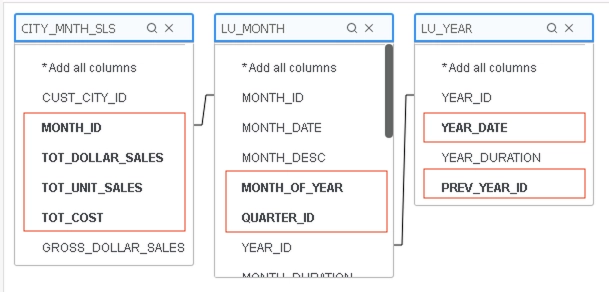
  • Create a new Intelligent Cube C01 by building a query:
    • Add External Data > Databases > Build a Query > Add the bolded columns: 
ka0PW0000001JmZYAU_0EM2R000000lpld.jpeg
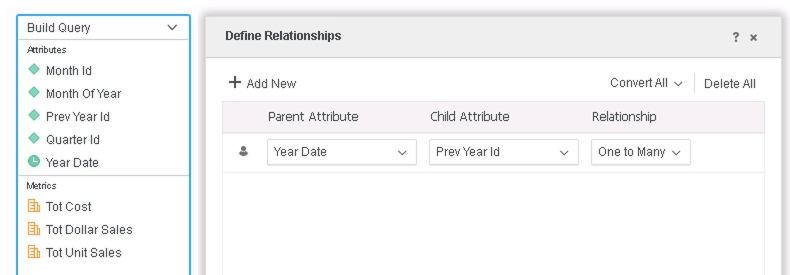
    • Define relationships: 
ka0PW0000001JmZYAU_0EM2R000000lpli.jpeg
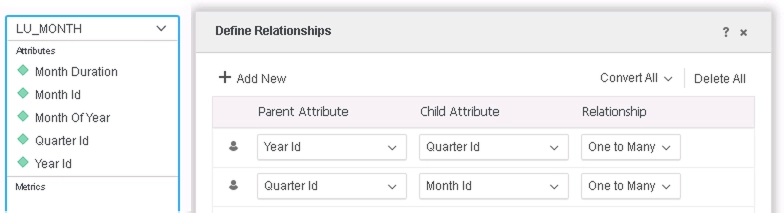
  • Create a new Intelligent Cube C02 by adding the table with the following relationships: 
ka0PW0000001JmZYAU_0EM2R000000lpkV.jpeg
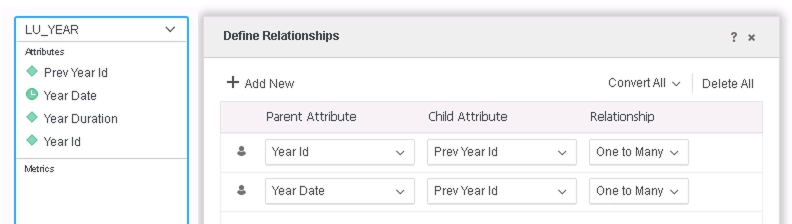
  • Create a new Intelligent Cube C03 by adding the table with the following relationships: 
ka0PW0000001JmZYAU_0EM2R000000lpka.jpeg
  • Create a new dossier:
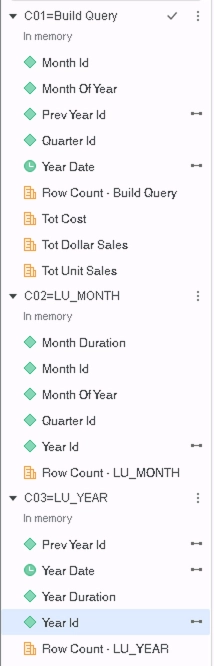
    • Link the attributes in C03 to their corresponding attributes in the other datasets: 
ka0PW0000001JmZYAU_0EM2R000000lpmW.jpeg
    • Drag Year Id, Quarter Id, Month Id, and Tot Cost to a Grid Visualization.


Examining the CSI reveals that a cross join is used to create an intermediate table by joining two other intermediate tables:


...

select    [Quarter Id]@[QUARTER_ID],
    sum([[F_Build Query].Tot Cost])@{[Quarter Id]} as [Tot Cost]
from    C01=Build Query
with Table Join Tree:     [F_Build Query]
to    Ex2_tempcube0

select    [Year Id]@[YEAR_ID],
    [Month Id]@[MONTH_ID]
from    C02=LU_MONTH
with Table Join Tree:     [REL_QUARTER_ID_MONTH_ID]
     Join [REL_YEAR_ID_QUARTER_ID] with output level Tuple([Month Id]@[MONTH_ID], [Year Id]@[YEAR_ID])
to    Ex2_tempcube1

...

select *
from Cross Join(
Ex2_tempcube0,
Ex2_tempcube1
)
to Ex2_tempcube2

...


Cause

  • Incorrect CSI is generated and contains a cross join that creates an intermediate table with more rows of data than can be supported.
    • The cross join selects all of the attributes of the two tables it joins, including unused ones, and this is not necessary. 

Solution

  • Upgrade to Strategy 2021 or above. We recommend the latest version.
  • Set Data Engine Version setting to 12 or above.
    • The project level setting Data Engine Version can only be enabled through Workstation. For more details on enabling the setting, see Change Data Engine Version.
    • After changing the Data Engine Version setting, you will need to republish your datasets to see the changes.


In the new fix, Data Engine improves on CSI generation so that unused attributes are not selected and large intermediate tables will not be created. This prevents scenarios where the limit of intermediate rows is exceeded. In some cases, the data returned may change.
In the example above, a cross join is no longer used. Instead, some attributes are selected first, and that table is used in a left outer join of some other intermediate tables:


...

select ([Year Id]@[YEAR_ID]) as ([Year Id]@[YEAR_ID]),
([Prev Year Id]@[PREV_YEAR_ID]) as ([Prev Year Id]@[PREV_YEAR_ID])
from C03=LU_YEAR
with Table Join Tree: [REL_YEAR_ID_PREV_YEAR_ID]
to RELATION0-<Year Id, Prev Year Id>

select *
from Left Outer Join(
Left Outer Join(
Ex2_tempcube0, RELATION0-<Year Id, Prev Year Id>
) on Prev Year Id,
Left Outer Join(
Ex2_tempcube1,
RELATION0-<Year Id, Prev Year Id>
) on Year Id
) on Year Id, Prev Year Id
to Ex2_tempcube2

...


Strategy Internal Reference Number for this technical note is KB483574 and DE127043 / DE133631.


Comment

0 comments

Details

Knowledge Article

Published:

August 30, 2019

Last Updated:

March 21, 2024