EducationSoftwareStrategy.com
StrategyCommunity

Knowledge Base

Product

Community

Knowledge Base

TopicsBrowse ArticlesDeveloper Zone

Product

Download SoftwareProduct DocumentationSecurity Hub

Education

Tutorial VideosSolution GalleryEducation courses

Community

GuidelinesGrandmastersEvents
x_social-icon_white.svglinkedin_social-icon_white.svg
Strategy logoCommunity

© Strategy Inc. All Rights Reserved.

LegalTerms of UsePrivacy Policy
  1. Home
  2. Topics

KB483587: Derived Attribute that is Nested on More than Three Layers Returns Incorrect Data


Community Admin

• Strategy


In MicroStrategy 2019 and previous versions, a derived attribute that is nested on more than 3 layers returns incorrect data.

Starting with the release of Strategy ONE (March 2024), dossiers are also known as dashboards.
Symptoms

  • Derived attribute that is nested on more than 3 layers returns incorrect data.
    • A nested derived attribute is an attribute made from another derived attribute.

Glossary

  • Derived Attribute
  • CSI

Steps to Reproduce

  • Open Strategy Web. We use Strategy Tutorial objects to reproduce this issue.
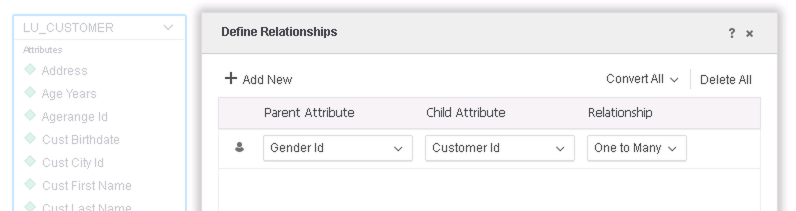
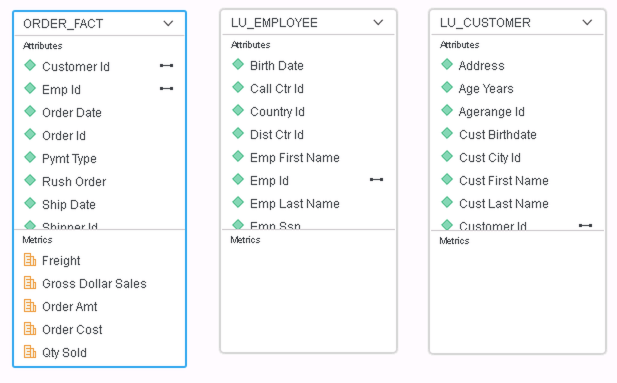
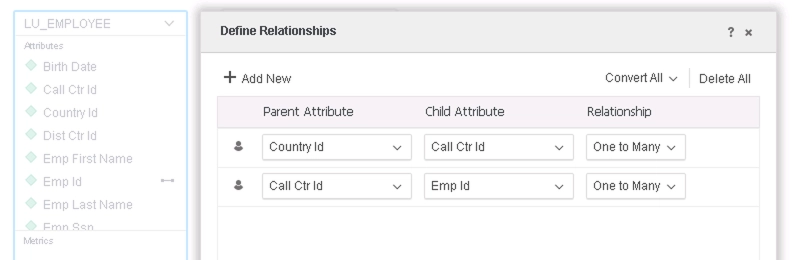
  • Create an Intelligent Cube with the following tables and relationships: 
ka0PW0000001JZAYA2_0EM2R000000lpxU.jpeg
ka0PW0000001JZAYA2_0EM2R000000lpxZ.jpeg
ka0PW0000001JZAYA2_0EM2R000000lpxe.jpeg
  • Create a new dossier.
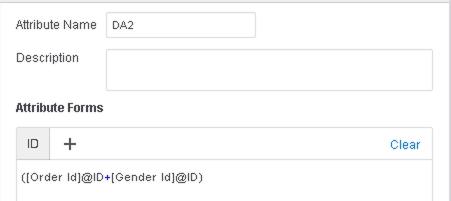
  • Create a derived attribute DA2: 
ka0PW0000001JZAYA2_0EM2R000000lpzL.jpeg
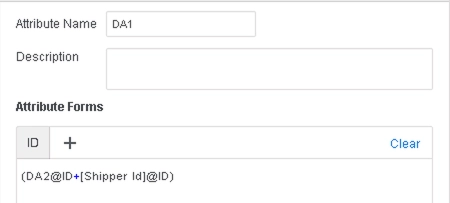
  • Create a second derived attribute DA1 using DA2: 
ka0PW0000001JZAYA2_0EM2R000000lpzQ.jpeg
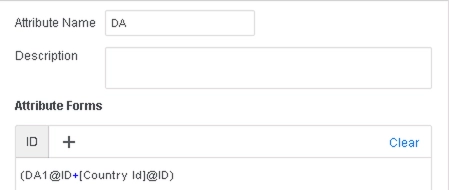
  • Create a third derived attribute DA using DA1: 
ka0PW0000001JZAYA2_0EM2R000000lpzV.jpeg
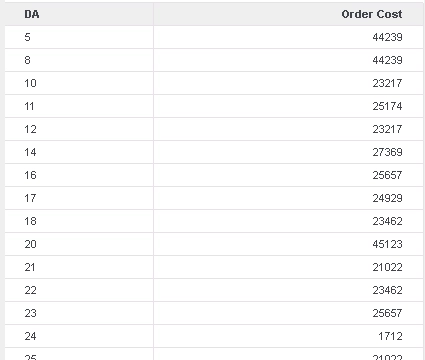
  • Drag DA and Order Cost to a Grid Visualization.


Note the values that the grid returns (the data on grid will look different based on specific data in warehouse):
ka0PW0000001JZAYA2_0EM2R000000lr0r.jpeg

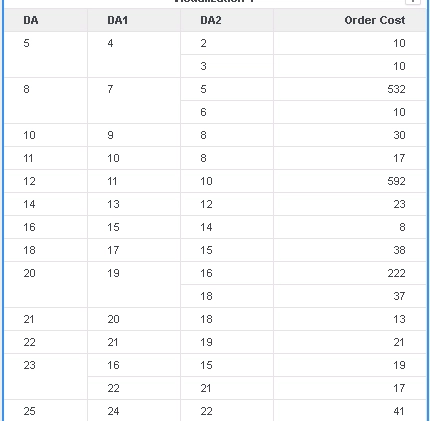
If DA, DA1,  DA2 and Order Cost to a Grid Visualization, the grid returns (the data on grid will look different based on specific data in warehouse):
ka0PW0000001JZAYA2_0EM2R000000lr16.jpeg

Comparing the data on 2 grid, it is obvious that when aggregated to DA level, the Order cost is not calculated correctly.

Cause


This is a known issue in Strategy 2019 and previous versions:

  • Incorrect data is returned because Data Engine does not use the necessary relationships table in the join tree when generating CSI, resulting in data calculated at the wrong level.

Solution

  • Upgrade to Strategy 2020 or above. We recommend the latest version.
  • Set Data Engine Version setting to 12 or above.
    • The project level setting Data Engine Version can only be enabled through Workstation. For more details on enabling the setting, see Change Data Engine Version.
    • After changing the Data Engine Version setting, you will need to republish your datasets to see the changes.


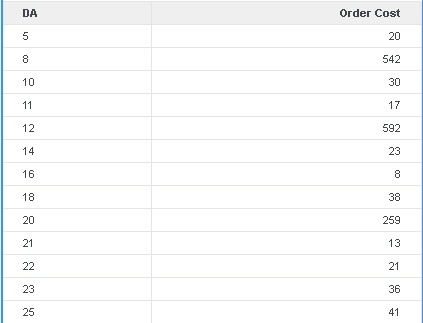
In the new fix, Data Engine logic is improved to ensure that the necessary tables are used in the join tree and the derived attributes are calculated at the correct output level.
For the example above, the grid should now return:
ka0PW0000001JZAYA2_0EM2R000000lr1p.jpeg

Strategy Internal Reference Number for this technical note is KB483587 and DE136998.


Comment

0 comments

Details

Knowledge Article

Published:

August 30, 2019

Last Updated:

March 21, 2024