EducationSoftwareStrategy.com
StrategyCommunity

Knowledge Base

Product

Community

Knowledge Base

TopicsBrowse ArticlesDeveloper Zone

Product

Download SoftwareProduct DocumentationSecurity Hub

Education

Tutorial VideosSolution GalleryEducation courses

Community

GuidelinesGrandmastersEvents
x_social-icon_white.svglinkedin_social-icon_white.svg
Strategy logoCommunity

© Strategy Inc. All Rights Reserved.

LegalTerms of UsePrivacy Policy
  1. Home
  2. Topics

KB483614: Derived metric returns null value if it contains another derived metric which has a derived attribute with currentTime function


Qinyi Chen

Quality Engineer, Principal • Strategy


Before MicroStrategy 2020, when a user creates a nested derived metric, if the inner metric contains a derived attribute with currentTime function, the outer derived metric will return null as a result.

Starting with the release of Strategy ONE (March 2024), dossiers are also known as dashboards.

Symptoms

  • A derived attribute with currentTime function is created
  • A derived metric containing the derived attribute is created, and is a component of another derived metric 
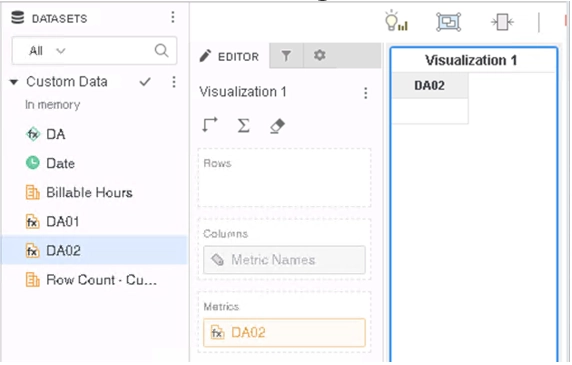
  • The nested derived metric shows missing data (null value)

Glossary

  • Derived Attribute
  • Derived Metric
  • CurrentDate – A function that returns the current date as provided by the database timer.

Steps to Reproduce


1.    Open Strategy Web. 
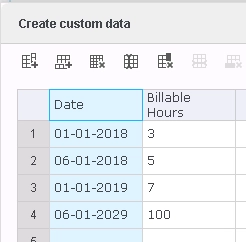
2.    Create a new dossier, add new data, use Clipboard and input the same data as below.
ka0PW0000001JZYYA2_0EM2R000000lzuo.jpeg

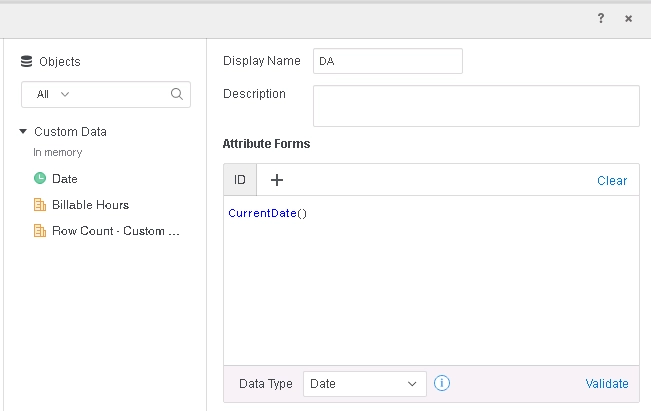
3.    Create a new derived attribute.
a.    Rename the attribute to “DA”.
b.    Type “currentDate()” in Attribute Forms section.
c.    Validate the formula and save the attribute.
ka0PW0000001JZYYA2_0EM2R000000lzut.jpeg


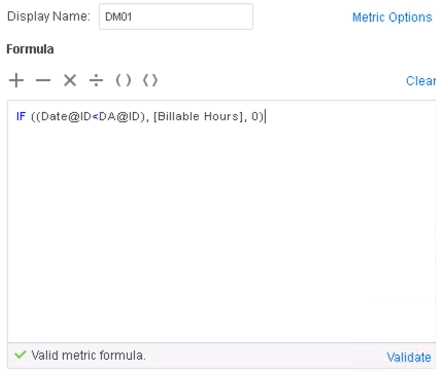
4.    Create a new derived metric.
a.    Rename the metric to “DM01”.
b.    Type “IF((Date@ID<DA@ID), [Billable Hours], 0)” in Formula section.
c.    Validate the formula and save the metric.
ka0PW0000001JZYYA2_0EM2R000000lzvN.jpeg


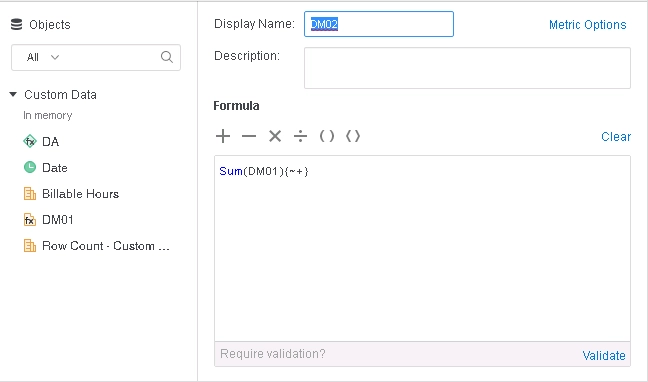
5.    Create a new derived metric.
a.    Rename the metric to “DM02”.
b.    Type “Sum(DM01){~+}” in Formula section.
c.    Validate the formula and save the metric.
ka0PW0000001JZYYA2_0EM2R000000lzv3.jpeg


6.    Add metric DM02 to the grid, and null is returned.
ka0PW0000001JZYYA2_0EM2R000000lzvI.jpeg

Cause


This is a known defect before Strategy 2020.
The cause of this issue is because of incorrect logic which fails to detect the attribute in IF condition and returned the wrong type of result.

Solution


To resolve this defect, please upgrade to Strategy 2020 or above, and set Data Engine Version setting to 12.
The project level setting Data Engine Version can only be enabled through Workstation. For more details on enabling the setting, see Change Data Engine Version . 
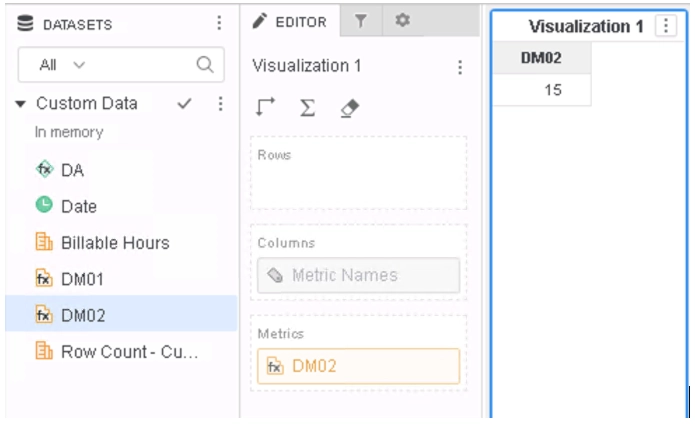
In Strategy 2020, the issue is fixed and correct value could be returned.
ka0PW0000001JZYYA2_0EM2R000000lzvS.jpeg

Strategy Internal Reference number for this technical note is KB483614 and DE104430.


Comment

0 comments

Details

Knowledge Article

Published:

September 16, 2019

Last Updated:

March 21, 2024