EducationSoftwareStrategy.com
StrategyCommunity

Knowledge Base

Product

Community

Knowledge Base

TopicsBrowse ArticlesDeveloper Zone

Product

Download SoftwareProduct DocumentationSecurity Hub

Education

Tutorial VideosSolution GalleryEducation courses

Community

GuidelinesGrandmastersEvents
x_social-icon_white.svglinkedin_social-icon_white.svg
Strategy logoCommunity

© Strategy Inc. All Rights Reserved.

LegalTerms of UsePrivacy Policy
  1. Home
  2. Topics

KB483635: Histogram Does Not Load When Using an Attribute Duplicated From a Metric


Community Admin

• Strategy


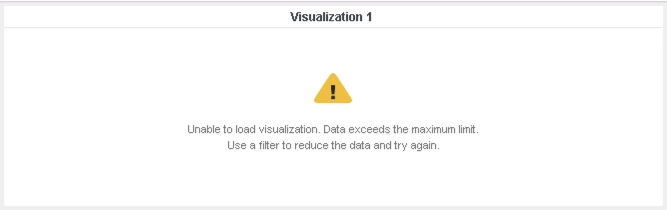
A Histogram Visualization does not load when an attribute converted from the only metric in a dataset is placed in the "Aggregate By" section. This special case where the dataset contains only one metric, no attributes, and a large number or rows results in an error message of "Data exceeds maximum limit".

Starting with the release of Strategy ONE (March 2024), dossiers are also known as dashboards.

Symptoms

  • Dataset used contains only one metric, no attributes, and a large number of rows.
  • Histogram Visualization does not load when an attribute converted from the only metric in the dataset is placed in the "Aggregate By" section.
    • User may see an error message like:

      https


      Expected BehaviorCurrent BehaviorUnable to load visualization. Data exceeds the maximum limit. Use a filter to reduce the data and try again.


Steps to Reproduce

  1. Open Strategy Web, and create a new dossier.
  2. Add a dataset with only one column and a large number of rows. This column will serve as the only metric.
    1. We use a file with 50,000 rows that we populated with random values.
  3. Duplicate the metric as an attribute.
  4. Create a Histogram Visualization:
    1. Drag the metric to the "Metric" section.
    2. Drag the attribute to the "Aggregate By" section.


The Histogram does not load, and the user sees:
ka0PW0000001JZgYAM_0EM2R000000m2C1.jpeg

Cause

  • Data Engine incorrectly returns too much data, so the display limit for a Histogram Visualization is exceeded, and the user sees the above error.
    • In this case, row count and column count need to be calculated differently, but they are not handled correctly in the current logic.

Solution

  • Upgrade to Strategy 2020 or above. We recommend the latest version.
  • Set Data Engine Version setting to 12 or above.
    • The project level setting Data Engine Version can only be enabled through Workstation. For more details on enabling the setting, see Change Data Engine Version.
    • After changing the Data Engine Version setting, you will need to republish your datasets to see the changes.


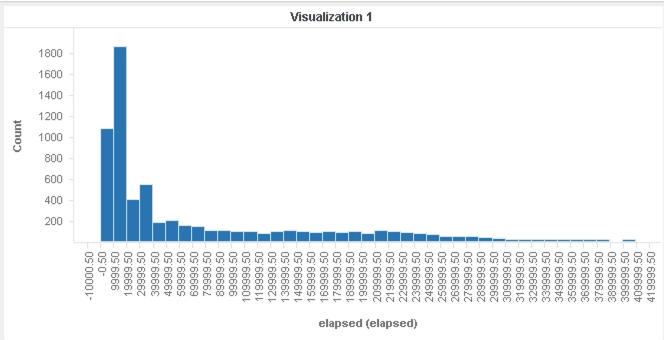
In the new fix, the way in which row count and column count for an attribute duplicated from a metric is calculated inside Data Engine calculations is changed. This results in the appropriate amount of data being returned and allows the Histogram to display properly.
The Histogram now properly loads:
ka0PW0000001JZgYAM_0EM2R000000m2L3.jpeg

Strategy Internal Reference Number for this technical note is KB483635 and DE124465.


Comment

0 comments

Details

Knowledge Article

Published:

September 18, 2019

Last Updated:

March 21, 2024