EducationSoftwareStrategy.com
StrategyCommunity

Knowledge Base

Product

Community

Knowledge Base

TopicsBrowse ArticlesDeveloper Zone

Product

Download SoftwareProduct DocumentationSecurity Hub

Education

Tutorial VideosSolution GalleryEducation courses

Community

GuidelinesGrandmastersEvents
x_social-icon_white.svglinkedin_social-icon_white.svg
Strategy logoCommunity

© Strategy Inc. All Rights Reserved.

LegalTerms of UsePrivacy Policy
  1. Home
  2. Topics

KB483662: Report Execution Fails When Parallel Query Execution Is Enabled With Certain Combinations of Other VLDB Settings


Community Admin

• Strategy


In MicroStrategy 2019, report execution fails with an unspecified error about an unexpected issue when Parallel Query Execution is enabled with certain combinations of the Intermediate Table Type and Parallel SQL Execution Intermediate Table Type VLDB settings.

Symptoms

  • Parallel Query Execution VLDB setting is enabled and:
    • Intermediate Table Type VLDB setting is set to one of the below:
      • Permanent table
      • True temporary table
      • Temporary view
    • Parallel SQL Execution Intermediate Table Type VLDB setting is set to one of the below:
      • Derived Table
      • Common Table Expressions (hidden)
  • A report that cannot be executed in one SQL pass, even with a sub-query, fails execution with the following error: 


Error : SQLEngine got an Exception from DFC: [DFCENGINE] Engine Logic: An unexpected issue has been detected in the Engine. If this error can be reproduced, please save the metadata and call Strategy Customer Service. 
 

Glossary

  • Parallel Query Execution
  • Intermediate Table Type
  • Parallel SQL Execution Intermediate Table Type

Steps to Reproduce

  • Open Strategy Developer. We use Strategy Tutorial objects to create this example.
  • Create a new Report:
    • Add Quarter, Customer, and Profit to the template.
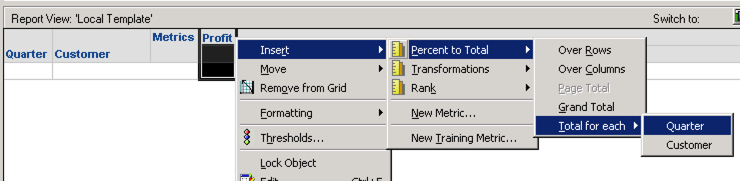
    • Insert a Percent to Total metric on Profit at the Quarter level:  
ka04W000001Ix3GQAS_0EM2R000000mDyz.jpeg
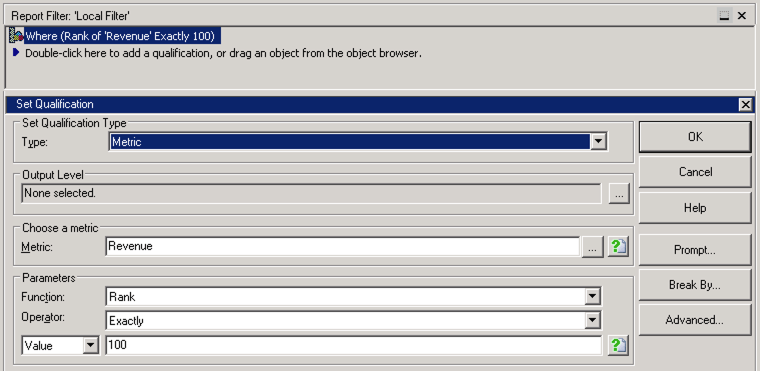
    • Add a Set Qualification on Revenue in the Report Filter to show only the top 100:  
ka04W000001Ix3GQAS_0EM2R000000mDz4.jpeg
  • Change the following VLDB settings. You can set these at the Project, Database Instance, or Report level:
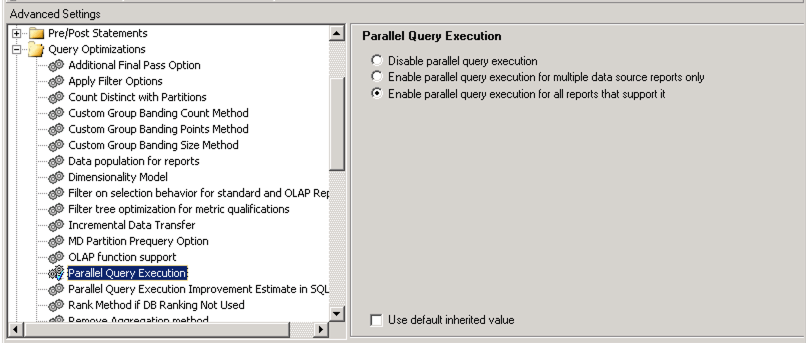
    • Set 'Parallel Query Execution' to 'Enable parallel query execution for all reports that support it' (example at Report level). 
ka04W000001Ix3GQAS_0EM2R000000mDzi.jpeg
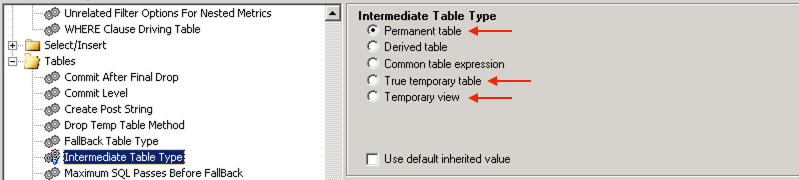
    • Set Intermediate Table Type to 'Permanent Table', 'True temporary table', or 'Temporary view' (example at Report level).
ka04W000001Ix3GQAS_0EM2R000000mDzs.jpeg
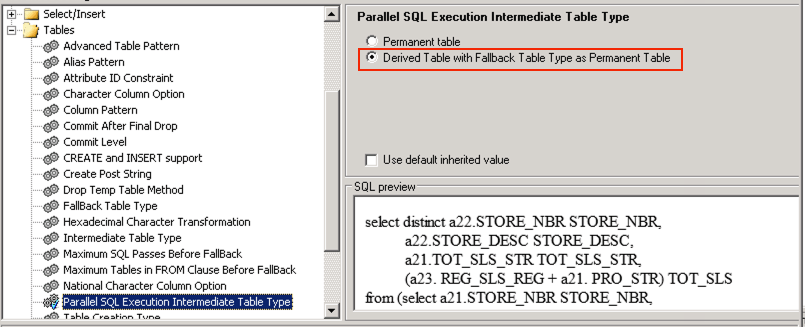
    • Set Parallel SQL Execution Intermediate Table Type to 'Derived Table' (example at Database Instance level). 
ka04W000001Ix3GQAS_0EM2R000000mDzT.jpeg
  • Run the report. The user encounters an error about an unexpected issue.

Cause


This is a known issue in Strategy 2019:

  • The report will not use derived tables or common table expressions, even if the Parallel SQL Execution Intermediate Table Type is set as such because of current limitations in Data Engine (explained here). The example report above falls under the limitation on percentage ranking.
    • Certain combinations of the Parallel SQL Execution Intermediate Table Type setting and Intermediate Table Type setting cause an unexpected error when Parallel Query Execution is enabled. This is a legacy bug that has existed in Data Engine logic, but is now exposed by these combinations of settings.

Solution

  • Upgrade to Strategy 2019 Update 1 or later. We recommend the latest version.


In the new fix, the legacy bug is fixed, and the behavior for reports with Parallel Query Execution enabled is standardized. Now, REGARDLESS of the setting for Intermediate Table Type, reports will display expected results when Parallel SQL Execution Intermediate Table Type is set to:
Permanent table, True temporary table, or Temporary view

  • The report executes like previously expected.

Derived Table

  • The setting is ignored due to current limitations in Data Engine. Derived tables are not used, and the report is treated as if the setting was 'True Temporary Table', so the report will execute.

Common Table Expression

  • The report will fail execution with an EXPECTED error, which may look like:


SQLEngine got an Exception form DFC: [DFCENGINE] Engine Logic: This report requires temporary tables. Check the Intermediate Table Type and Fallback Table Type defined tor this report. Error in Process method of Component: SQLEngineServer, Project Strategy Tutorial, Job 639, Error Code=-2147212800.
Strategy Internal Reference Number for this technical note is KB483662 and DE124428.


Comment

0 comments

Details

Knowledge Article

Published:

September 30, 2019

Last Updated:

September 30, 2019