Starting with the release of Strategy ONE (March 2024), dossiers are also known as dashboards.
Steps to Reproduce
This procedure is using Strategy Tutorial WH that is shipped with Strategy products.
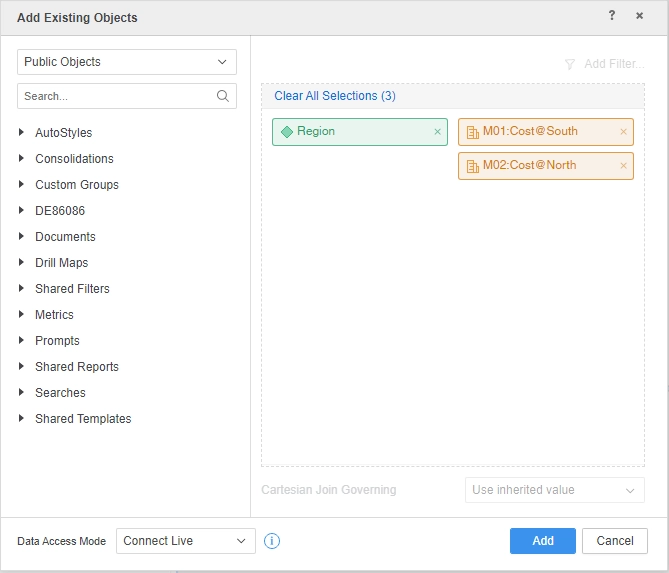
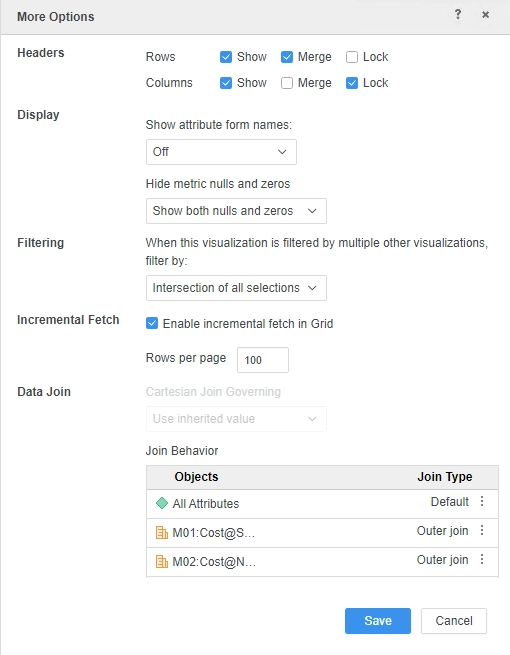
Cause
This is a known issue in Strategy.
Solution
This issue has been addressed in Strategy 2021.
To pick up the fix, upgrade to Strategy 2021 or above and enable project level setting "Data Engine Version" to 2021 or above. For more details on enabling the setting, refer to Change Data Engine Version
After the fix, metric outer join works and data returns.
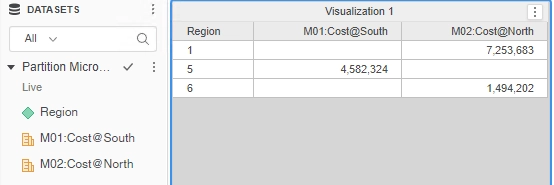
Check Query Details
************ Individual Step Start ************
Query Engine Execution Start Time: 3/15/2021 5:01:48 PM
Query Engine Execution Finish Time: 3/15/2021 5:01:52 PM
Query Generation Time: 0:00:00.00
Total Elapsed Time In Query Engine: 0:00:03.63
Sum of Query Execution Time: 0:00:00.64
Total Data Fetching and Processing Time: 0:00:00.00
Total Data Transfer from Datasource(s) Time: 0:00:00.00
Total Analytical Processing Time: 0:00:00.00
Total Other Processing Time: 0:00:02.91
Projected execution time improvement (%) if executed in Parallel Execution mode: Parallel SQL Execution is not supported for this report
Sum of Template Calculate Time 0:00:00.00
Sum of AE Data Persisting Time 0:00:00.00
Total Cube Publish Time 0:00:00.00
Number of Rows Returned: 3
Number of Columns Returned: 3
Number of Temp Tables: 1
Total Number of Passes: 4
Number of Datasource Query Passes: 4
Number of Analytical Query Passes: 0
DB User: T177MQWH
DB Instance: T177MQWH
Tables Accessed:
LU_CALL_CTR
CITY_CTR_SLS
SQL Statements:
Pass0 - Query Pass Start Time: 3/15/2021 5:01:48 PM
Query Pass End Time: 3/15/2021 5:01:51 PM
Query Execution: 0:00:00.61
Data Fetching and Processing: 0:00:00.00
Data Transfer from Datasource(s): 0:00:00.00
Other Processing: 0:00:02.91
create table T4DPHER76MD000 nologging as
select a12.REGION_ID REGION_ID,
sum((Case when a12.REGION_ID in (1, 6) then a11.TOT_COST else NULL end)) WJXBFS1,
sum((Case when a12.REGION_ID in (5) then a11.TOT_COST else NULL end)) WJXBFS2
from CITY_CTR_SLS a11
join LU_CALL_CTR a12
on (a11.CALL_CTR_ID = a12.CALL_CTR_ID)
where (a12.REGION_ID in (1, 6)
or a12.REGION_ID in (5))
group by a12.REGION_ID
Pass1 - Query Pass Start Time: 3/15/2021 5:01:51 PM
Query Pass End Time: 3/15/2021 5:01:51 PM
Query Execution: 0:00:00.00
Data Fetching and Processing: 0:00:00.00
Data Transfer from Datasource(s): 0:00:00.00
Other Processing: 0:00:00.02
Rows selected: 3
select pa12.REGION_ID REGION_ID,
pa12.WJXBFS1 WJXBFS1,
pa12.WJXBFS2 WJXBFS2
from T4DPHER76MD000 pa12
Pass2 - Query Pass Start Time: 3/15/2021 5:01:51 PM
Query Pass End Time: 3/15/2021 5:01:51 PM
Query Execution: 0:00:00.00
Data Fetching and Processing: 0:00:00.00
Data Transfer from Datasource(s): 0:00:00.00
Other Processing: 0:00:00.01
[Populate Report Data]
Pass3 - Query Pass Start Time: 3/15/2021 5:01:51 PM
Query Pass End Time: 3/15/2021 5:01:51 PM
Query Execution: 0:00:00.02
Data Fetching and Processing: 0:00:00.00
Data Transfer from Datasource(s): 0:00:00.00
Other Processing: 0:00:00.02
drop table T4DPHER76MD000 purge
[Analytical engine calculation steps:
1. Perform cross-tabbing
]
to Partition Strategy Tutorial_0
************ Individual Step End ************
************ Individual Step Start ************
Number of Rows Returned: 3
Time Spent: 0.152 sec(s)
Query Execution Start Time: 3/15/2021 5:01:52 PM
Query Execution End Time: 3/15/2021 5:01:52 PM
select [Region]@[REGION_ID],
[M02:Cost@North],
[M01:Cost@South]
from Partition Strategy Tutorial_0
************ Individual Step End ************
Strategy internal reference number for this technical note is DE176522.
