EducationSoftwareStrategy.com
StrategyCommunity

Knowledge Base

Product

Community

Knowledge Base

TopicsBrowse ArticlesDeveloper Zone

Product

Download SoftwareProduct DocumentationSecurity Hub

Education

Tutorial VideosSolution GalleryEducation courses

Community

GuidelinesGrandmastersEvents
x_social-icon_white.svglinkedin_social-icon_white.svg
Strategy logoCommunity

© Strategy Inc. All Rights Reserved.

LegalTerms of UsePrivacy Policy
  1. Home
  2. Topics

KB484032: Unspecified error caused by an aggregate from base (AFB) metric defined by Sum(Case(Clause, Max(attr), 0)) in MicroStrategy 2019


Liheng Ding

Software Engineer, Senior • MicroStrategy


This article addresses the unspecified error caused by an AFB metric defined by a Sum function. This article also provides a solution to avoid this error.

Starting with the release of Strategy ONE (March 2024), dossiers are also known as dashboards.

Description


In Strategy 2019 with Data Engine Version set to 11, you may experience an unspecified error with the following AFB metric:
Sum(Case(([Customer City]@ID>0), [Max(Days to Ship)], 0)){}
 

Steps to reproduce


The following example uses the Strategy Tutorial attributes and metrics. 
  • Create a new dossier.
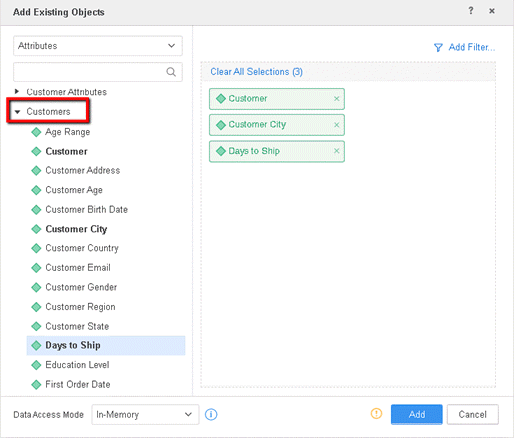
  • Click Existing Objects.
  • Expand Customers and double-click on Customer, Customer City, Days to Ship. 
ka0PW0000001JbQYAU_0EM2R000000nn25.jpeg
  • Click Add.
  • Add a second dataset with existing objects.
  • Expand Geography and double-click Country and Region.
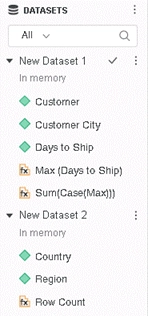
  • Click Add. You have two datasets imported.
ka0PW0000001JbQYAU_0EM2R000000nn2F.jpeg
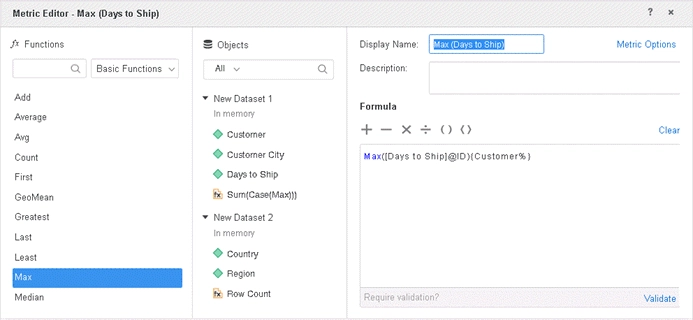
  • Create a derived metric with the formula: Max([Days to Ship]@ID){Customer%}
  • Name the metric: Max (Days to Ship)
ka0PW0000001JbQYAU_0EM2R000000nn2K.jpeg
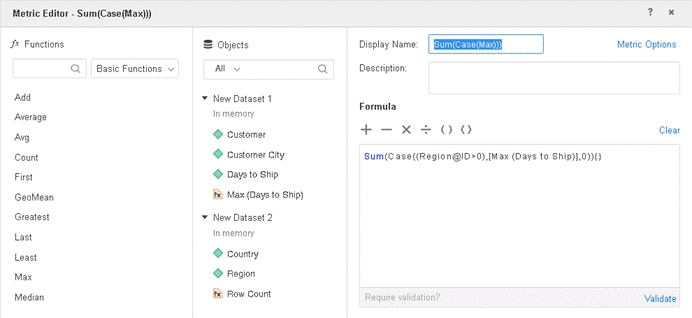
  • Create a derived metric with the formula: Sum(Case((Region@ID>0),[Max (Days to Ship)],0)){}
  • Name the metric: Sum(Case(Max)))
ka0PW0000001JbQYAU_0EM2R000000nn2P.jpeg
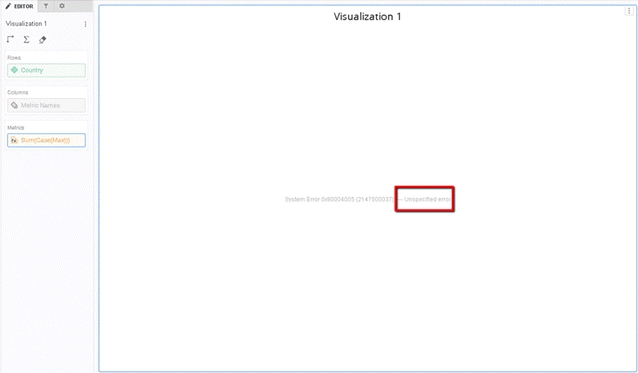
  • Drag the attribute, Country, and the derived metric, Sum(Case(Max))), to the grid.

If Data Engine Version is set to 11, the dossier will fail with an unspecified error.
ka0PW0000001JbQYAU_0EM2R000000nn2o.jpeg


Why is this happening?


This is a known defect in Strategy 2019. The features enabled by Data Engine Version 11 expose a problem with the server engine when dealing with AFB metrics. 
 

Solution

To resolve this defect, you should set the Data Engine Version to 11. The project level setting, Data Engine Version, can only be enabled through Strategy Workstation.
You can also upgrade to Strategy 2019 Update 5 and set the Data Engine Version to 11. 

Glossary 

Data Engine Version A setting to minimize the impact of data changes for platform release upgrades
Aggregate from Base (AFB) metric Uses the attributes in a dataset (the base) when dynamic aggregation is triggered
 
Strategy Internal Reference number for this technical note is KB484032 and DE155272.


Comment

0 comments

Details

Knowledge Article

Published:

February 10, 2020

Last Updated:

March 21, 2024