Starting with the release of Strategy ONE (March 2024), dossiers are also known as dashboards.
Prior to Strategy 2021, for unit condition selectors in a dossier, the default selection is unset, which is the same as selecting (All). This will NOT filter the target views. The option, use first or last N, may be needed for default selections in a unit condition selector (just like the slicing selector has the option available in documents), as it is expected that the selection of unit condition selector is automatically updated to the most current or specific data (such as date), when datasets are updated. With this feature, dynamic default selections in unit condition selectors in dossiers are supported via specifying the last/first N elements. The setting is shown in the following screenshot.

For more details, please refer to KB484663: Dynamic default selection (last N/first N) for filters in dossiers.


After the dossier is created based on this report, the attribute in the Page-by section of the report is placed in the dossier’s filter panel. However, the filter’s status is reset to ‘unset,' and the grid returns all data.

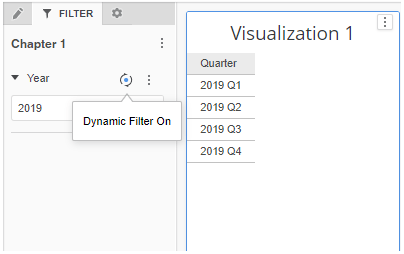
For such scenario, we always believe it is better to keep the consistency between the Page-by selection of the report and the filter selection of the dossier. With dynamic default selection introduced in Strategy 10.3, we are able to make it happen. After the dossier is created, you can see the ‘Year’ filter has the first element selected. The icon next to the filter name indicates that this filter has dynamic default selection ON. You can turn the dynamic setting on or off by simply clicking the icon.