Starting with the release of Strategy ONE (March 2024), dossiers are also known as dashboards.
Prior to Strategy 2020, for unit condition selectors in a dossier, the default selection is unset, which is the same as selecting (All). This will NOT filter the target views. The option, use first or last N, may be needed for default selections in a unit condition selector (just like the slicing selector has the option available in documents), as it is expected that the selection of unit condition selector is automatically updated to the most current or specific data (such as date), when datasets are updated. With this feature, dynamic default selections in unit condition selectors in dossiers are supported via specifying the last/first N elements. The setting is shown in the following screenshot.
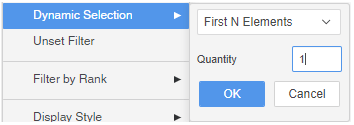
For more details, please refer to KB484663: Dynamic default selection (last N/first N) for filters in dossiers.
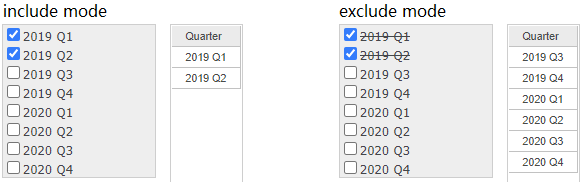
In the following screenshot, you can see that in a document, a slicing selector was created. After manually selecting 2 elements, the results for include mode and exclude mode are as below. Exclude mode returns the correct grid data which excludes the user's selections.
In the same document, define the slicing selector to use the first 2 results and the results of include and exclude modes are as shown below. Exclude mode shows exactly the same grid data as include mode and there is only a visual difference in the slicing selector itself, which obviously is not what we are looking for.
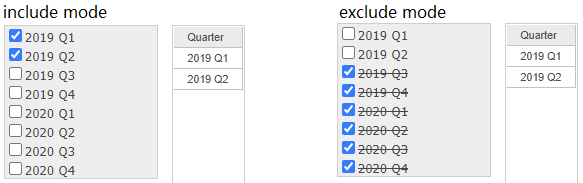
With the above understanding, we believe exclude mode would be actually helpful if it can correctly exclude the user selection and return correct data. For example, when a user defines a filter to ‘use last 10’ and turn to exclude mode, the user is expecting to see all data except the last 10 elements. The last thing they expect to see is something like the above screenshot (with exactly the same grid data as include mode, only a different visual display of the selector).
Therefore in a dossier, for selectors using first N/last N, exclude mode has inconsistent behavior as those in a document. However, we believe it is an enhancement instead of a regression.
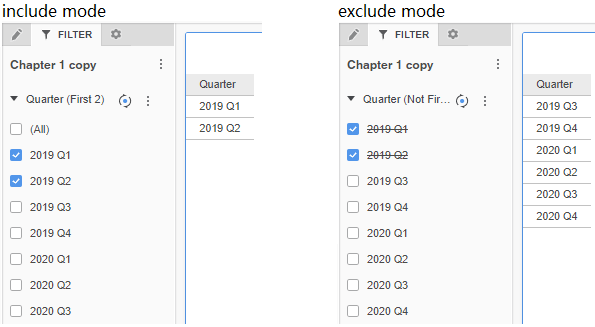
The above change fully utilizes the dynamic selection plus exclude mode. However, the behavior is not expected to change in a document to the same as a dossier. Because the current behavior in documents has been there for many years, making such change could bring big pain points and escalations when upgrading Strategy versions.
