EducationSoftwareStrategy.com
StrategyCommunity

Knowledge Base

Product

Community

Knowledge Base

TopicsBrowse ArticlesDeveloper Zone

Product

Download SoftwareProduct DocumentationSecurity Hub

Education

Tutorial VideosSolution GalleryEducation courses

Community

GuidelinesGrandmastersEvents
x_social-icon_white.svglinkedin_social-icon_white.svg
Strategy logoCommunity

© Strategy Inc. All Rights Reserved.

LegalTerms of UsePrivacy Policy
  1. Home
  2. Topics
  3. Bullet Chart Visualization

Bullet Chart Visualization


Alejandro Olvera Velasco

Product Manager, Principal • MicroStrategy


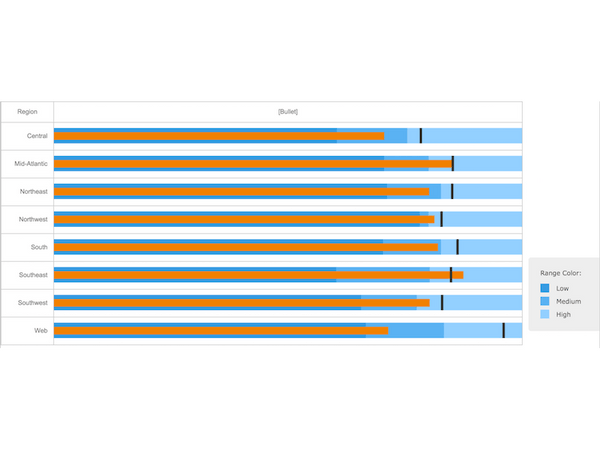
Bullet Charts work to provide a rich display of data in a small space, with quantitative and qualitative context to enrich the meaning. Bullet Charts compare a single, primary measure to other complementary measures within a qualitative context of performance ranges represented by different shades of a single color.

Starting with the release of Strategy ONE (March 2024), dossiers are also known as dashboards.
For more detailed information on setting up and customizing this visualization, please refer to the tutorial Creating bullet charts with threshold markers in documents and dossiers
ka0PW0000001JaNYAU_0EM2R000000mrOB.jpeg

The Bullet Chart has five main components:

  1. Text Label: defines your chart and the unit of measurement
  2. Quantitative Scale: measures the value of your metric along a single linear axis
  3. Primary Measure: bar representing the featured metric
  4. Comparative Measures: metrics you want to compare the featured metric to
  5. Qualitative Scale: 2-5 ranges along the quantitative scale that represent the performance of the primary measure 

Requirements

Object requirements:

  • Attributes: 1 or more
  • Metrics: 1 or more
     

Drop Zones:

  • Category: 1 or more attributes

    Note: When there are multiple attributes, all the combinations of attributes should be listed. For example, USA Central, USA Mid-Atlantic, Web Web, etc. By default, all of the attributes should be listed like a grid.
  • Actual: 1 metric (Value used for the bar)
  • Target: 1 metric (Value used for the tick)
  • Range (Low, Medium, High): 1 or 3 metrics
    • When 1 metric is used, use 0.5* for Low, 1* for Medium, and 2* for High
    • When 3 metrics are used, use the first metric for Medium, the second metric for High, and the third metric for Low
  • KPI: 1 or more metrics
     

Minimum Strategy version: 10.2
Publisher: Strategy 
 

Installation Instructions

To install this visualization:

  1. Download the .zip file below and deploy it in MicroStrateg deploy it in Strategy Desktop or Strategy Web.
  2. After you have installed the visualization, you can open a working demo by downloading the .mstr file below and doing the following:
    • To open the demo visualization in Strategy Desktop, double click the .mstr file.
    • To open the demo visualization in Strategy Web, choose:
      Create > Upload Strategy File > View Dashboard.

Note: The sample "BulletChartDemo.mstr" only works with Strategy versions 10.11 and above.
 

Visualization Disclaimer


By downloading or using this visualization, you accept and acknowledge these terms.
 
This visualization is both intended as sample code and provided as a convenience to Strategy users. Strategy cannot guarantee that the code provided will apply to any Strategy releases and clients outside of the versions stated within this article. This sample is supported by Strategy Technical Support up to and including the basic visualization functionality listed in this article. Defects will be triaged by the Strategy team as they are raised. For users with active Strategy Technical Support contracts, contact Strategy Technical Support to raise these defects.
 
Anyone seeking to use this visualization is encouraged to review and adapt this sample based on user requirements. Contact Strategy Professional Services for assistance with these same adaptations. If users would like to provide feedback on or recommendations for this visualization, post in the comments section of this article.
 

Learning Resources


Interested in learning more about Dossier authoring? Visit the Learning Center on Community!
Or feel free to go to our Documentation pages for more product information.


Comment

0 comments

Details

Example

Published:

November 20, 2019

Last Updated:

March 21, 2024