EducationSoftwareStrategy.com
StrategyCommunity

Knowledge Base

Product

Community

Knowledge Base

TopicsBrowse ArticlesDeveloper Zone

Product

Download SoftwareProduct DocumentationSecurity Hub

Education

Tutorial VideosSolution GalleryEducation courses

Community

GuidelinesGrandmastersEvents
x_social-icon_white.svglinkedin_social-icon_white.svg
Strategy logoCommunity

© Strategy Inc. All Rights Reserved.

LegalTerms of UsePrivacy Policy
  1. Home
  2. Topics

KB485737: "Catastrophic failure” error occurs occasionally when opening a dossier in Library


Danfeng Zhan

Principal Product Specialist • Strategy


This article narrates "Catastrophic failure” error occurs occasionally when opening dossier contains Dossier page link in Library due to a known defect of workflow with Page Linking.

Starting with the release of Strategy ONE (March 2024), dossiers are also known as dashboards.
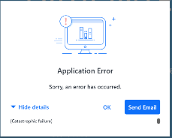
"Catastrophic failure” error occurs in peak time occasionally when opening a particular dossier in library as shown below. The dossier contains Page Linking. 
ka0PW0000001JjTYAU_0EM4W000005nyAj.jpeg


Cause


In Strategy Web, those manipulations like Drill, Keep Only, Sort, Show Data, Page Linking, etc. are implemented by one taskProc request. This taskProc request send the corresponding actions to web server and get the JSON data from the response, then using the JSON data to update the UI.
But in Library, for those manipulations taskProc requests, each request is refactored to two separate requests:

  1. A PUT request: This request just sends the manipulation actions to server and server side according to the actions to update the dossier
  2. A GET request: After the first PUT request is finished, the GET request to try to get the current page’s JSON data and update the dossier.

For Page Linking case, Library will not save the GET request’s response (it is the source page data) to the state tree. Library just updates to the target page by directly setting the URL. The PUT request has been switched to the target page, but the GET request is still required to source paged data. Server side failed to return the source page data, returns unexpected error.
Following five conditions need to meet to expose the issue when clicking on the Dossier page linking:

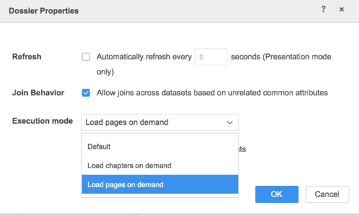
  1. The Dossier need to set “Load pages on demand” (The Default option is load all the pages of the Dossier).
  2. In the source page, it has a metric dynamic text.
  3. In the source page, it has the Dossier contexture link to the other page of the same Dossier.
  4. The Dossier cache is enabled.
  5. The target page (which is the link target) is not viewed/accessed at all, no cache is generated. 


Action


This issue has been fixed in Strategy 2021 Update 7. Upgrade to this version to take advantage of the fix.
 

Workaround


Two workarounds available: 

  1. Change “Load pages on demand" to default 
ka0PW0000001JjTYAU_0EM4W000005nyBD.jpeg

Refer to Knowledge Base article below for this setting: 
KB483871: Ability to load pages on demand in a dossier in MicroStrategy 2020
 

  1. Remove "metric dynamic text" in the source page. 


Comment

0 comments

Details

Knowledge Article

Published:

October 20, 2022

Last Updated:

March 21, 2024