EducationSoftwareStrategy.com
StrategyCommunity

Knowledge Base

Product

Community

Knowledge Base

TopicsBrowse ArticlesDeveloper Zone

Product

Download SoftwareProduct DocumentationSecurity Hub

Education

Tutorial VideosSolution GalleryEducation courses

Community

GuidelinesGrandmastersEvents
x_social-icon_white.svglinkedin_social-icon_white.svg
Strategy logoCommunity

© Strategy Inc. All Rights Reserved.

LegalTerms of UsePrivacy Policy
  1. Home
  2. Topics

KB485075: How to confirm if the SMTP server supports the TLS transport protocol in MicroStrategy 2020 Update 2 and later


Danfeng Zhan

Principal Product Specialist • Strategy


This article outlines the steps to run quick test via sending email to the email target to confirm if the SMTP server supports the TLS transport protocol.

Description 


After upgrading to Strategy 2020 Update 2 or Strategy 2019 Update 8, the email device with Smart Host mode requires the SMTP server to support the TLS transport protocol. 
For more details, refer to KB484645: Email delivery fails with error, "STARTTLS is required but hose does not support STARTTLS".

Confirm if the SMTP server configured with a port supports the TLS

  • Navigate to this site. 
  • Input the email target. For example,
    Strategy.com
    (you do not need to input the full email address). Leave the rest of the options as default, as shown in the below screenshot.
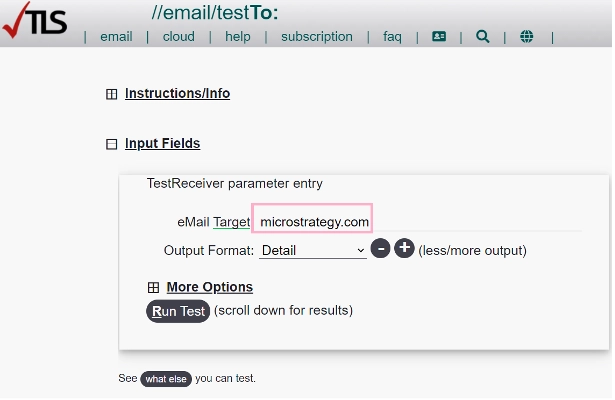
ka04W000001EuzWQAS_0EM4W0000028qad.jpeg
  • Click Run Test.
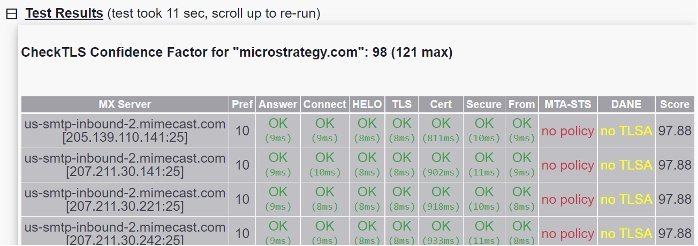
  • Expand the test result and the CheckTLS Confidence Factor results display, including the MX server. 
ka04W000001EuzWQAS_0EM4W0000028qai.jpeg
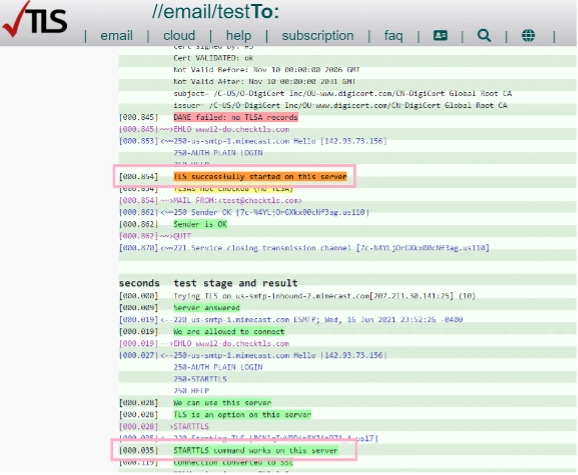
  • Scroll down to the see "test stage and result".
    If TLS is enabled, entries as "
    TLS successfully started on this server
    " and "
    STARTTLS command works on this server
    " is noticed, as shown in the below screenshot.
ka04W000001EuzWQAS_0EM4W0000028qax.jpeg
  • The following entry indicates the port 25 works with STARTLS:
    Trying TLS on us-smtp-inbound-2.mimecast.com[205.139.110.141.25]


Comment

0 comments

Details

Knowledge Article

Published:

June 29, 2021

Last Updated:

June 29, 2021