Starting with the release of Strategy ONE (March 2024), dossiers are also known as dashboards.
When user tries to create a new Hyper Card from Strategy workstation, after select an Intelligent Cube and start fetching data, “Failed to fetch” error occurs (as below).
The error is happened to all users and all Intelligent Cubes. However, the same user can create Dossier based on these Intelligent Cubes.

Reproduce steps:
The error can be reproduced with below steps when the workstation subprocess “CefSharp.BrowserSubprocess.exe” was blocked by the Firewall.
1. Turn on the Firewall and create a outbound rule to block the CefSharp.BrowserSubprocess.exe.
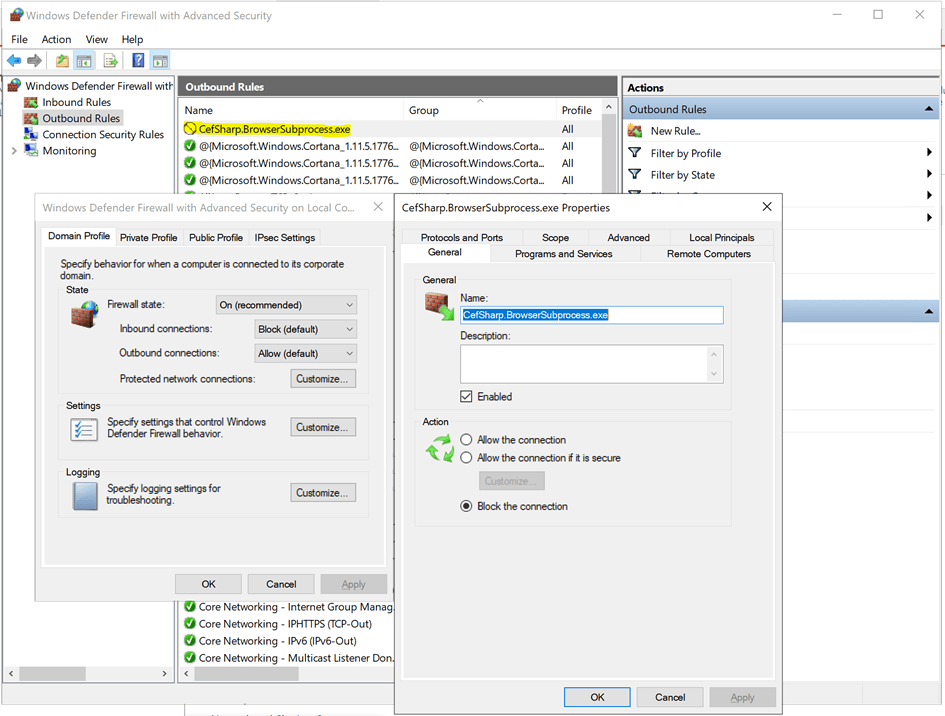
2. From Workstation, connect to an Environment (need to connect to a Library which is located on different server so that there is a Network connection), create a new Card and select a Intelligent Cube.
3. After loading for several seconds, error occurs.

Cause:
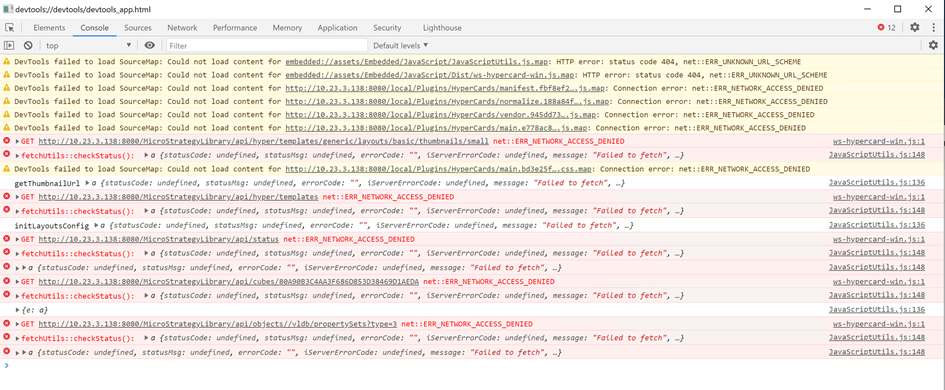
The workstation subprocess “CefSharp.BrowserSubprocess.exe” is a browser process that supports the web view in which the hypereditor is loaded. The issue is caused by this subprocess has been blocked by the Firewall. From Fiddler log/Network trace, it is found the requests to create a card are failed with ERR_NETWORK_ACCESS_DENIED.

Action:
Allow the subprocess “CefSharp.BrowserSubprocess.exe” from Firewall.
