When working with the tool Jenkins (https://jenkins.io/) to run Strategy project automated deliveries, it was noticed that generated update packages via the projectmerge.exe were of different size than when generated directly via the command line (outside of Jenkins).
Difference being that running projectmerge.exe on command line creates a process as the Windows user whereas running same process via Jenkins creates a process as Windows SYSTEM user.
After further analysis, it showed that hidden objects were not included in the package.
STEPS TO REPRODUCE:
With Tutorial project:
1. Create an xml file for a package creation following KB36167 using the search object 'Search for all objects of type Object Prompt', whereby setting the object 'Choose from a list of metrics' to hidden.
2. Run projectmerge.exe -f"<path to xml file location>\ProjectPackage_xxx.xml" from cmd prompt as usual Windows user and a package is created successfully.
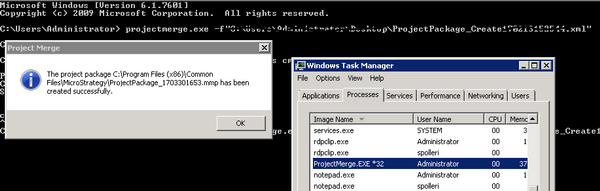
3. Find out how to run as System user using the following: Use PsExec from Microsoft's Systinternals suite - https://technet.microsoft.com/en-us/sysinternals/bb897553.aspx.
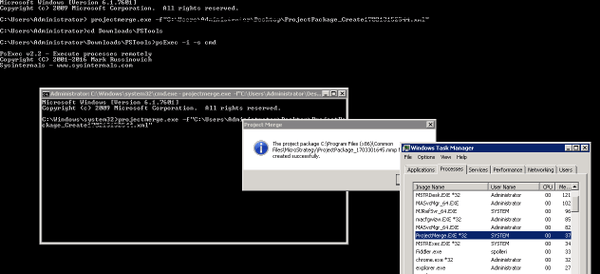
PsExec must be run from an administrative command prompt. Use the -i -s switches to launch your script/command prompt.
4. Download PsExec, open a cmd (run as administrator) and go to <location/path of downloaded tool>\PSTools and run: psExec -i -s cmd
5. In newly opened cmd window run again the projectmerge.exe: projectmerge.exe -f"<path to xml file location>\ProjectPackage_xxx.xml" from there. Package is created successfully as well:
6. Comparing the packages, size differs slightly:

7. Exporting the contents, indeed the object 'Choose from a list of metrics' is missing in the latter package:
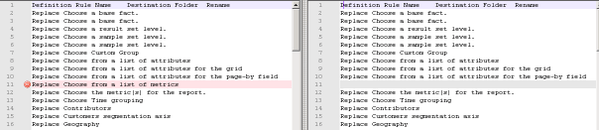
Note: This issue only happens when you use a search object as a container in the project merge XML.
CAUSE:
When Project Merge executes this search, and tries to find the related objects, it will read the setting of "Display hidden objects" and then determine whether the hidden objects should be included in the result.
This setting is a GUI side configuration (it can be changed in the Object Manager Browsing preferences) and it is saved in the registry, or more precisely, the registry of Current User (\HKEY_CURRENT_USER\SOFTWARE\MicroStrategy\DSS Agent\DSS Agent\ObjectInfoDisplayFlags).
When the cmd with SYSTEM user is executed, the setting is different from the normal Windows user.
WORKAROUND:
A workaround could be to change the setting for SYSTEM user with the following steps:
If it is not possible to use the PsExec software, this setting can be changed in the registry directly, however it might not be straight forward to find the right entry corresponding to the System user.
KB429061
