EducationSoftwareStrategy.com
StrategyCommunity

Knowledge Base

Product

Community

Knowledge Base

TopicsBrowse ArticlesDeveloper Zone

Product

Download SoftwareProduct DocumentationSecurity Hub

Education

Tutorial VideosSolution GalleryEducation courses

Community

GuidelinesGrandmastersEvents
x_social-icon_white.svglinkedin_social-icon_white.svg
Strategy logoCommunity

© Strategy Inc. All Rights Reserved.

LegalTerms of UsePrivacy Policy
  1. Home
  2. Topics

KB484141: Improved Intelligence Server stability and Memory Management through unified Cartesian Join governing in MicroStrategy 2020 Update 2 and later


Min Zhao

Quality Engineer, Principal • MicroStrategy


This article introduces the VLDB Property, "Cartesian Join Governing," introduced in MicroStrategy 2020 Update 2 which serves to govern all Cartesian Joins for SQL, MDX, and In-memory queries.

Starting with the release of Strategy ONE (March 2024), dossiers are also known as dashboards.
Cartesian Joins between large tables consume vast amounts of memory and compute resources as every row in one table is joined to every row in another table. At best, this degrades the performance experience for other users in the system. At worst, the resulting memory spike can bring down a server node with the memory depletion.
Because of the impact, the VLDB Property, Cartesian Join Warning, introduced in Strategy 2020 Update 2 exists to protect the system in Live Connect to Project Schema scenarios. However, there is no governing for in-memory executions, including data blending which creates unnecessary risk to the stability and performance of the Intelligence Server.

Enable Cartesian Join Governing


You can enable the new setting, Cartesian Join Governing, to govern all the Cartesian Joins for SQL, MDX, and In-memory queries, except for two business cases which require Cartesian Join. The new VLDB Property is accessible in Strategy Developer, Web, and Workstation. For more details, refer to How to set VLDB Property Cartesian Join Governing.

Cartesian Join Governing Options


The new VLDB Property has the following 3 options:
If option 2 or 3 are selected, Cartesian Join Governing replaces Cartesian Join Warning and Cartesian Join Warning no longer works and becomes obsolete.

  • Option 1: Keep the backward compatibility with Strategy 2019 where SQL queries are governed by Cartesian Join Warning VLDB setting
  • Option 2: Cancel execution of Cartesian Joins for SQL, MDX, In-Memory queries
  • Option 3: Execute cartesian join for SQL, MDX, In-Memory queries

Metadata and Data Engine Version Requirement

  • Metadata must be upgraded to Strategy 2020 GA or above to populate the new VLDB Property.
  • Existing projects have the project level setting set to Option 1 by default to keep the backward compatibility with Strategy 2019, so that this setting has no effect unless an admin manually changes the setting for the project.
  • New projects have the project level setting set to Option 2, Cancel execution of cartesian join for SQL, MDX, In-Memory queries, by default.
  • The VLDB Property only works for Data Engine Version 2020 or above, otherwise all users see the setting in Web greyed out with a tooltip. For more details, refer to Change Data Engine Version.

Possible Errors and Sample Cases with Workaround


The following internationalized error message may appear for a report, document, or dossier which produces a Cross Join when Cartesian Join Governing is set to Cancel Execution.
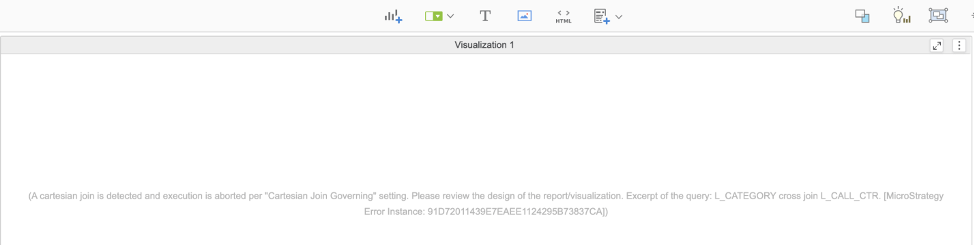
ka0PW0000001JeaYAE_0EM2R000000flv4.jpeg


In some cases, error occurs unexpectedly due to Cross join detected. Here are some sample cases and workaround.
Case 1: Derived attribute defined with a constant value  
Case 2: Cross Join is used to apply unrelated filter
The Strategy Internal Reference Number for the issue discussed in this technical note is KB484141 and F24210.


Comment

0 comments

Details

Knowledge Article

Published:

March 25, 2020

Last Updated:

March 21, 2024