SYMPTOM
Below error may occur when performing metadata upgrade.
Executing Project Logical update on project 'Project_XXX': (Object with ID '52C4764B412E749D187204B3DF52D919' and type 61 (GraphStyle)
is not found in metadata.
It may have been deleted.Object with ID 'AC02ABD14FB1DEA66D7FD0A47A1DDEDA'
and type 61 (GraphStyle) is not found in metadata.
It may have been deleted.Object with ID 'B1E40B124A8F5E098EF488AFBB73031D'
and type 61 (GraphStyle) is not found in metadata.
It may have been deleted.Object with ID '157E50CE4328FC8CE021F2B0835A77D0'
and type 61 (GraphStyle) is not found in metadata.
It may have been deleted.Object with ID 'C756679B48F233488BCEBFB5B240094F'
and type 61 (GraphStyle) is not found in metadata.
It may have been deleted.Object with ID '8634B58F446E7518DFB779B584C0DC08'
and type 61 (GraphStyle) is not found in metadata.
It may have been deleted.Object with ID '46B27FC14FEDA6848DF22AAAA8BDBF5D'
and type 61 (GraphStyle) is not found in metadata.
It may have been deleted.Object with ID 'F9A4272B4BAB44F2F48F81AC6DCDF9B7'
and type 61 (GraphStyle) is not found in metadata.
It may have been deleted.Object with ID 'A7EF52BB428D81082632329DFD48F0C7'
and type 61 (GraphStyle) is not found in metadata.
It may have been deleted.Object with ID '78F7257C414A0FBA47CA399F2657590E'
and type 61 (GraphStyle) is not found in metadata.
It may have been deleted.Object with ID '089994CB4BA7525250B7A39041AAADB5'
and type 61 (GraphStyle) is not found in metadata.
It may have been deleted.Object with ID '5FB954E4407B5457D3B3598F585D7263'
and type 61 (GraphStyle) is not found in metadata.
It may have been deleted.Object with ID 'C024C0B14348564299EBC9997451FFDB'
and type 61 (GraphStyle) is not found in metadata.
It may have been deleted.Object with ID '735CCC3A4208FAA04E1EBCB0110639F7'
and type 61 (GraphStyle) is not found in metadata.
It may have been deleted.Object with ID '1B6DE5724915554C50A513A5C6308785'
and type 61 (GraphStyle) is not found in metadata.
It may have been deleted.Object with ID 'F2A6D9A1454E6E1C1F1AA5B6FFECDE94'
and type 61 (GraphStyle) is not found in metadata.
It may have been deleted.Object with ID 'B49B34C545F373C7F40D7AB761CB473A'
and type 61 (GraphStyle) is not found in metadata.
It may have been deleted.Object with ID 'D069B11D48FC5B5FDAA70199B67DC588'
and type 61 (GraphStyle) is not found in metadata.
It may have been deleted.Object with ID '4F7C919D474CC653F4F225B7AEF798E5'
and type 61 (GraphStyle) is not found in metadata.
It may have been deleted.Object with ID '559BCD564BAADAA0CD795699BC09A7A7'
and type 61 (GraphStyle) is not found in metadata.
It may have been deleted.Object with ID '4F2A6AB944DECA70877D99BE219F8873'
and type 61 (GraphStyle) is not found in metadata.
It may have been deleted.Object with ID '2C05D4BF4FCDE07833FC42AE1E4CAB31'
and type 61 (GraphStyle) is not found in metadata.
It may have been deleted.Object with ID '98D36BA4428E19F27C0116A9FE26AF98'
and type 10 (Prompt) is not found in metadata.
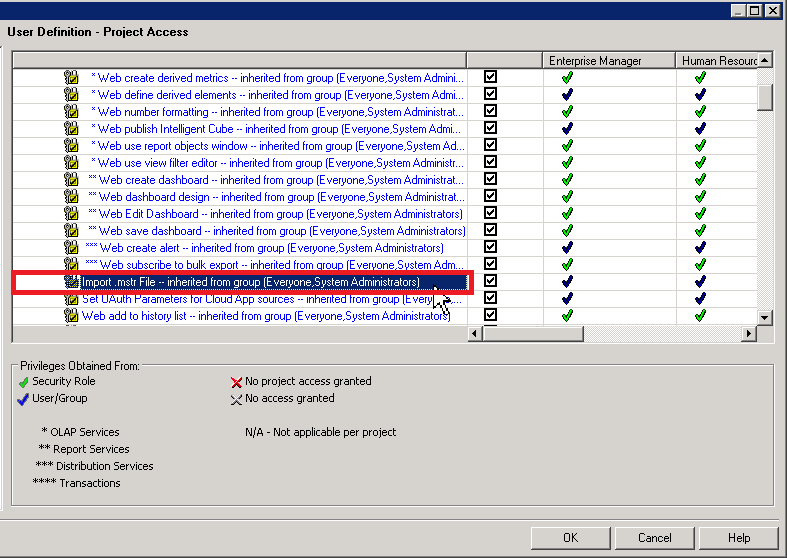
It may have been deleted.You do not have Import .mstr File privilege that is
required to perform the task.
)
You do not have Import .mstr File privilege that is
required to perform the task.
Related Article:
Another possible reason for the similar error during metadata upgrade:
KB441541:Error “Cannot find a function corresponding to XIRR” occurred during metadata update process when upgrading from Strategy 9.x to Strategy 10.x
https://community.strategy.com/article/Error-Cannot-find-a-function-corresponding-to-XIRR-occurred-during-metadata-update-process-when-upgrading-from-MicroStrategy-9-x-to-MicroStrategy-10-x?language=en_US
KB483003
