SYMPTOM:
In Strategy 2019, it is possible to create an attribute with an HTML attribute form that displays as a tooltip when hovering over an attribute element in Strategy Web. KB42134 outlines the steps to create this attribute form.
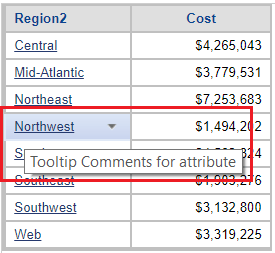
When running a document containing a grid with this attribute, the attribute appears correctly in the grid and displays the tooltip as expected when hovering over elements as seen below.
However, the selector displays the attribute form as HTML code as seen below.
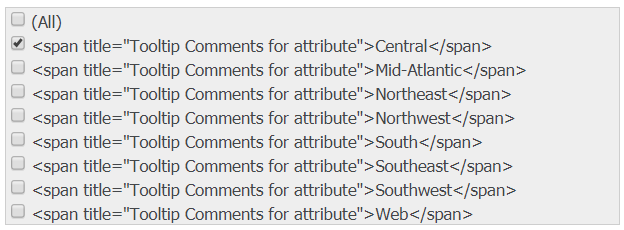
This issue occurs for all selectors.
STEPS TO REPRODUCE:
ApplySimple("'<span title=""Tooltip Comments for attribute"">'+#0+'</span>'", [REGION_NAME]).
CAUSE:
This is an identified defect in Strategy Web 2019.
ACTION:
This issue has been addressed in Strategy Web 2019 Update 1. Upgrade to this version to take advantage of this fix.
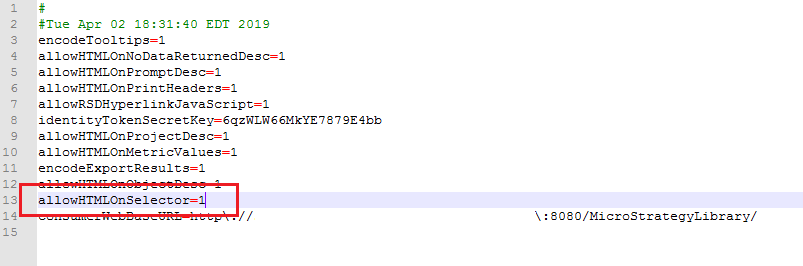
After upgrading to Strategy Web 2019 Update 1, the parameter allowHTMLOnSelector=1 needs to be added to the sys_defaults.properties files located by default at <Strategy Web>\WEB-INF\xml as seen below. The web server should be restarted after making this change.
The Strategy Internal Reference Number for this issue is: KB483030
