EducationSoftwareStrategy.com
StrategyCommunity

Knowledge Base

Product

Community

Knowledge Base

TopicsBrowse ArticlesDeveloper Zone

Product

Download SoftwareProduct DocumentationSecurity Hub

Education

Tutorial VideosSolution GalleryEducation courses

Community

GuidelinesGrandmastersEvents
x_social-icon_white.svglinkedin_social-icon_white.svg
Strategy logoCommunity

© Strategy Inc. All Rights Reserved.

LegalTerms of UsePrivacy Policy
  1. Home
  2. Topics

How to Control the Time Zone for Which PostgreSQL ODBC Drivers Fetch Timestamps


Jing (Sally) Cheng

Senior Principal Consultant • MicroStrategy


This articles describes how to the control the time zone for which PostgreSQL ODBC drivers fetch timestamps.

Description

PostgreSQL supports a column datatype of Timestamp With Time Zone or TSWTZ that stores a timestamp along with its respective time zone. By default, the Platform Analytics Consumer persists all records in the UTC time zone. However, since the time zone information is stored with the timestamp, it can be retrieved easily in any time zone offset. By default, the ODBC driver fetches data at the time zone set at the global level for the server.

Solution

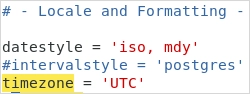
To edit the global server time zone, change the time zone parameter in the postgresql.conf file. See the Client Connection Defaults page in the PostgreSQL documentation for more information about the time zone parameter.

Windows

C:\Program Files (x86)\Common Files\MicroStrategy\Repository\pgsql\PGDATA\postgresql.conf

Strategy Cloud Platform

/opt/mstr/MicroStrategy/install/Repository/pgdata/postgresql.conf

Linux on-prem

/opt/MicroStrategy/Repository/pgdata/postgresql.conf

Example of the postgresql.conf file:

ka0PW0000005iLNYAY_0EM2R000000nG64.jpeg

To see a list of supported time zones, run the following query on PostgreSQL instance:

SELECT * FROM pg_timezone_names;

Note: the 'name' column must be utilized and not the 'abbrev' column for this configuration. After the configuration change is made, restart the Repository Service by following this article .

Alternate Solution

This can also be controlled at the Strategy database instance level by altering the Report Pre-Statement for the Platform Analytics Database instance. Please note that this only affects reports and OLAP cubes, not MTDI cubes such as the Platform Analytics cube.
You can modify this setting using Strategy Developer or Strategy Command Manager.
In Strategy Command Manager:

  1. Run the following command:

    ALTER VLDBSETTING PROPERTYNAME "Report Pre Statement 1" PROPERTYVALUE "SET TIME ZONE 'US/Eastern'" FOR DBINSTANCE "Platform Analytics";


  2. Restart the Intelligence server.

In Strategy Developer:

  • Open the project source containing the Platform Analytics project.

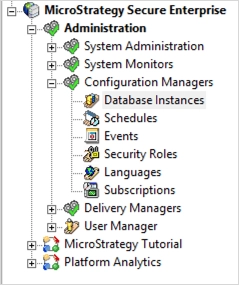
  • Navigate to Administration > Configuration Managers > Database Instances.

ka0PW0000005iLNYAY_0EM2R000000nG8P.jpeg
  • Right-click the Platform Analytics database instance and choose VLDB Properties. 

ka0PW0000005iLNYAY_0EM2R000000nG8j.jpeg
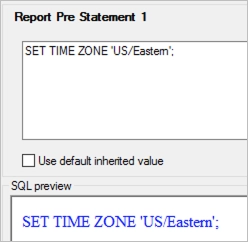
  • Navigate to Pre-Post Statements > Report Pre Statement 1 (or any other number depending on the existing pre-statements).

ka0PW0000005iLNYAY_0EM2R000000nG8o.jpeg
  • Uncheck Use default inherited value.

  • Enter SET TIME ZONE 'US/Eastern'; into the Report Pre Statement box, using the appropriate time zone. If necessary, use the command listed above to get a list of time zones.

ka0PW0000005iLNYAY_0EM2R000000nG93.jpeg
  • Click Save and Close.

  • Restart the Intelligence server.


Comment

0 comments

Details

Knowledge Article

Published:

December 20, 2019

Last Updated:

May 15, 2025