EducationSoftwareStrategy.com
StrategyCommunity

Knowledge Base

Product

Community

Knowledge Base

TopicsBrowse ArticlesDeveloper Zone

Product

Download SoftwareProduct DocumentationSecurity Hub

Education

Tutorial VideosSolution GalleryEducation courses

Community

GuidelinesGrandmastersEvents
x_social-icon_white.svglinkedin_social-icon_white.svg
Strategy logoCommunity

© Strategy Inc. All Rights Reserved.

LegalTerms of UsePrivacy Policy
  1. Home
  2. Topics

KB482999: Custom fonts do not display for graphs in MicroStrategy Web 2019 and above


Mengran (Molly) Wang

Senior Cloud Support Engineer III • MicroStrategy


Following KB37127 KB235107, custom fonts can be displayed successfully in grid; however font cannot be rendered successfully in graph. User will need to install the font in iserver machine to make the font render in graph

STEPS TO REPRODUCE:
1. Follow KB37127: Adding Fonts to the Font Dropdown Menu using MicroStrategy Web SDK 9.4.x-10.x. and KB235107: How to Embed a Custom Font Without Having to Install it on the Client Machines using MicroStrategy Web SDK 9.4.x-10.x to add custom font Annabel Antique Script
2. Create a simple document containing a simple grid
3. Apply custom font to the grid in document ----see the custom font shows in grid
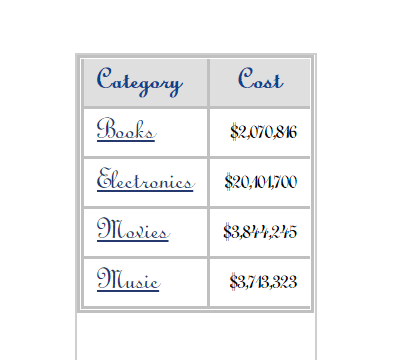
ka04W000001Is4HQAS_0EM44000000geUJ.jpeg

4. Change grid to graph. In editable mode, format graph to make the all text use custom font.---Not taking effect
5. Install custom font in Iserver machine. See the font is now affecting.

ka04W000001Is4HQAS_0EM44000000geUT.jpeg

KB482999


Comment

0 comments

Details

Knowledge Article

Published:

March 27, 2019

Last Updated:

March 27, 2019