EducationSoftwareStrategy.com
StrategyCommunity

Knowledge Base

Product

Community

Knowledge Base

TopicsBrowse ArticlesDeveloper Zone

Product

Download SoftwareProduct DocumentationSecurity Hub

Education

Tutorial VideosSolution GalleryEducation courses

Community

GuidelinesGrandmastersEvents
x_social-icon_white.svglinkedin_social-icon_white.svg
Strategy logoCommunity

© Strategy Inc. All Rights Reserved.

LegalTerms of UsePrivacy Policy
  1. Home
  2. Topics

KB484393: How to match the exact string when using a search box filter in a dossier


Shuang Qi

Senior Cloud Support Engineer II • Strategy


This article describes how to match on the exact string using double quotations and asterisks in a search box filter.

Starting with the release of Strategy ONE (March 2024), dossiers are also known as dashboards.
When you type keywords in a search box filter to filter elements, the search box returns all elements containing the keywords. However, you may want to search for the exact string. 

ka0PW0000001JcuYAE_0EM2R000001I34u.jpeg

KB12658 introduces the cause of the search results.
 
To match on an exact string, use double quotations (") around the search keywords. The search result will display the element exactly matching the input. 
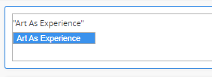
ka0PW0000001JcuYAE_0EM2R000001I35J.jpeg

Double quotations return the exact string. If you want to see the results without typing the complete element, use an asterisk (*) inside the double quotation to match the following keywords. For example:

ka0PW0000001JcuYAE_0EM2R000001I35T.jpeg


Comment

0 comments

Details

Knowledge Article

Published:

July 8, 2020

Last Updated:

March 21, 2024