EducationSoftwareStrategy.com
StrategyCommunity

Knowledge Base

Product

Community

Knowledge Base

TopicsBrowse ArticlesDeveloper Zone

Product

Download SoftwareProduct DocumentationSecurity Hub

Education

Tutorial VideosSolution GalleryEducation courses

Community

GuidelinesGrandmastersEvents
x_social-icon_white.svglinkedin_social-icon_white.svg
Strategy logoCommunity

© Strategy Inc. All Rights Reserved.

LegalTerms of UsePrivacy Policy
  1. Home
  2. Topics

KB484881: How to use the URL without the user ID and password parameters to export dossier reports and documents to PDF


Shuang Qi

Senior Cloud Support Engineer II • Strategy


This article provides steps for removing your user ID and password from the URL when exporting dossiers, reports, and documents.

Starting with the release of Strategy ONE (March 2024), dossiers are also known as dashboards.

Description 


Strategy URL API supports exporting dossiers, reports, and documents with constructed URL. However, URL API exposes the username and password within the URL to access to exported object. If you have security concerns and do not want to expose your username and password, please refer to the following steps. 
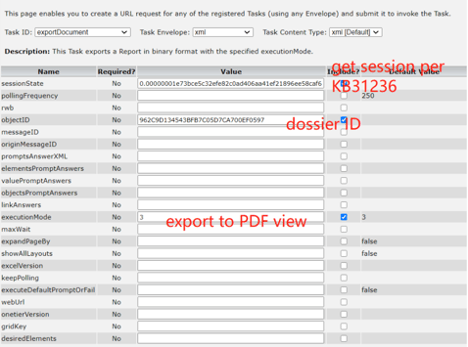
  • Refer to KB31236 to use use sessionState task to get the user session state. 
  • Use the generated URL for exportDocument task. The following is a screenshot of exporting a dossier with the exportDocument task for reference. 
ka0PW0000001JfEYAU_0EM4W000001Ky0s.jpeg
  • The final URL looks like the following, where the user ID and password parameters are not revealed. 

Comment

0 comments

Details

Knowledge Article

Published:

February 16, 2021

Last Updated:

March 21, 2024