Note: Starting with the release of Strategy ONE (March 2024), dossiers are also known as dashboards.
Strategy continues to be dedicated to providing our customers with the most trusted and secure enterprise analytics platform by leveraging the latest and most secure technologies with our suite of products for enhanced performance, stability, and security. In pursuit of this effort, Strategy added support for JDK 11, a long-term release that provides many exciting performance and security enhancements over JDK 8.
The move to JDK 11 carries several security, performance, diagnostics, and productivity enhancements including:
As a result of the move from JDK 8 to JDK 11, the following Application Server versions will be removed from our certification matrix:
Customers that are leveraging any of these Application Servers are advised to adopt our standard Application Server Apache Tomcat 9.0.x or upgrade to another JDK 11 compatible server listed in our Strategy 2021 certification matrix:
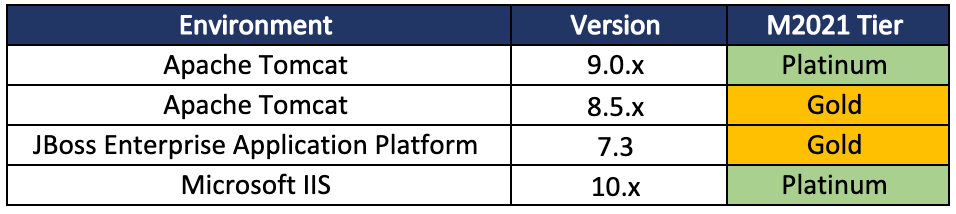
Apache Tomcat -- v9.0.x -- Platinum Certification
Apache Tomcat -- v8.5.x -- Gold Certification
JBoss EAP -- v7.3 -- Gold Certification
Microsoft IIS -- v10.x -- Platinum Certification
For more information, see the Certifications Dossier on this page.
Apache Tomcat® is a widely adopted open-source Java Application Server and is being used by numerous organizations for supporting their large-scale, mission-critical web applications. Compared to other enterprise Application Servers, Tomcat is a lightweight, easy to configure, and cost-effective solution that is well-suited for Strategy web applications with its adequate level of Java EE functionality support and reduced complexity.
'Strategy web applications are rigorously tested with Tomcat to ensure that they meet the performance, security, and stability standards.
Strategy recommends the latest stable release of Tomcat 9 which includes several bug fixes, improved functionality and security enhancements.
If a customer is using Web ASP (IIS 10.x) or Web JSP (Tomcat 9.x) deployed by our Strategy Installer, the JDK upgrade will be completed during the installation process.
If the Application Server is self-deployed, please upgrade the JDK to AdoptOpenJDK11. Failure to do so will result in a HTTP Status 404 error when the user opens a Strategy Web page. After the JDK 11 upgrade, please enable JRE locale data on Tomcat 8.5.x / 9.0.x or JBoss EAP 7.3.x to have consistent data and number formatting with previous releases.
C:\jdk-11.0.8+10\.
C:\jdk-11.0.8+10\bin\java -version. It should output the corresponding version number, for example, OpenJDK version "11.0.8."
If the JDK path is
C:\jdk-11.0.8+10\
setenv.batunder Tomcat path
/bin.
set "JRE_HOME=C:\jdk-11.0.8+10\"
set "JAVA_OPTS=%JAVA_OPTS% -Djava.locale.providers=COMPAT,CLDR,SPI"
tomcat9w.exe(
tomcat8w.exefor Tomcat8) under Tomcat path
/bin.
jvm.dllunderneath
bin\server.
-Djava.locale.providers=COMPAT,CLDR,SPI

standalone.conf.batunder JBoss EAP path
/bin.
:JAVA_OPTS_SET
set "JAVA_HOME=C:\jdk-11.0.8+10"
set "JAVA_OPTS=%JAVA_OPTS% -Djava.locale.providers=COMPAT,CLDR,SPI"
If the JDK path is /java/jdk-11.0.8+10
setenv.shunder Tomcat path /
bin.
JRE_HOME=/java/jdk-11.0.8+10
JAVA_OPTS="$JAVA_OPTS -Djava.locale.providers=COMPAT,CLDR,SPI"
standalone.confunder JBoss EAP path
/bin.
JAVA_HOME=/java/jdk-11.0.8+10
JAVA_OPTS="$JAVA_OPTS -Djava.locale.providers=COMPAT,CLDR,SPI"
\WEB-INF\log\MSTRLogMMddyyyy_1.logwill have the following log:
<record reset="true">

  <package>com.Strategy.utils</package>

  <level>SEVERE</level>

  <miliseconds>1606833226190</miliseconds>

  <timestamp>12/01/2020 22:33:46:192</timestamp>

  <thread>0</thread>

  <class>FormatUtils</class>

  <method><clinit></method>

  <message>JRE locale data is not currently used. Locale-sensitive functionality such as date, time, and number formatting may behave differently.</message>

</record>
Note: To view the latest changes to the certifications scope and impending 3rd party upgrades in 2023, see KB485900.
