In Strategy 2020 Update 2, the size of the Intelligent Cube keeps gradually increasing even after setting the Maximum % growth of Intelligent Cube to 50%.
The initial size of the Intelligent Cube is 11G and can grow to a maximum of 32G while the Maximum % growth of the Intelligent Cube is 50%. The following
DSSErrors.logbelow indicates the max growth percentage of 50% is being set.
2021-06-09 05:28:54.447-04:00 [HOST:xxx][SERVER:CastorServer][PID:832][THR:16540][Kernel][Info][UID:0][SID:0][OID:0] Project Loading Index 0, Project "xxx": Started.
2021-06-09 05:29:12.775-04:00 [HOST:xxx][SERVER:CastorServer][PID:832][THR:16540][Cube Server][Info][UID:0][SID:0][OID:0] Cube Manager: I-Server sets index check upper bound to 50 percent.
2021-06-09 05:30:23.284-04:00 [HOST:xxx][SERVER:CastorServer][PID:832][THR:16540][Kernel][Info][UID:0][SID:0][OID:0] Project Loading Index 0, Project "xxx": Finished with 88837 ms.
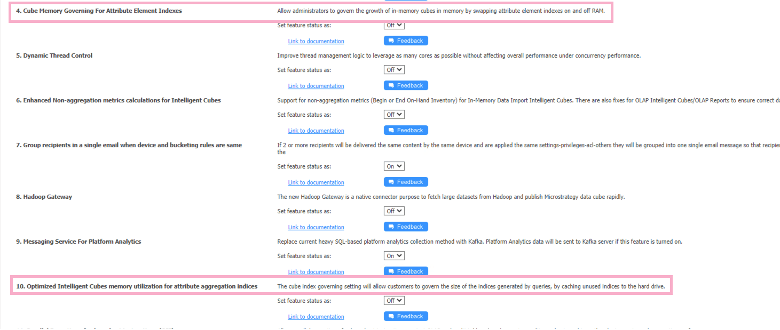
The two features are turned ON by default and hidden from the Strategy Web GUI in Strategy 2020 Update 2. The metadata should be updated when upgrading to Strategy 2020 Update 2.
The "Respect Maximum % Growth of an Intelligence Cube due to Indexes" registry setting was unintentionally deleted causing the cube size to grow unbounded.
You must re-enable to registry key "Respect Maximum % Growth of an Intelligence Cube due to Indexes".
