SYMPTOM:
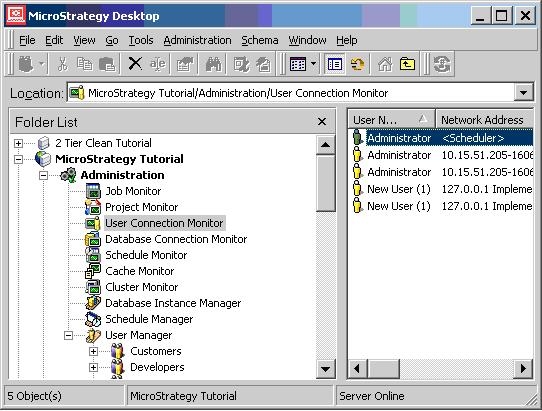
Users who login to Strategy Web and then close the browser without logging out still appear as though they are connected through the User Connection Monitor. In the example below, "New User (1)" was logged into the Web and then closed the browser without logging out:
CAUSE:
This occurs because Strategy does not know that the browser has been closed and therefore, does not know to end the session.
ACTION:
The best method to ensure that the session is ended, provided that there are no jobs still being processed, is to ensure that users select "logout" when they are finished connecting to Strategy Web.
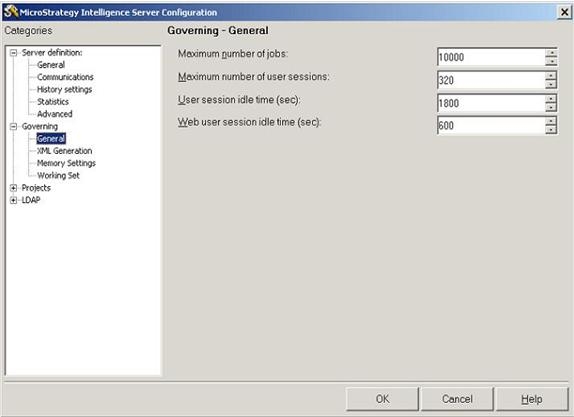
Alternately, change the Web User Session Idle Time. This will decrease the amount of time that a user is still connected after they have closed the browser. The server setting can be found by connecting to the project in 3-tier from Strategy Developer and going to Administration Menu > Server > Configure Intelligence Server. From the Intelligence Server Configuration Menu, select Governing > General and then Web User Session Idle Time. This setting is illustrated below:
To disconnect the user connection from the Strategy Web server, the timeout setting can also be changed. Step by steps instructions can be found in the following Strategy Knowledge Base documents.
KB41860: What are the timeout settings controlled by IIS that affect MicroStrategy Web?
KB12966: How to configure the web session timeout set on JSP application servers using MicroStrategy Web JSP
