In general, the projectsources.xml file, by default located at Program Files\MicroStrategy\Web Services\projectsources.xml can be used to configure Strategy Office to point to a particular Strategy Intelligence Server. This procedure is described in the following Strategy Knowledge Base document:
However, it may seem that there is not a facility to configure Strategy Office for clustered Intelligence Servers. The relevant part of the projectsources.xml file only accommodates one server name per data source. For example:
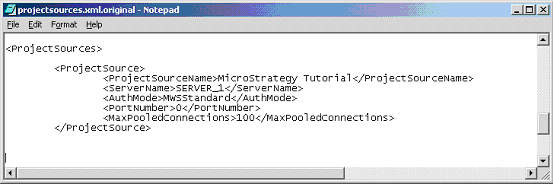
This raises the question of how to configure Strategy Office to work against a cluster, for instance consisting of SERVER_1 and SERVER_2.
In fact, no more complex manipulation of the projectsources.xml file is required. The user should simply specify the name of one of the cluster nodes in projectsources.xml, and the clustering functionality will work automatically between the named node and any other nodes in that cluster. The sample extract given above would therefore facilitate the use of Strategy Office against a cluster containing a node named SERVER_1.
