Memory Contract Manager (MCM):
The memory contract manager is a consolidated memory management component within Strategy Intelligence Server 2021 that grants or denies memory from different tasks within Strategy Intelligence Server. Users can refer to the following Strategy Knowledge Base technical note for a detailed explanation of the design of the MCM governor:
SmartHeap:
SmartHeap is a third party component used by Strategy Intelligence Server 2021 to provide improved memory management performance. This component is used on both the Microsoft Windows and Linux Platform.
From the manufacturer's website, "SmartHeap is a fast reliable, ANSI-compliant malloc/operator new library. SmartHeap supports multiple memory pools, includes a fixed-size allocator, and is thread-safe. SmartHeap also includes comprehensive memory debugging APIs to detect leakage, overwrites, double-frees, wild pointers, out of memory, references to previously freed memory, and other memory errors."
Specifics of the Smartheap behaviour are discussed in the following Strategy Knowledge Base article:
MCM governing for the Strategy Intelligence Server:
In both the Strategy Intelligence Server on Microsoft Windows, and the Strategy Intelligence Server Universal on Unix/Linux platforms, users will observe that the server process virtual bytes or process size does not reduce significantly, even during periods of low server activity. To a large extent, this observed behaviour of the server process over time is due to the smartheap behaviour of caching previously allocated memory for future use.
The core Intelligence Server code allocates and releases memory for the specific operations it performs. However, smartheap, which manages the memory allocation and deallocation for the server code simply marks this memory for reuse, and will utilize this cached memory to satisfy future memory allocation requests rather than allocating from the operating system again.
Users can expect to see a difference in the exact amount of memory cached and Intelligence Server memory profile depending on the specific operating system used. This is primarily because the default tuning of the smartheap parameters differs between various operating systems.
Also the default behaviour of the MCM components will differ between platforms. One difference lays in available counters to monitor memory usage.
Unix/Linux systems generally provide two useful counters - Process 'Size' and 'Resident Set Size', that can be used to monitor process memory usage. The 'Size' counter can be considered roughly equivalent to the Virtual Bytes counter in Microsoft Windows. However there is no easily accessible operating system counter of the committed memory used by a process equivalent of the Private Bytes Counter on Microsoft Windows. Further, the MCM component in the Strategy Intelligence Server universal on Unix/Linux does not perform the calculation to identify the largest free blocks or use this in determining whether memory requests may be rejected.
To calculate this committed memory usage in Unix, Strategy Intelligence Server Universal on Unix/Linux uses a smartheap provided counter internally called 'PoolSize', which increments and decrements with memory allocation and de-allocation. This is roughly equivalent to the committed memory, and the MCM component uses this counter to decide whether a request can be granted or denied. For all MCM calculations, this counter is treated as the equivalent of the Microsoft Windows 'Private Bytes' counter. This counter is logged in the DSS Errors log as the Smart Heap Pool Size or Memory Oscillator component, when a MCM request is rejected as shown below:
2019-12-09 08:42:39.000 [HOST:env-1744981laio2use1][SERVER:CastorServer][PID:4270][THR:140172129986304][Kernel][Error][UID:0][SID:0][OID:0] Memory Oscillator(bytes)
System Total (Bytes)= 30181662216
System Available (Bytes)= 8213233224
For Unix/Linux: All Other Process Data(Bytes) = 36264755
For Windows: All Other Process PB = 10022375424
For Unix/Linux: Heap Limit(Bytes)= 18446744073709551615
For Windows: System UAS (User Address Space): 140737488224256
For Unix/Linux: I-Server Private Memory Size = 8276877600
For Windows: I-Server PB = 7970549760
For Unix/Linux systems, there is no 'User Address Space' concept as in Microsoft Windows. As discussed earlier, the heap limit in Unix/Linux systems is typically set to an unlimited value. As a result, in most Unix/Linux systems, the default MCM governing setting of a virtual byte limit of 90% will evaluate as 90% of 2^64 bytes which is also a very large number.
In most practical cases, the total amount of memory (physical + swap) will be much below this value, and the MCM parameters must be set to avoid the condition (a) - i.e. prevent the Intelligence Server from allocating all the available memory on the system. Because the default Intelligence Server governing configuration does not check for this condition, users may notice that MCM will fail to prevent the the server from running out memory unless specific governing is implemented.
The specific MCM governing settings that must be changed to ensure that the Intelligence Server does not run out of memory are the 'Reserved memory for processes external to the Intelligence Server' settings as shown below. Users can either specify an absolute value, or a percentage of the total memory to be reserved for other processes.
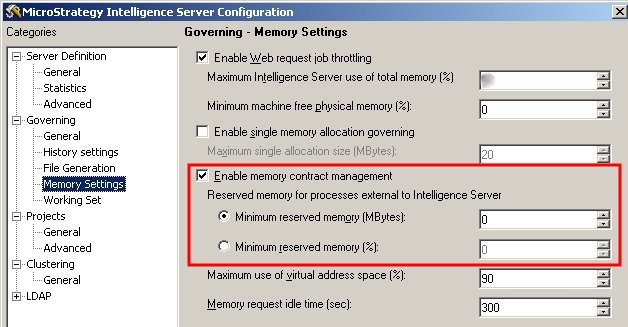
When calculating the value to be used, users should know how much physical memory and swap memory is available on the system (or the total of both). Users should also know exactly how much memory they would like to limit the memory usage of the Intelligence Server process to use.
Consider an example of how the MCM governor works for a simple scenario. The log files for a rejected request are reproduced below:
Windows:
2019-10-22 22:52:12.471-04:00 [HOST:TEC-W-003923][SERVER:CastorServer][PID:16368][THR:11208][Kernel][Error][UID:54F3D26011D2896560009A8E67019608][SID:0F69D1F3DCBC05A8BA5FAEDAAE31F20E][OID:8885C1254CEF4EBC1AC080B4C4161EBC] Contract Request Failed. ***** Start of Info Dump *****
2019-10-22 22:52:12.471-04:00 [HOST:TEC-W-003923][SERVER:CastorServer][PID:16368][THR:11208][Kernel][Error][UID:54F3D26011D2896560009A8E67019608][SID:0F69D1F3DCBC05A8BA5FAEDAAE31F20E][OID:8885C1254CEF4EBC1AC080B4C4161EBC] Source= XMLDOM, Handle=1, Size=69632.
ContractedTotal=200724480, AvailableTotal=0.
2019-10-22 22:52:12.472-04:00 [HOST:TEC-W-003923][SERVER:CastorServer][PID:16368][THR:11208][Kernel][Error][UID:54F3D26011D2896560009A8E67019608][SID:0F69D1F3DCBC05A8BA5FAEDAAE31F20E][OID:8885C1254CEF4EBC1AC080B4C4161EBC] Memory I-Server PB = 7970549760.
I-Server VB (Virtual Byte)= 15743385600.
System UAS (User Address Space) = 140737488224256.
System Available (Bytes)= 9842229248.
System Total (Bytes)= 27835154432.
All Other Process PB = 10022375424.
Largest Free and its bottom = 0, 2147483648.
High and Low Watermark (byte) = 7467908480, 7094512980.
2019-10-22 22:52:12.473-04:00 [HOST:TEC-W-003923][SERVER:CastorServer][PID:16368][THR:11208][Kernel][Error][UID:54F3D26011D2896560009A8E67019608][SID:0F69D1F3DCBC05A8BA5FAEDAAE31F20E][OID:8885C1254CEF4EBC1AC080B4C4161EBC] Single Alloc Limit = 18446744073709551615.
Memory Reserve = 19484608102.
Virtual Byte Limit (percent) = 90.
Doubling Limit = 1 MB
2019-10-22 22:52:12.474-04:00 [HOST:TEC-W-003923][SERVER:CastorServer][PID:16368][THR:11208][Kernel][Info][UID:54F3D26011D2896560009A8E67019608][SID:0F69D1F3DCBC05A8BA5FAEDAAE31F20E][OID:8885C1254CEF4EBC1AC080B4C4161EBC] SmartHeap Cache Releasable = true
2019-10-22 22:52:12.475-04:00 [HOST:TEC-W-003923][SERVER:CastorServer][PID:16368][THR:11208][Kernel][Error][UID:54F3D26011D2896560009A8E67019608][SID:0F69D1F3DCBC05A8BA5FAEDAAE31F20E][OID:8885C1254CEF4EBC1AC080B4C4161EBC] Contract Request Failed. ***** End of Info Dump *****.
2019-12-09 08:42:38.999 [HOST:env-174498laio2use1][SERVER:CastorServer][PID:4270][THR:140172129986304][Kernel][Error][UID:0][SID:0][OID:0] Contract Request Failed. ***** Start of Info Dump *****.
2019-12-09 08:42:38.999 [HOST:env-174498laio2use1][SERVER:CastorServer][PID:4270][THR:140172129986304][Kernel][Error][UID:0][SID:0][OID:0] Source= cache - hashtable, Handle=1, Size=4096.
ContractedTotal=641773568, AvailableTotal=0.
2019-12-09 08:42:39.000 [HOST:env-174498laio2use1][SERVER:CastorServer][PID:4270][THR:140172129986304][Kernel][Error][UID:0][SID:0][OID:0] Memory Oscillator(Bytes) = 45294759088.
I-Server Private Memory Size(Bytes) = 49550954496.
Heap Limit(Bytes) = 18446744073709551615.
System Available(Bytes) = 10496536576.
System Total(Bytes) = 64387756032.
All Other Process Data(Bytes) = 4340264960.
High and Low Watermark(Bytes) = 54729592628, 51993112970.
2019-12-09 08:42:39.000 [HOST:env-174498laio2use1][SERVER:CastorServer][PID:4270][THR:140172129986304][Kernel][Error][UID:0][SID:0][OID:0] MCM Settings:
Single Alloc Limit(Bytes) = 4194304000.
Memory Reserve(Bytes) = 9658163404.
Virtual Byte Limit(percent) = 95.
Doubling Limit(MB) = 1
SmartHeap Cache Releasable = true
2019-12-09 08:42:39.000 [HOST:env-174498laio2use1][SERVER:CastorServer][PID:4270][THR:140172129986304][Kernel][Error][UID:0][SID:0][OID:0] Contract Request Failed. ***** End of Info Dump *****.
For Unix/Linux:Memory Reserve(Bytes) = 9658163404
For Windows:Memory Reserve = 19484608102
2019-10-22 22:52:12.367-04:00 [HOST:TEC-W-003923][SERVER:CastorServer][PID:16368][THR:5724][Kernel][Info][UID:0][SID:0][OID:0] MCM has reached PBLimit
If PBLimit is reached,
Note: For Windows, IServerPB represents the value of "I-Server PB," For Unix/Linux, IServerPB represents the value of "I-Server Private Memory Size(Bytes)." The equation is not always satisfied for all circumstances, it's just an approximate.
