Ignoring Grouping on All Attributes in a Dimension
In MDX, the following construction specifies the level at which a measure (metric) will be calculated.
(., .)
This means that the measure listed first in the parentheses will have the same value for the entire dimension given second.
In general, an OLAP Cube's dimensions will have a member encompassing all of the dimension's leaf members. It functions as a grand total when used in conjunction with a measure.
A metric in Strategy with the following formula means that for the Subcategory dimension, the metric should aggregate over all subcategories and present this aggregated value for each member of the dimension. This is the multidimensional way of expressing the concept Grouping = None.
"(., .)"
In a report, the metric does, in fact, ignore grouping on the Subcategory attribute, as shown below:

This syntax applies to an entire dimension. In the above report, Category and Subcategory exist on different dimensions; unlike the regular Strategy Tutorial schema, these attributes do not have a parent-child relationship. The metric ignores grouping for the entire Subcategory dimension. It can group by Category because Category is in a separate, unrelated dimension.
What is seen, then, for the Category Revenue metric is the aggregate of all subcategories further sliced by the unrelated Category attribute.
Ignoring Grouping on One or More Attributes in a Dimension
If the two attributes are related in the same dimension/hierarchy, a different syntax must be used. Consider the following hierarchy layout:
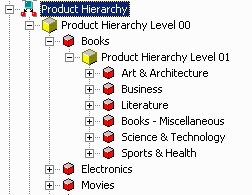
To return the metric values at the level of Category (Product Hierarchy Level 00) and also include Product Hierarchy Level 01 on the report, the query must know what is the level 01 member for the current row, and return the metric value for the parent member. That is, if the current member is 'Business,' the metric value for Books should be the result.
In MDX, the CurrentMember and Parent functions can be applied to the product hierarchy.
"(., .CurrentMember.Parent)"
If it is necessary to aggregate up more than one level of the hierarchy, the Ancestor function may be used: Ancestor(.CurrentMember, 2) navigates the hierarchy from the current member to its grandparent (2 levels up).
Important: This metric definition now depends on the Product hierarchy being used on the report template. If this metric is used on a report without one of the Product attributes, the current member for the product hierarchy cannot be determined. The OLAP cube source will either return empty values for the metric, or fail the report with an error. Generally it does not make sense to disallow grouping on an attribute if that attribute is not used in the report.
For additional details on creating custom MDX metric formulas in Strategy, consult the following Strategy Knowledge Base technical note.
KB16057: How to create customized metric expressions for MDX Cube data sources in MicroStrategy Engine
