EducationSoftwareStrategy.com
StrategyCommunity

Knowledge Base

Product

Community

Knowledge Base

TopicsBrowse ArticlesDeveloper Zone

Product

Download SoftwareProduct DocumentationSecurity Hub

Education

Tutorial VideosSolution GalleryEducation courses

Community

GuidelinesGrandmastersEvents
x_social-icon_white.svglinkedin_social-icon_white.svg
Strategy logoCommunity

© Strategy Inc. All Rights Reserved.

LegalTerms of UsePrivacy Policy
  1. Home
  2. Topics

KB17041: How to set 'Null Checking for Analytical Engine' for every single metric on project level in MicroStrategy Developer 9.x and 10.x


Stefan Zepeda

Salesforce Solutions Architect • Strategy


How to set 'Null Checking for Analytical Engine' for every single metric on project level in MicroStrategy Developer 9.x and 10.x

NULL values can be treated as zeroes (0) for computational purposes by enabling suitable settings in the Very Large Database (VLDB) properties at the project, report, and metric levels.
 
NOTE: For information regarding the hierarchy of the different Strategy VLDB settings, refer to the following Strategy Knowledge Base technical note:
 
KB3632: What is the hierarchy for the MicroStrategy VLDB Settings?
 
Follow the steps below to make the null check on the Analytical Engine available for every single metric at the project level:
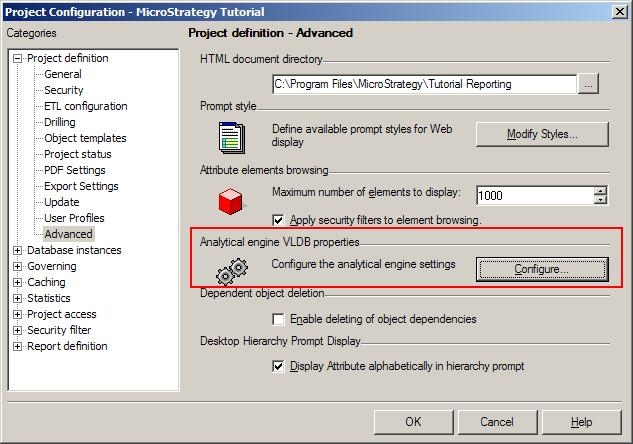
 

  • Open the Project Configuration window.
  • Expand 'Project Definition'.
  • Highlight 'Advanced'.
  • Under the section 'Analytical engine settings', click on 'Configure....' as shown below:
ka04W000001IqhHQAS_0EM440000002F7d.jpeg
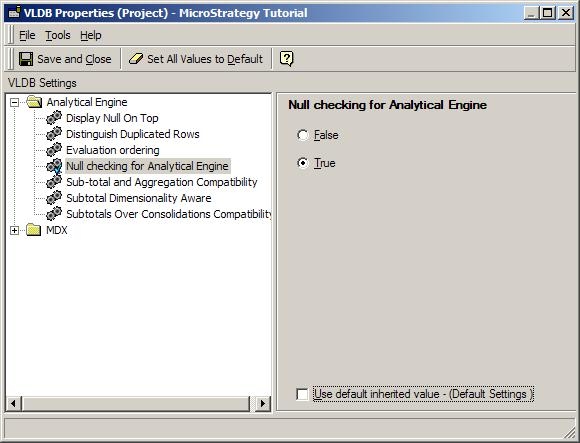
  • Open folder Analytical Engine.
  • Click on 'Null checking for Analytical Engine'.
  • Check the radio button for 'True'. If the options are grayed out, uncheck the 'Use default inherited value' checkbox first, as shown below:
ka04W000001IqhHQAS_0EM440000002F7R.jpeg
  • Save and Close the VLDB Properties window.
  • Click on 'OK' to close the project configuration window.

Comment

0 comments

Details

Knowledge Article

Published:

June 2, 2017

Last Updated:

June 2, 2017