EducationSoftwareStrategy.com
StrategyCommunity

Knowledge Base

Product

Community

Knowledge Base

TopicsBrowse ArticlesDeveloper Zone

Product

Download SoftwareProduct DocumentationSecurity Hub

Education

Tutorial VideosSolution GalleryEducation courses

Community

GuidelinesGrandmastersEvents
x_social-icon_white.svglinkedin_social-icon_white.svg
Strategy logoCommunity

© Strategy Inc. All Rights Reserved.

LegalTerms of UsePrivacy Policy
  1. Home
  2. Topics

KB17429: How to delete an object from Object Browser panel in a Freeform SQL Editor in MicroStrategy Developer 9.x and 10.x


Stefan Zepeda

Salesforce Solutions Architect • Strategy


How to delete an object from Object Browser panel in a Freeform SQL Editor in MicroStrategy Developer 9.x and 10.x

SYMPTOM:
A user wants to delete attributes and/or metrics that exist on the Object Browser panel from the Freeform SQL Editor in Strategy Developer 9.x and 10.x.
 
CAUSE:
There is no way to format each series label without affecting the totals.
 
ACTION:
To remove any attribute or metric from the object browser in a Freeform SQL Editor, follow the steps below:
 

  1. Show hidden objects. Refer to the following Strategy Knowledge Base technical note to get more information about how to enable hidden folders in Strategy Developer 9.x and 10.x:
    KB19828
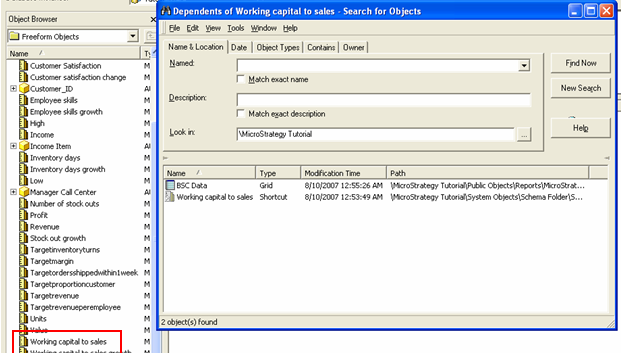
  • Right click on the attribute or metric that wants to be deleted and select 'Search for Dependents' as shown in the image below:
ka02R000000kb62QAA_0EM440000002F0w.jpeg
  • Select all objects found and delete them.
    Note: Ensure these objects should be deleted before deleting objects found.
     
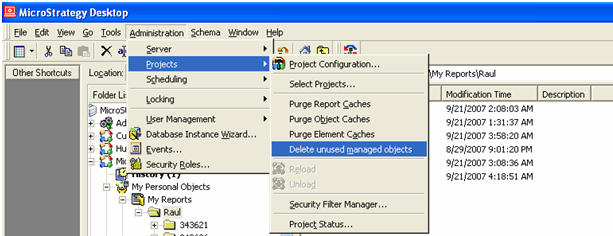
  • Close the Freeform SQL Editor window and delete unused managed objects, as shown in the image below.
ka02R000000kb62QAA_0EM440000002F0s.jpeg
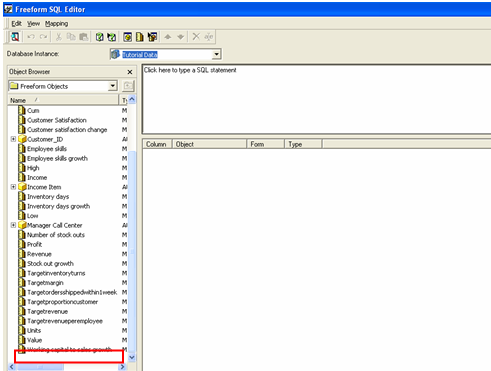
  • Create a new Freeform SQL report and the metric or attribute will be deleted, as shown below below:
ka02R000000kb62QAA_0EM440000002F0y.jpeg

000018214


Comment

0 comments

Details

Knowledge Article

Published:

June 5, 2017

Last Updated:

June 26, 2018