INTRODUCTION
Strategy Intelligence Server 9.4.x - 10.x statistics logging is configured at the project level. Server level session statistics are logged into the STG_IS_SESSION_STATS table in the statistics database while Project level session statistics are recorded in STG_IS_PROJ_SESS_STATS.
There are two options to collect statistics:
1) Complete Session Logging - Each project can use a different Database Instance to connect to different databases for its own statistics logging. This ensures compete data for all these projects. This options is selected by Default. Every session created at the server level is represented by one row in the STG_IS_SESSION_STATS table, with separate columns for the connection and disconnection times. If the Strategy Intelligence Server has projects whose statistics are logged into different databases, the logging scheme above is necessary to keep track of when the session was started on the Strategy Intelligence Server within these various statistics databases.
2) Single Instance Session Logging (Recommended Configuration) - This option should be selected when all monitored projects that exist under a single project source log statistics to the same database. When choosing Single Instance Session Logging, if there is more than one project listed in the list, the users must select one of the projects that is being monitored by Enterprise Manager.
Strategy Intelligence Server statistics options:
In Strategy 9.4.x:
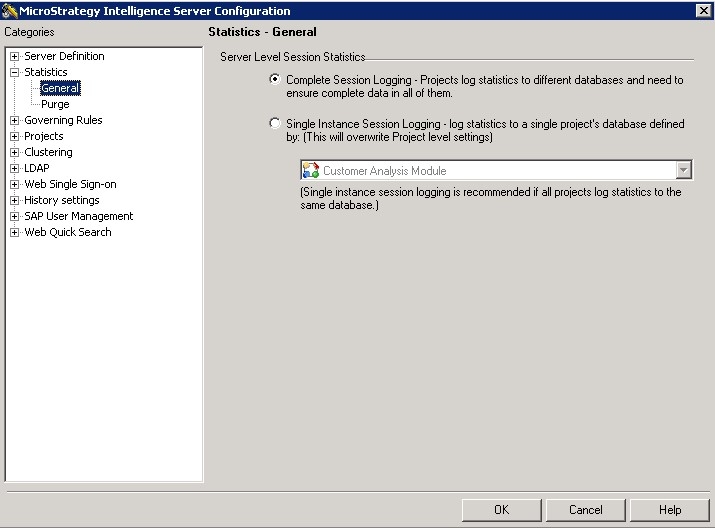
In Strategy 10.x

Note: To use single instance session logging successfully, the single instance session logging project must be loaded onto the Intelligence Server at startup. If clustered Intelligence Servers are being used, the project must be loaded onto all the clustered Intelligence Servers. Failure to load this project on all servers at startup will result in a loss of session statistics for any Intelligence Server onto which the project is not loaded at startup.
For more information, see the following in the Knowledge Base article: KB14591: Some statistics for one or more Intelligence Servers are not migrated during the MicroStrategy Enterprise Manager data load in MicroStrategy Enterprise Manager 9.x.
Single Instance Session Logging
This option minimizes session logging and optimizes system performance. This is because the size of the STG_IS_SESSION_STATS table can be significantly reduced, as it is not necessary to log the server session statistics information for every project that is logging into the same database instance.
The following example illustrates how the Singe Instance Session Logging works - Assume that there are two projects, Project A and Project B under the same Strategy Intelligence Server. Also assume that there are two separate statistics database instances, named Database X and Database Y.
Single Instance Session Logging is checked with Project A in the scroll-down list:
Complete Session Logging
Within a single project source, some projects log statistics to one database and other projects log to another database. Complete Session logging is used when different projects under the same project source log statistics to different databases.
The following example illustrates how the different server level session statistics logging options lead to different results - Assume that there are two projects, Project A and Project B under the same Strategy Intelligence Server. Also assume that there are two separate statistics database instances, named Database X and Database Y.
Project A and B logging statistics to different databases
Essentially, complete session logging creates duplicate entries for server level session statistics - one in Database X and one in Database Y.
Note: These settings are run-time settings so administrators should be cautious in changing them.
