EducationSoftwareStrategy.com
StrategyCommunity

Knowledge Base

Product

Community

Knowledge Base

TopicsBrowse ArticlesDeveloper Zone

Product

Download SoftwareProduct DocumentationSecurity Hub

Education

Tutorial VideosSolution GalleryEducation courses

Community

GuidelinesGrandmastersEvents
x_social-icon_white.svglinkedin_social-icon_white.svg
Strategy logoCommunity

© Strategy Inc. All Rights Reserved.

LegalTerms of UsePrivacy Policy
  1. Home
  2. Topics

KB18646: Troubleshooting the 'Incorrect login/password' error when logging into the MicroStrategy Intelligence Server using LDAP authentication


Community Admin

• Strategy


The article that follows below describes some typical error messages that may be seen when a user is attempting to login to the Intelligence Server using LDAP authentication. /DIV>

Users interested in setting up the Strategy Intelligence Server 9.4.x-10.x to authenticate users against a LDAP server should refer to the information provided in the following Strategy Knowledge Base articles:

  • KB18562: Understanding LDAP integration with the MicroStrategy Intelligence Server 9.x and newer
  • KB18506: Importing and linking users using LDAP integration with the MicroStrategy Intelligence Server 9.x and newer

These articles can help users to understand the various configuration options available for the Strategy Intelligence Server and the setup necessary for successful integration with a LDAP server.
 
Typically, LDAP integration issues within Strategy Intelligence Server usually fall into one of the following categories:

  1. Intelligence Server Connectivity and initial authentication with the LDAP Server.
  2. User Login authentication failure.
  3. Functionality problems/questions regarding Importing of Users/Groups/synchronization of the LDAP users within the Strategy Intelligence Server metadata.

For troubleshooting LDAP setup and initial connectivity related issues, users should refer to the following Strategy Knowledge Base Technical Note for troubleshooting information:
KB18579: Steps to take to troubleshoot LDAP integration - connectivity and initial authentication from the MicroStrategy Intelligence Server 9.x-10.x
The article that follows below describes some typical error messages that may be seen when a user is attempting to login to the Intelligence Server using LDAP authentication. 
 
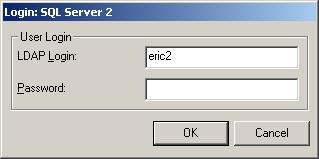
The Incorrect login/password error:
ka04W00000148r4QAA_0EM440000002BJQ.jpeg

 
This error message is seen if the authentication user is able to successfully bind to the LDAP Server, but the user logging in cannot be found or authenticated on the LDAP Server side. The error messages found in the Authentication Server -> Trace log file can help diagnose the cause if the error. The following are the main reasons why this error message may be seen:
 
If syntactically incorrect search filter is passed to the LDAP server to perform the search, the Authentication Server -> Trace logs will display the following error:


2010-01-27 11:10:38.021-06:00 LDAP authentication trace: Failure in search LDAP user based on filter '(&(objectclass=person (sAMAccountName=hector1))' and search root 'dc=Strategy,dc=com''. (LDAP error 87: Filter Error)

 
In this example, the syntax error consists of a missing parenthesis  in the objectclass section of the filter.

  • The specified search filter is syntactically incorrect:
  • User does not exist in the specified search path or is excluded by the search filter:
    When a user logs into Strategy using LDAP authentication, the Strategy Intelligence Server is presented with the users LDAP username / login and password.
    The Strategy Intelligence Server first searches for the user on the LDAP server using the login name provided. The search specifies a base location in the directory tree as specified by the user in the "Search root distinguished name (DN)" field of the Strategy Intelligence Server configuration. The search itself uses a filter criteria "User search filter" shown below. If no object is found on the LDAP server matching this search, the Authentication Server -> Trace logs will display the following error:
    
    2008-05-27 17:43:32.494-05:00 Login using LDAP with LDAP User='testuser1'
    
    2008-05-27 17:43:32.525-05:00 LDAP authentication trace: no LDAP users are found to have the login with search filter '(&(objectclass=person) (uid=testuser1))' and search root 'DC=corp,DC=Strategy,DC=com'
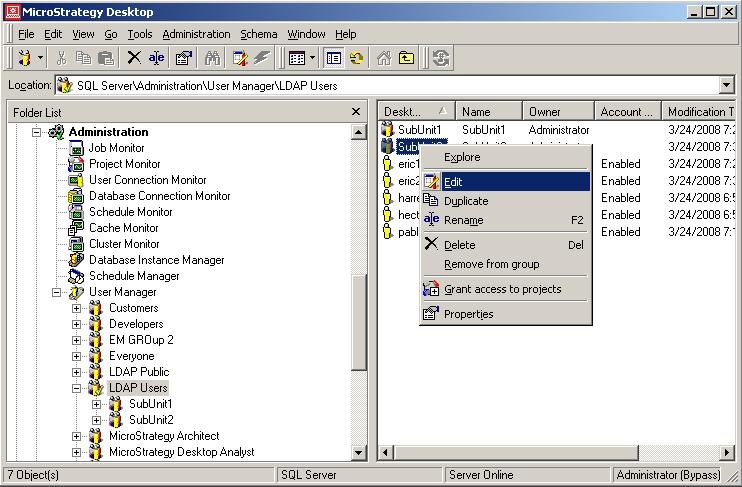
     
  • The default search filter is populated depending on the LDAP server vendor chosen in the "LDAP Server Vendor name" field on the Strategy Intelligence Server LDAP Configuration (General). This filter can also be modified by users to make the search more selective or to include additional criteria in the search.
     
ka04W00000148r4QAA_0EM440000002BJR.jpeg
  • The user search failed for some other reason:
    It is possible that the user search action may fail other reasons - i.e. the user login is present on the LDAP server and can be located using the same search base distinguished name and filter using some third party tool such as Softerra LDAP browser or ldapsearch, but fails from the Strategy Intelligence Server.
    This is an extremely uncommon scenario and additional troubleshooting including network traces may need to be used to identify the cause of the issue.
    One typical reason for this behaviour may be related to the "Chase referrals" functionality that is implemented by the LDAP client libraries. When using Microsoft Active Directory as the LDAP server, if the search base distinguished name is specified to be the Root DSE of the directory, Active Directory will return referrals for the ForestDNSZones and other zones as part of the search result.
    As a default, the Intelligence Server does not set the chase referrals flag when initializing the LDAP client libraries, and the usual option chosen by the client libraries is to chase referrals. This will sometimes result in an error in the Authentication Server -> Trace logs shown below:
    
    2008-05-27 17:54:24.916-05:00 LDAP authentication trace: Failure in search LDAP user based on filter '(&(objectclass=person) (sAMAccountName=hector1))' and search root 'dc=Strategy,dc=com''. (LDAP error 1: Operations Error)

     
  • Turning off the chase referrals option is available from the Strategy Intelligence Server 8.0.3 Hotfix 1 and newer versions, and is documented in the Technical Note:
    KB15655: How to configure MicroStrategy Intelligence Server 9.x and 10.X to ignore LDAP chase referrals

    4. The user search succeeded but the LDAP server does not let the user authenticate: This may happen for some users if for example, the incorrect password was entered by the user and rejected by the LDAP server, or if the user is disabled from authenticating on the LDAP server. The Authentication Server -> Trace logs will show an error similar to the following in the logs:
  • 
    2008-05-30 13:44:09.224-05:00 Login using LDAP with LDAP User='hector1'
    2008-05-30 13:44:09.334-05:00 LDAP authentication trace: user 'CN=hector1,OU=businessunit1,OU=test,DC=ads2003-labs,DC=Strategy,DC=com' failed in bind to LDAP server '10.16.17.58' on port '389'. (LDAP error 49: Invalid Credentials)

    On successful login users will see the log entries in the Authentication Server ->Trace similar to following messages: 
    
    2008-05-27 17:50:29.572-05:00 Login using LDAP with LDAP User='hector1'
    2008-05-27 17:50:30.728-05:00 LDAP authentication trace: this LDAP user belongs to the LDAP group, CN=SubUnit1,OU=businessunit1,OU=test,DC=ads2003-labs,DC=Strategy,DC=com

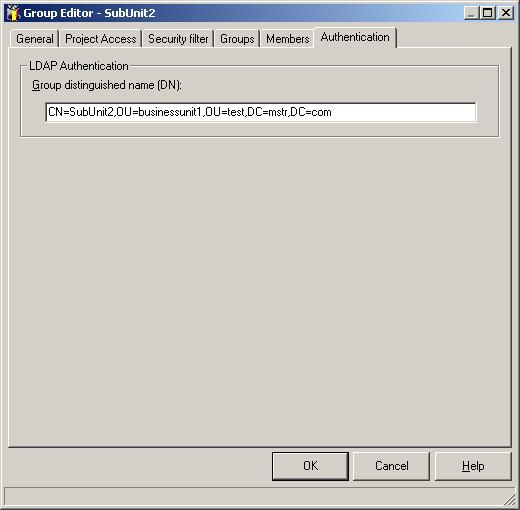
    After the user search and bind operations are complete, the Intelligence Server will also search the LDAP Server for any groups to which the user belongs. This search is performed using the group search filter. If any groups are returned by the LDAP server for the user logging in, they are imported in accordance with the user / group import options. Entries similar to the following will appear in the logs: 
    
    2008-05-27 17:50:30.853-05:00 LDAP authentication trace: this LDAP user belongs to the LDAP group, CN=SubUnit2,OU=businessunit1,OU=test,DC=ads2003-labs,DC=Strategy,DC=com
ka04W00000148r4QAA_0EM440000002BJM.jpeg

 
Anonymous Authentication:
If no password is specified when logging in to the Strategy Intelligence Server using LDAP authentication, the user is logged in as an Anonymous guest user. For more details see section 7 - Guest Connection in the Technical Note: 

  • KB18506: Importing and linking users using LDAP integration with the Strategy Intelligence Server 9.x


Comment

0 comments

Details

Knowledge Article

Published:

May 26, 2017

Last Updated:

May 26, 2017