SYMPTOM:
Administrator has created a DSN via ODBC Data Source Administrator using Strategy ODBC Driver for DB2 Wire Protocol. When attempting to log in to database using Test ODBC tool, the following error is displayed:
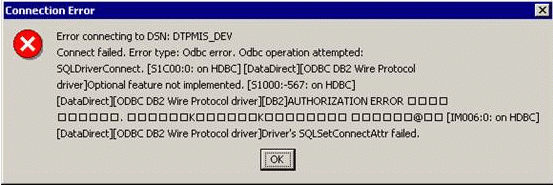
Error connecting to DSN:
Connect failed. Error type: Odbc error. Odbc operation attempted:
SQLDriverConnect. Optional feature not implemented.

Authorization Error Bind
[Driver`s SQLSetConnectAttr failed.
ACTION:
Contact the Database Administrator (DBA) to give the above User ID. If the above User ID does not have these privileges, then a User ID with DBA privileges needs to create these packages by connecting with the driver. This connectivity with the latter User ID needs to be done just once, the very first time the driver attempts to connect to the DB2 server.
Refer to the above mentioned Knowledge Base articles (KB1100-000-0659 and KB1100-000-0660) for more details.
Third Party Software Installation:
WARNING:
The third-party product(s) discussed in this technical note is manufactured by vendors independent of Strategy. Strategy makes no warranty, express, implied or otherwise, regarding this product, including its performance or reliability.
