Users receive a bootstrap error message when running a dashboard in flash mode in Strategy Web. When analyzed with the Flash debugger (Ctrl+Alt+Shift+D), the following error appears.
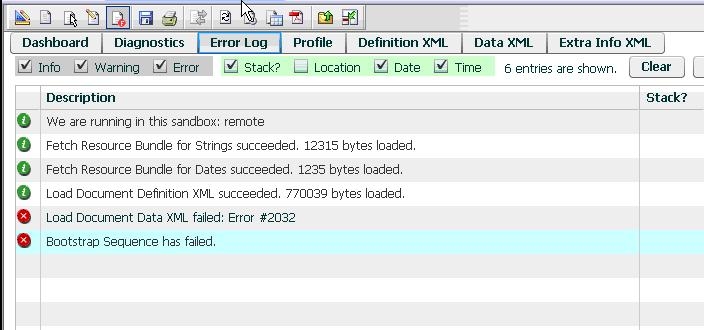
Load Document Data XML failed: Error #2032. Bootstrap Sequence has failed.
Notice that the Definition XML was successfully loaded.
This issue can be analyzed better using Fiddler. Refer to the following Technical Note for more information on using Fiddler - KB17633: 'How to use Fiddler to retrieve data and definition XML from a Flash document in MicroStrategy Web 8.1.x., 9.x and 10.x
Even when there are several causes for the #2032 bootstrap error, the most common cause for it is when the Data XML fails to load, as shown in the image below.
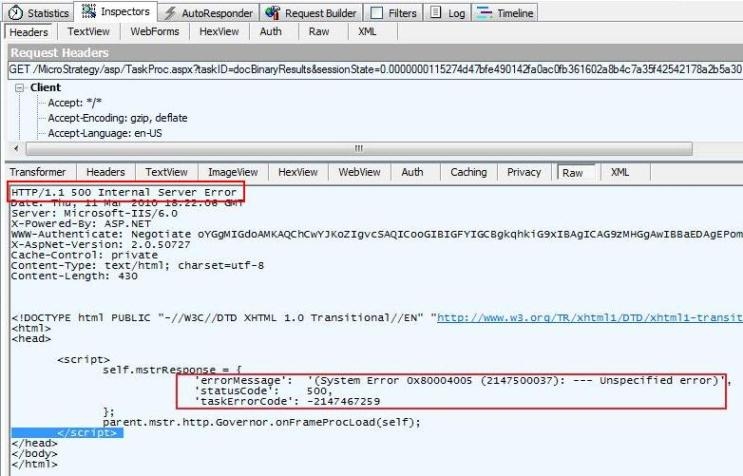
HTTP/1.1 500 Internal Server Error.
---
'errorMessage': '(System Error 0x80004005 (2147500037): --- unspecified error)',
'statusCode' : 500,
'taksErrorCode': -2147467259
This error occurs because of a timeout within the httpRuntime handler of the .NET framework ASP processor.
This error resembles the issue described in the following Technical Note:
There are two timeout settings that affect Strategy Web. One is handled by IIS as described in tech note KB16800.
The other one is in the Strategy Web Admin page > Default Properties > Request Timeout (default is 40 seconds).
Increase the timeout to verify if the dashboard would execute correctly if it has enough time to load.
