EducationSoftwareStrategy.com
StrategyCommunity

Knowledge Base

Product

Community

Knowledge Base

TopicsBrowse ArticlesDeveloper Zone

Product

Download SoftwareProduct DocumentationSecurity Hub

Education

Tutorial VideosSolution GalleryEducation courses

Community

GuidelinesGrandmastersEvents
x_social-icon_white.svglinkedin_social-icon_white.svg
Strategy logoCommunity

© Strategy Inc. All Rights Reserved.

LegalTerms of UsePrivacy Policy
  1. Home
  2. Topics

KB20256: How to create a rolling month filter using dynamic dates filter and date and time function in MicroStrategy


Stefan Zepeda

Salesforce Solutions Architect • Strategy


KB20256: How to create a rolling month filter using dynamic dates filter and date and time function in MicroStrategy Developer 10.x

If a user needs to display data for a period of time based on the current date, then the user can make use of a rolling time filter. In this example the Month attribute will be used to create a rolling six month filter. This filter starts on the first day of the month from six months ago and ends on last day of the prior month:
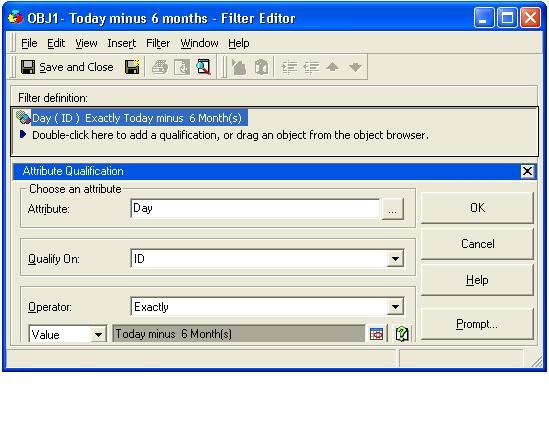
 

  • Create a dynamic date filter 'OBJ1 - Today Minus 6 months'
ka04W000001IqapQAC_0EM440000002Ee3.jpeg
  •  
    For more information on how to create a dynamic date filter, please refer to the following Strategy Knowledge Base document:
     
    KB20000: How to create dynamic dates using MicroStrategy Developer 9.4.x-10.x
     
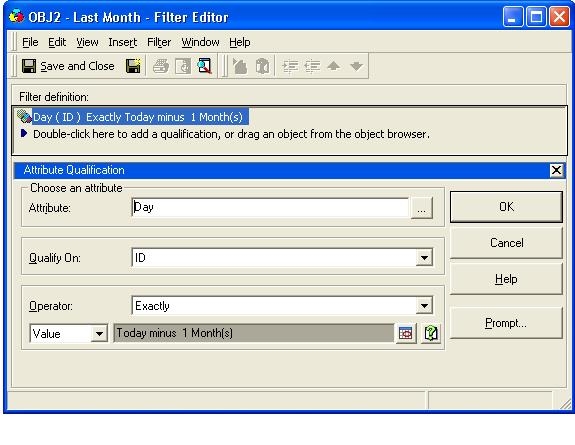
  • Create another dynamic date filter 'OBJ2 - Last Month'
ka04W000001IqapQAC_0EM440000002Edu.jpeg
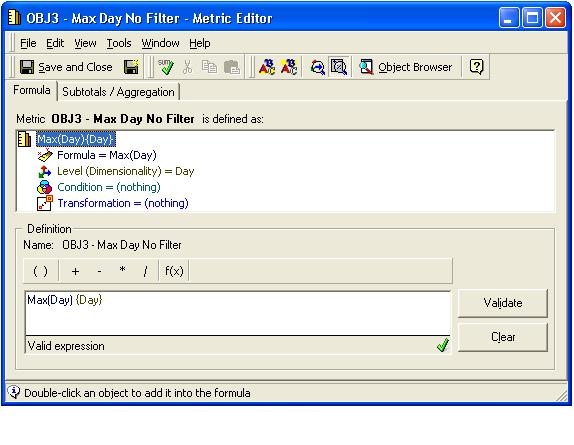
  • Create a Metric 'OBJ3 - Max Day No Filter' that returns the day value in a metric for a given day.
    • Definition : Max(Day)
    • Condition : nothing
    • Level : Remove report level and add Day (standard, standard)
ka04W000001IqapQAC_0EM440000002Ee6.jpeg
  • Create a Metric 'OBJ4 - Max Day (Today Minus 6 Months)' that returns a date from six months ago.
    • Definition : Max(Day)
    • Condition : `OBJ1 - Today Minus 6 months` Filter
    • Level : Leave as it is (Report Level)
  • Create a Metric 'OBJ5 - Max Day (Last Month)' that returns a date from the prior month.
    • Definition : Max(Day)
    • Condition : `OBJ2 - Last Month` Filter
    • Level : Leave as it is (Report Level)
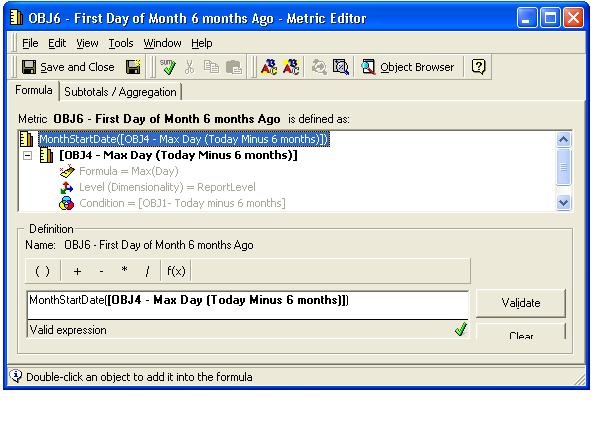
  • Create a Metric 'OBJ6 - First Day of the Month 6 Months ago' that returns the first day of the month from six months ago.
    • Definition : MonthStartDate()
    • Condition : Leave as it is
    • Level : Leave as it is (Report Level)
ka04W000001IqapQAC_0EM440000002Ee7.jpeg
  • Create a Metric 'OBJ7 - Last Day of Prior Month' that returns the last day of the prior month
    • Definition : MonthEndDate()
    • Condition : Leave as it is
    • Level : Leave as it is (Report Level)
  • Create a Metric 'OBJ8 - Max OBJ6' that returns first day of the month from six months ago for all dates irrespective of what the current date is (As the metric has no level)
    • Definition: Max () {}
    • Condition : Leave as it is
    • Level : Remove Report Level
  • Create a Metric 'OBJ9 - Max OBJ8' that returns the last day of the prior month for all dates irrespective of what the current date is? (As the metric has no level)
    • Definition : Max() {}
    • Condition : Leave as it is
    • Level : Remove Report Level
  • Create a Report 'OBJ10 - R1' that serves the purpose of the rolling six month filter.
    • Add `Day` attribute to row
    • Add `OBJ8 - Max OBJ6` , `OBJ3 - Max Day No Filter` and `OBJ9 - Max OBJ8` Metrics to column
      • Format the Metric values to display `Date`
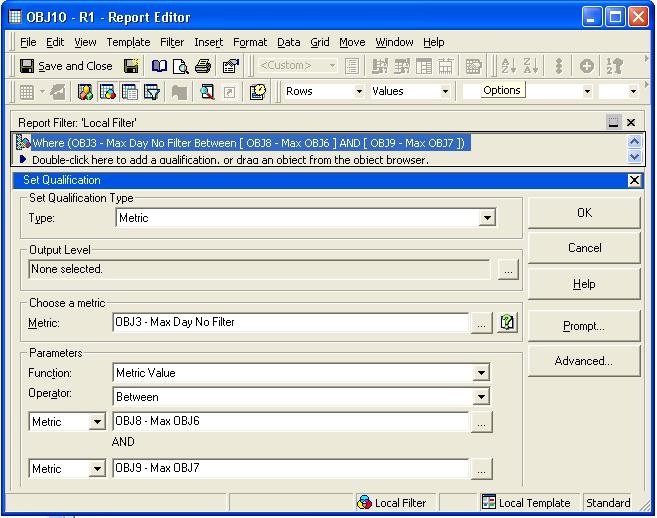
    • Drag and drop `OBJ3 - Max Day No Filter` into the report filter section
      • In the Set qualification `Parameters` subsection:
  • Find below the screen shot of the report filter section:
     
          • Metric: OBJ8 - Max OBJ6
          • Metric: OBJ9 - Max OBJ7
ka04W000001IqapQAC_0EM440000002Edt.jpeg
  • Use Report 'OBJ10 - R1' as a filter in any other report in order to use a rolling six month filter.


Comment

0 comments

Details

Knowledge Article

Published:

June 1, 2017

Last Updated:

June 23, 2017