SUMMARY: Advanced Clustering Maps is a new feature introduced in Strategy Mobile 9.4.1 iOS Update 3 (KB47577). However, as explained in KB47684, this feature cannot be disabled before the document is executed. Moreover, it cannot be disabled permanently. However, this can be done on the application level in Strategy Mobile 9.4.1 iOS Update 4 using the Mobile SDK.
Follow these steps to achieve this goal:
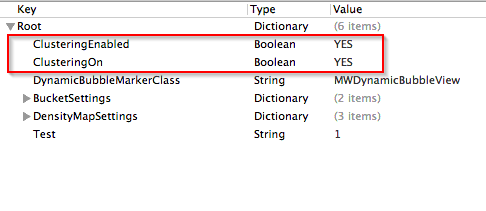
Important Note with Strategy Mobile 10.1: In Strategy 10.1, the Map Widget now has a property to turn off clustering by default. Information on how to do so can be found in the following documentation: KB262373: New Feature in MicroStrategy Mobile for iOS 10.1 - Additional Control to enable or disable Advanced Clustering Maps. However, the icon to enable/disable clustering will still appear. To remove this icon, the ClusteringEnabled property in the steps above will still need to be set to NO. The ClusteringOn property no longer has an effect on the Map Widget in Strategy Mobile 10.1.
ADDITIONAL INFORMATION:
The Strategy SDK allows you to customize the standard Strategy Web interface, and extend and integrate the Strategy business intelligence functionality into other applications. However, before changing the way Strategy Web products look or behave, it is helpful to understand how the application is built. For more information regarding the Strategy Web architecture or the process of customizing Strategy Web, please refer to Strategy Developer Zone (https://resource.microstrategy.com/msdz/).
Customization Warning:
This customization is provided as a convenience to Strategy users and is only directly applicable to the version stated. While this code may apply to other releases directly, Strategy Technical Support makes no guarantees that the code provided will apply to any future or previous builds. In the event of a code change in future builds, Strategy Technical Support makes no guarantee that an updated version of this particular customization will be provided. For enhancements to this customization or to incorporate similar functionality into other versions, contact your Account Executive to inquire about Strategy Consulting assistance.
