Strategy Enterprise Manager dataload fails with the following error message:
Object with ID `XXX` and type Y (description of object type) is not found in the metadata. It may have been deleted.
This error can be seen in case of a metadata inconsistency after the deletion of an object from the metadata. In most cases, the above error is encountered during dataload if one of the following additional dataload options is enabled.
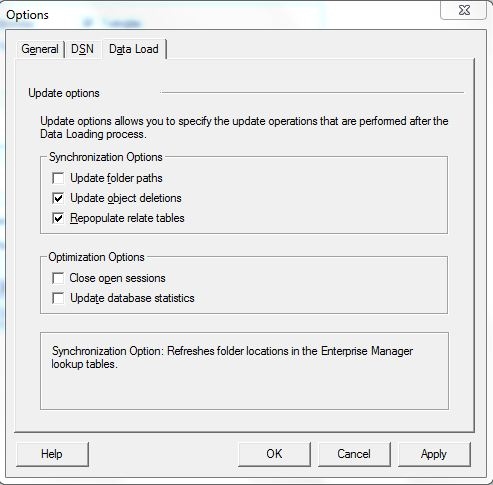
NOTE: This error is independent of the actual dataload and is related to the dataload options mentioned above. Hence this error can also be encountered if the above dataload options are run individually (from Tools > Dataload Options) i.e. independent of the dataload process.
For more information about the above dataload options, refer to the following Knowledge Base articles:
KB7230: How to update the Object Exist Status indicator in MicroStrategy Enterprise Manager
KB11307: What does the "Repopulate relate tables" option achieve in MicroStrategy Enterprise Manager
The failure point is indicated in the Enterprise Manager Dataload log, mstrmigration.log. Additional information regarding where the enterprise manager dataload is failing can be obtained by tracing the SQL during dataload.
KB30594: How to enable the SQL executed during the MicroStrategy Enterprise Manager 9.x data load (ETL) to be logged to the MSTRMigration.log
To avoid the failure of dataload, users can run the Enterprise Manager Dataload without enabling the above mentioned additional dataload options.
In cases where it is essential to run the additional dataload options, it is necessary to identify and fix the inconsistency in the metadata that is causing the problem. Users can run Scan MD to try to identify and fix the inconsistency. For more information about ScanMD, refer to the following knowledge base document:
KB35809: Using ScanMD to fix known logical metadata inconsistencies in the MicroStrategy Product Suite
In cases, where the inconsistency is not resolved by running ScanMD, the metadata causing the error should be provided to Strategy Technical Support for further analysis.
