EducationSoftwareStrategy.com
StrategyCommunity

Knowledge Base

Product

Community

Knowledge Base

TopicsBrowse ArticlesDeveloper Zone

Product

Download SoftwareProduct DocumentationSecurity Hub

Education

Tutorial VideosSolution GalleryEducation courses

Community

GuidelinesGrandmastersEvents
x_social-icon_white.svglinkedin_social-icon_white.svg
Strategy logoCommunity

© Strategy Inc. All Rights Reserved.

LegalTerms of UsePrivacy Policy
  1. Home
  2. Topics

KB20617: How to schedule purging of Statistics in MicroStrategy Intelligence Server


Community Admin

• Strategy


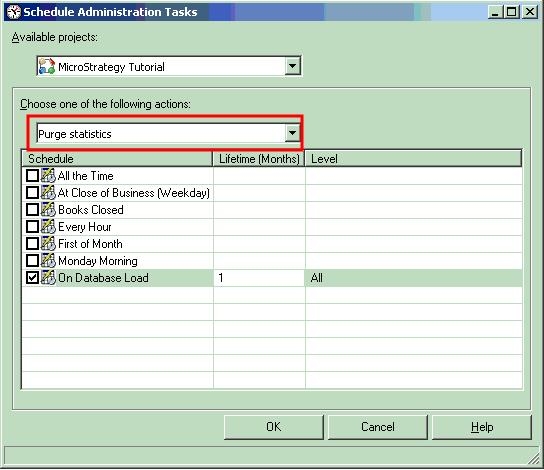
A scheduled administrative task called 'Purge Statistics' is available for individual project or for all projects. To set up an administrative task to schedule purge of statistics, follow the steps below:
  • Connect to a 3-tier project source on Strategy Developer 9.4.x 
  • Open the editor to schedule administrative tasks by navigating to Administration > Scheduling > Schedule Administrative Tasks.
  • The editor is as shown below and as mentioned previously, the purge statistics option is available for all projects or for each individual project.
ka04W00000148GcQAI_0EM440000002B8Y.jpeg
  • A schedule required for the purge must be specified.
  • In the 2nd column, the lifetime of the Statistics data to be retained should be specified in months. For example, if the users specify the lifetime as 1, only one month of Statistics data will be retained i.e. only previous one month's of data will be retained. For example, if the purge is performed on 02/26/09, and the lifetime is 1, the delete statement against the statistics table will be as given below. As seen from the statement below, all the data between '1899-12-30 00:00:00' and '2009-01-27 20:26:04' (date on which purge was done - one month) will be deleted.
    
    Delete from IS_SCHEDULE_STATS where (PROJECTID ='A67E52E24BD2645C93A103ACEDA5E5B1' OR PROJECTID IS NULL) AND (RECORDTIME BETWEEN {ts'1899-12-30 00:00:00'} AND {ts'2009-01-27 20:26:04'})
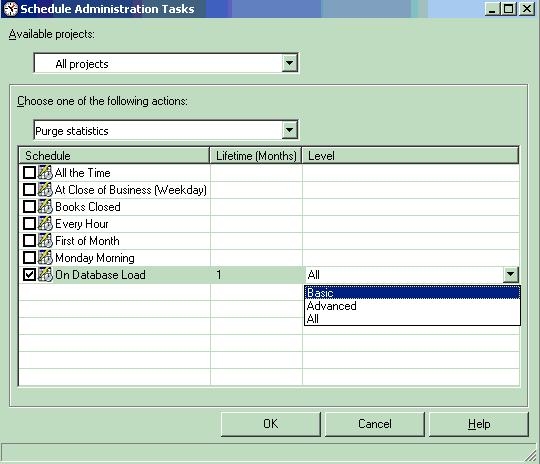
  • In the 3rd column, the level of Statistics purge should be specified. As shown below, it's possible to purge basic statistics or advanced statistics or all statistics.
ka04W00000148GcQAI_0EM440000002B8b.jpeg

Note: The timeout used for purging statistics (through scheduled administrative tasks) is hard-coded to a value of 60 seconds. 
For information about the level of Statistics logging (basic, advanced) in Strategy 9.x, refer to the following knowledge base document: 
KB20616: Levels of Statistics logging in MicroStrategy Enterprise Manager 9.x


Comment

0 comments

Details

Knowledge Article

Published:

June 5, 2017

Last Updated:

June 5, 2017