EducationSoftwareStrategy.com
StrategyCommunity

Knowledge Base

Product

Community

Knowledge Base

TopicsBrowse ArticlesDeveloper Zone

Product

Download SoftwareProduct DocumentationSecurity Hub

Education

Tutorial VideosSolution GalleryEducation courses

Community

GuidelinesGrandmastersEvents
x_social-icon_white.svglinkedin_social-icon_white.svg
Strategy logoCommunity

© Strategy Inc. All Rights Reserved.

LegalTerms of UsePrivacy Policy
  1. Home
  2. Topics

KB221697: Custom subtotals do not display on a report or grid in a report services document. When editing the custom subtotal, the error "Type mismatch" appears in MicroStrategy Developer 9.4.1


Stefan Zepeda

Salesforce Solutions Architect • Strategy


This technical note describes an issue when adding a custom subtotal with a subset of attribute elements to a report or a grid in a report services document. If the custom subtotal is created with a Fact instead of a metric in the case statement, the subtotal does not display on the grid and will generate a ‘type mismatch’ error when editing the custom subtotal.

SUMMARY:
This technical note describes an issue when adding a custom subtotal with a subset of attribute elements to a report or a grid in a report services document. If the custom subtotal is created with a Fact instead of a metric in the case statement, the subtotal does not display on the grid and will generate a ‘type mismatch’ error when editing the custom subtotal.
 
 
SYMPTOM:
In Strategy 9.x, users can create custom subtotals with a subset of attribute elements in the calculation. However, when adding this custom subtotal to a report or a grid in a report services document, the custom subtotal does not display, like shown below:

ka04W000001Ir04QAC_0EM440000002CAp.jpeg


When the user edits the custom subtotal, the report or document appears in the list of objects dependent on the subtotal. If the user attempts to remove the report or document object, an error appears and does not allow the user to save the changes, as shown below:

ka04W000001Ir04QAC_0EM440000002CAu.jpeg


Type mismatch

 
STEPS TO REPRODUCE:
 

  1. Create a report with Year and Profit.
  2. Create a Custom subtotal using the following case statement:


Sum(Case((Year@ID = 2011), Profit, (Year@ID = 2012), Profit, 0)) {~}
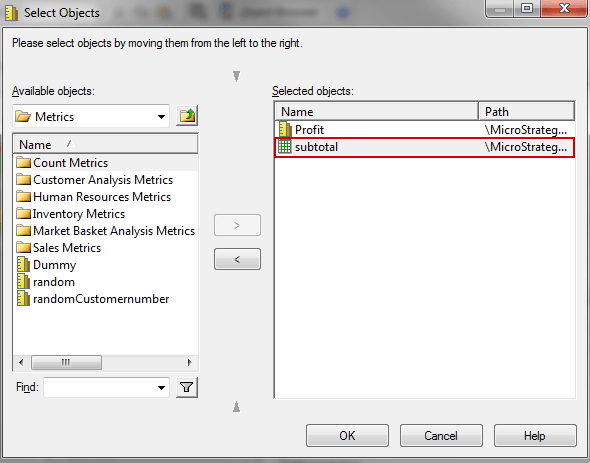
Note: In the above case statement, use the Fact 'profit', not the metric.

  • Save the custom subtotal and apply the subtotal to the Profit metric under Tools > Apply to metrics.
ka04W000001Ir04QAC_0EM440000002CAl.jpeg
  • Edit the report created in step 1, add the subtotal.
  • Notice the subtotal does not display on the report.
  • Save and close the report.  Open the Custom subtotal and browse to Tools > Apply to Metrics. Notice the report object appears.
ka04W000001Ir04QAC_0EM440000002CAr.jpeg
  • Move the report object to the left, notice the error displays.


CAUSE:
This issue occurs when the case statement in the custom subtotal’s definition references a Fact instead of the metric.
 
 
ACTION:
Replace the Fact in the case statement with the corresponding metric.
 
For more information on creating a custom subtotal, refer to technical note KB47180 : How to create a custom subtotal that includes a user-defined subset of available attribute elements in its calculation in Strategy 9.x.


Comment

0 comments

Details

Knowledge Article

Published:

June 8, 2017

Last Updated:

June 8, 2017