EducationSoftwareStrategy.com
StrategyCommunity

Knowledge Base

Product

Community

Knowledge Base

TopicsBrowse ArticlesDeveloper Zone

Product

Download SoftwareProduct DocumentationSecurity Hub

Education

Tutorial VideosSolution GalleryEducation courses

Community

GuidelinesGrandmastersEvents
x_social-icon_white.svglinkedin_social-icon_white.svg
Strategy logoCommunity

© Strategy Inc. All Rights Reserved.

LegalTerms of UsePrivacy Policy
  1. Home
  2. Topics

KB223695: How can users manually trigger email subscriptions created by other users in MicroStrategy 10.x?


Community Admin

• Strategy


This document discusses ways that users can manually trigger email subscriptions that were created by other users in MicroStrategy 10.x.

SUMMARY:
This document discusses ways that users can manually trigger email subscriptions that were created by other users in Strategy 10.x.
 
QUESTION:
How can users manually trigger email subscriptions that were created by other users?
 
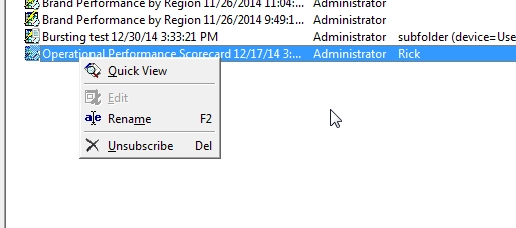
Users may notice that it is not possible to manually trigger an email subscription through the Subscriptions page in Developer.
 

ka04W000001483EQAQ_0EM4400000029Gz.jpeg

 
Further, it is not possible to access the email subscriptions of other users through the Strategy Web interface.
 
ANSWER:
Currently, there are two ways that a user may manually trigger an email subscription for other users:
 

  1. Find the schedule associated with the subscription in question. Edit the schedule to be an event-based schedule. Users should note that this will cause all subscriptions associated with this schedule to be triggered at the same time.  If users wish to only trigger an individual email subscription the following option can be used:
  2. Individual email subscriptions can be triggered using the TRIGGER SUBSCRIPTION Command Manager script:


TRIGGER SUBSCRIPTION GUID subscription_guid PROJECT "project_name";

 
For example:

TRIGGER SUBSCRIPTION GUID F4475B4842D3E718E18DB8AE467E09C7 FOR PROJECT "Strategy Tutorial";

 
Note:  The guid of a subscription can be found by following the steps in KB42870: How to get the GUID of a subscription in MicroStrategy 9.x


Comment

0 comments

Details

Knowledge Article

Published:

April 5, 2017

Last Updated:

April 5, 2017