EducationSoftwareStrategy.com
StrategyCommunity

Knowledge Base

Product

Community

Knowledge Base

TopicsBrowse ArticlesDeveloper Zone

Product

Download SoftwareProduct DocumentationSecurity Hub

Education

Tutorial VideosSolution GalleryEducation courses

Community

GuidelinesGrandmastersEvents
x_social-icon_white.svglinkedin_social-icon_white.svg
Strategy logoCommunity

© Strategy Inc. All Rights Reserved.

LegalTerms of UsePrivacy Policy
  1. Home
  2. Topics

KB224601: “Error in accessing information from the external data source…Incorrect syntax near ‘Date’.” error message displays when selecting a table or specific column from a SQL Server database during data import


Community Admin

• Strategy


This technical note describes a known issue selecting a column or table through data import from a SQL Server database using DATE, TIME, or DATETIME2 data types in MicroStrategy Web with the default SQL Server driver.

SUMMARY:
This technical note describes a known issue selecting a column or table through data import from a SQL Server database using DATE, TIME, or DATETIME2 data types in Strategy Web 9.4.1 with the default SQL Server driver.
 
SYMPTOM:
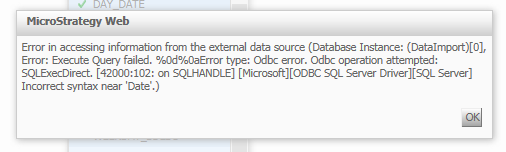
In Strategy Web 9.4.1, users are unable to pull data from a table or column that contains DATE, TIME, or DATETIME2 data types from a SQL Server database during the data import process. When users attempt to hit “Continue” after pulling a table or column over from the database, the below error message displays:


ka04W00000148nHQAQ_0EM4400000025nu.jpeg


Error in accessing information from the external data source (Database Instance: (DataImport)[0], Error: Execute Query failed. %0d%0aError type: Odbc error. Odbc operation attempted: SQLExectDirect. [42000:102: on SQLHANDLE][Microsoft][ODBC SQL Server Driver][SQL Server] Incorrect syntax near ‘Date’.

 
CAUSE:
This issue occurs when SQL Server 2008 or above is configured with the default ODBC driver with the Strategy Intelligence Server 9.4.1. Prior to SQL Server 2008, DATE, TIME, and DATETIME2 data types were not supported, thus the default ODBC driver that comes pre-installed does not support the new data types, causing database data import to fail when selecting columns with data of type DATE, TIME, or DATETIME2.
 
ACTION:
Download and install the native client driver for SQL Server 2008 or above and configure the ODBC driver with it. Refer to technical note KB40734 for more information on configuring this driver.


Comment

0 comments

Details

Knowledge Article

Published:

May 30, 2017

Last Updated:

May 30, 2017