EducationSoftwareStrategy.com
StrategyCommunity

Knowledge Base

Product

Community

Knowledge Base

TopicsBrowse ArticlesDeveloper Zone

Product

Download SoftwareProduct DocumentationSecurity Hub

Education

Tutorial VideosSolution GalleryEducation courses

Community

GuidelinesGrandmastersEvents
x_social-icon_white.svglinkedin_social-icon_white.svg
Strategy logoCommunity

© Strategy Inc. All Rights Reserved.

LegalTerms of UsePrivacy Policy
  1. Home
  2. Topics

KB233793: Thresholds to Replace Data with an image do not display anything when the condition is met in an Image Layout widget in MicroStrategy Web


Community Admin

• Strategy


In MicroStrategy Web, users can replace data with images using thresholds as per tech note KB47979. However, when using this feature with the Image Layout widget in a Report Services Document, the data points that meet the threshold condition do not appear. The data points that do not meet the threshold condition will display as blue balloons instead of the original Bubble markers.

SYMPTOM
In Strategy Web 9.4.1 Hotfix 3, users can replace data with images using thresholds as per tech note KB47979 . However, when using this feature with the Image Layout widget in a Report Services Document, the data points that meet the threshold condition do not appear. The data points that do not meet the threshold condition will display as blue balloons instead of the original Bubble markers, as shown below.

ka04W00000148rZQAQ_0EM4400000025h5.jpeg

 
STEPS TO REPRODUCE

  • Create a document with an Image Layout widget, using image thresholds as per tech note KB47979 .
  • Run the document. Notice that rather than being replaced with an image, the data points that meet the threshold do not display. Also notice that the data points that still appear revert to blue pushpins.
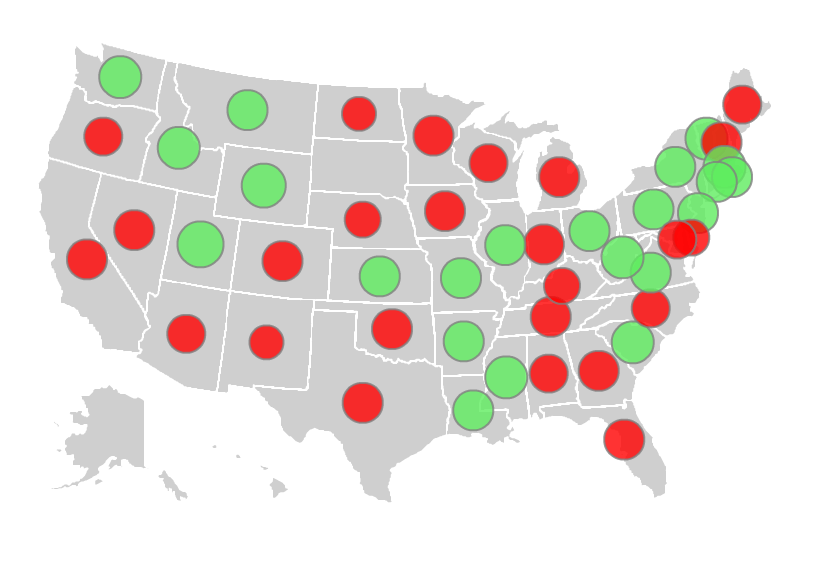
  • Rather than using Replace Data, change the threshold to only change the color if the threshold is met. Notice all of the points appear as expected, as shown below:
ka04W00000148rZQAQ_0EM4400000025h3.jpeg

CAUSE
This is a known issue in Strategy Web 9.4.1 Hotfix 3.
 
ACTION
Currently this issue is still being reviewed for feasibility by our Technology team and it is not scoped for any upcoming scheduled Strategy release. 


Comment

0 comments

Details

Knowledge Article

Published:

June 2, 2017

Last Updated:

June 2, 2017