SUMMARY
Starting in Strategy 10, the Data Import functionality let users extract data from Twitter and Facebook. The main part of the SNS data is often textual, and one of the most popular analyses for such unstructured data is to create a word cloud image from it. This technical note provides sample R scripts to achieve that goal and presents some demonstrations.
PREMISE
CONFIGURATION

Notes:
The attached R script is configured to work in the R Script directory. Therefore, this R script is already executable via an R metric. If a user wishes to place the script in a different directory, specify the folder path through the deployR() interface.
FOR END-USERS
In order to create a word cloud image from a metric containing textual data, create a new metric with the following R metric definition but replace the “MetricName” part by the name of the metric you wish to analyze. In other words, the whole definition except the last input metric name is always static.
RScript<_RScriptFile="Wordcloud.R", _InputNames="mstrInput">(MetricName)
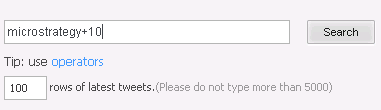
In a Dashboard, the ID attribute and Text metric may be added to the grid as follows and the data is also filtered by the user language.

In order to create a word cloud image from the Text metric, create a new metric and use the R metric definition. The last word ‘Text’ refers to the name of the ‘Text’ metric in the Twitter data.
RScript<_RScriptFile="Wordcloud.R", _InputNames="mstrInput">(Text)
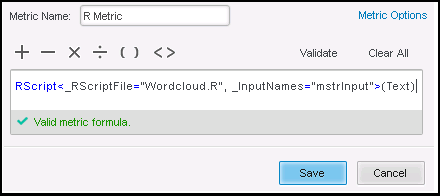

When the R metric is added to the grid, a word cloud image will then be created in the shared folder. The user can utilize this image for any purposes.


DEMO 2: Other Metrics
If a user wants to create a word cloud image from attribute elements, s/he first needs to display the elements in a metric, which can be accomplished by using the max function as follows.


After that, since the metric name is ‘ItemDesc’, specify this name in the same R metric definition.
RScript<_RScriptFile="Wordcloud.R", _InputNames="mstrInput">(ItemDesc)

ERROR HANDLING
Users might come across a machine specific issue in which the execution of the attached R script errors out only when it is kicked by the Strategy R Integration functionality (the same R script works fine in the R console). It appears that loading some R libraries is not successfully done. If such an issue is encountered in a Windows environment, the following files could be used as one possible workaround. In this workaround, the main part of the R script is executed via a batch file.
RScript<_RScriptFile="Wordcloud_Batch1.R", _InputNames="mstrInput">(MetricName)
