SUMMARY
The impact is limited to documents with specific settings which have been discussed below. A workaround is available in the current document.
SYMPTOM
In Strategy 9.4.x and 10.x, when exporting a document to Microsoft Excel, the cell width doesn't fit the contents for long column headers as shown below:

NOTE:
Content is not truncated; but the Excel column width doesn't expand as wide as the contents and some contents are hidden/partially shown only.
The wrap text option is not enabled as shown below:
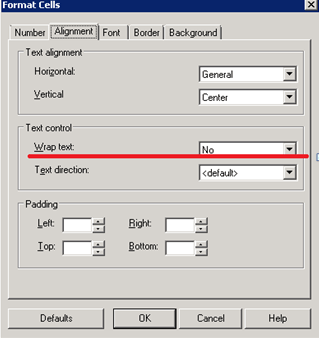
Document looks correct on Strategy Web and when exporting to PDF as shown below:

Refer to Technical Document below for details about a slightly different export issue:
KB47744 -- Text field height does not fit the content when a document is exported to Excel from Strategy Web or executed in Strategy Office 9.4.x.
CAUSE
This is the expected behavior when exporting from Strategy 9.x and 10.x to Excel 2007 and above. The limitation is actually because of Excel 2007's (and above versions) handling of the setting 'auto-fit column width'.
Note: Exporting report to Excel is not impacted by this issue.
ACTION
An enhancement has been logged to modify this behavior and get around the limitation imposed by Excel 2007 and above. This issue is currently not scoped to be addressed in any upcoming release. Contact Strategy Technical Support for an update.
The Strategy Internal Reference Number for the issue discussed in this technical note is 456136.
WORKAROUND
Set the document grid column width to be 'Fixed' instead of 'Fit to Content' as shown below:

