EducationSoftwareStrategy.com
StrategyCommunity

Knowledge Base

Product

Community

Knowledge Base

TopicsBrowse ArticlesDeveloper Zone

Product

Download SoftwareProduct DocumentationSecurity Hub

Education

Tutorial VideosSolution GalleryEducation courses

Community

GuidelinesGrandmastersEvents
x_social-icon_white.svglinkedin_social-icon_white.svg
Strategy logoCommunity

© Strategy Inc. All Rights Reserved.

LegalTerms of UsePrivacy Policy
  1. Home
  2. Topics

KB258357: New in MicroStrategy 10.1 - Single View Mode for Documents: Presentation Mode


Community Admin

• Strategy


This technical note introduces Presentation Mode present in MicroStrategy 10.1 and up.

In Strategy 10.1, the only available view mode for documents is Presentation View Mode. The new Presentation View is based on the Express View mode and will be the only view mode to be further developed and supported in future releases of Strategy Web.
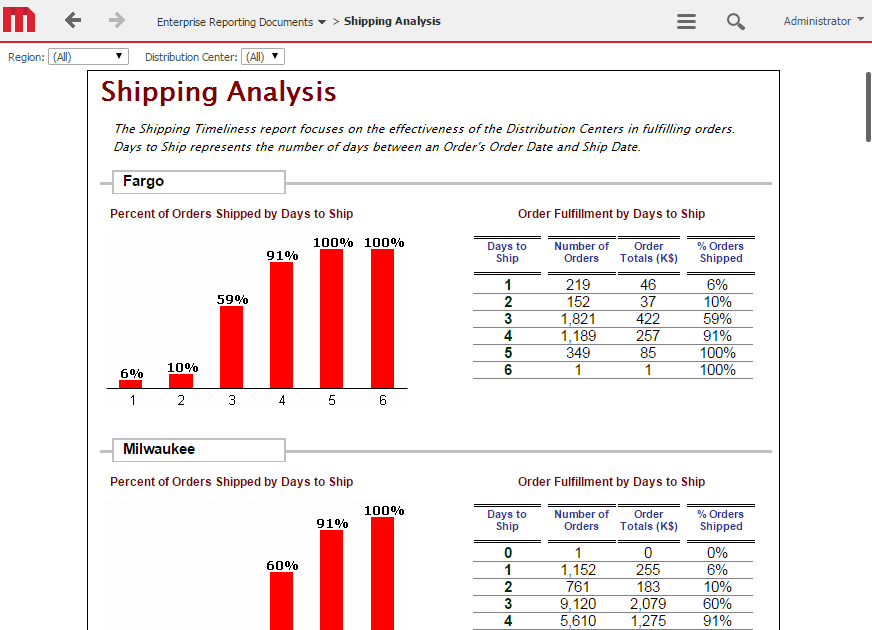
  • Presentation View simplifies the user interface and always runs in full screen mode.
ka04W0000014906QAA_0EM4400000025cJ.jpeg


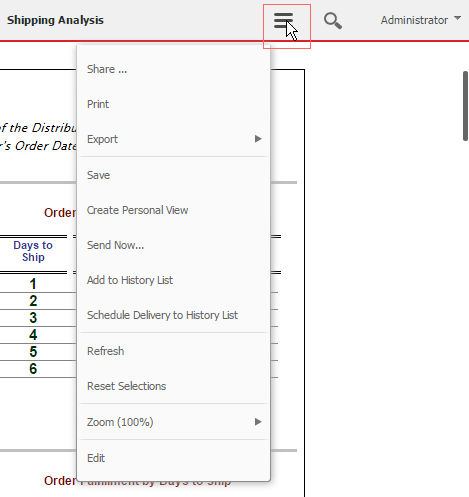
  • The menu bar can be accessed through the context icon in the top right corner.
ka04W0000014906QAA_0EM4400000025cK.jpeg
  • With the introduction of Presentation View mode, previously available view modes (Interactive and Flash mode) have been deprecated. Please refer to KB257502: New in MicroStrategy 10.1 - Interactive and Flash document view modes deprecated.


Comment

0 comments

Details

Knowledge Article

Published:

April 4, 2017

Last Updated:

April 4, 2017