EducationSoftwareStrategy.com
StrategyCommunity

Knowledge Base

Product

Community

Knowledge Base

TopicsBrowse ArticlesDeveloper Zone

Product

Download SoftwareProduct DocumentationSecurity Hub

Education

Tutorial VideosSolution GalleryEducation courses

Community

GuidelinesGrandmastersEvents
x_social-icon_white.svglinkedin_social-icon_white.svg
Strategy logoCommunity

© Strategy Inc. All Rights Reserved.

LegalTerms of UsePrivacy Policy
  1. Home
  2. Topics

KB262867: Users cannot display Japanese characters of “Print cover page” when exporting a report to PDF in MicroStrategy 9.4.1 and newer in Linux environment.


Community Admin

• Strategy


Users cannot display Japanese characters of “Print cover page” when exporting a report to PDF in MicroStrategy 9.4.1 and newer in Linux environment.

SYMPTOM
When exporting reports to PDF, the "Print cover page" option can be selected in Web. However, the Japanese characters in the cover page are garbled in Strategy 9.4.1 and newer in Linux environment.
STEPS TO REPRODUCE
1.Login to Strategy Web with the preferences is Japanese language.
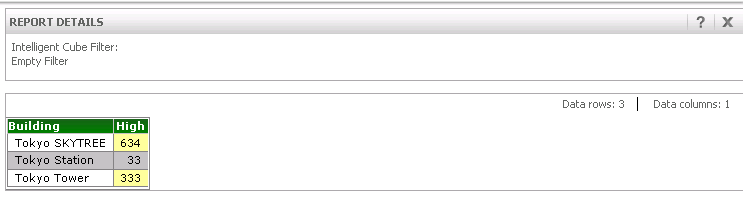
   Sample report is below.
ka04W000000OacwQAC_0EM4400000029De.jpeg

2. Export a report to PDF with checking “Print cover page”.
    The left image is Japanese environment. The right image is English environment.

ka04W000000OacwQAC_0EM4400000029Dd.jpeg

3. Click the “Export”.
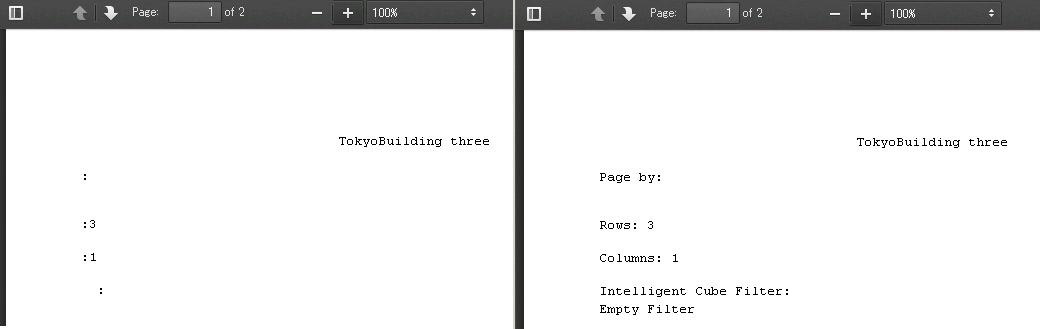
4. The PDFs exported are as shown below.
    The left image cannot display Japanese characters. The right image can display English correctly.
ka04W000000OacwQAC_0EM4400000029Db.jpeg

CAUSE
This is a known issue in Strategy 9.4.1.
ACTION
This issue has been addressed in Strategy 10.7 or above. 
Please refer to KB439299 for the detailed steps.
The Strategy Internal Reference Number for the issue discussed in this technical note is DE20389.
KB262867


Comment

0 comments

Details

Knowledge Article

Published:

June 13, 2017

Last Updated:

September 3, 2018