SYMPTOM:
As noted in article KB44532: Case function doesn't display in available function list but it is supported in MicroStrategy Visual Insight 9.3.1 the Case function can be used in Visual Insight in Strategy Web 9.4.1 and 10, even though it does not appear in the available function list. If a derived metric is created with the Case function to show one value or another depending on qualification, the results of that derived metric would not allow any number formatting to be applied to it.
Consider the example below:
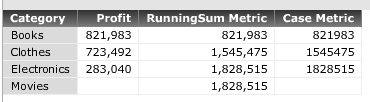
The definition of the Case metric to the right is as follows:
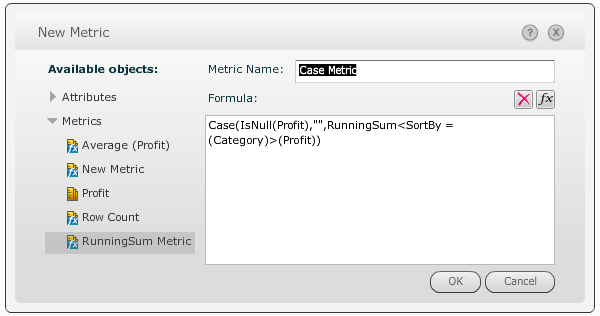
Case(IsNull(Profit),"",RunningSum<SortBy=(Category)>(Profit))
Preserver backward compatibility with 8.x and earlier. | Preserver backward compatibility with 8.x and earlier. |
Preserver backward compatibility with 8.x and earlier. | Preserver backward compatibility with 8.x and earlier. |
Preserver backward compatibility with 8.x and earlier. | Preserver backward compatibility with 8.x and earlier. |
Preserver backward compatibility with 8.x and earlier. | Preserver backward compatibility with 8.x and earlier. |
Preserver backward compatibility with 8.x and earlier. | Preserver backward compatibility with 8.x and earlier. |
CAUSE:
This is working as designed in Strategy Web 9.4.x and 10.x. Since the Case function is mixing data types, in one condition an empty character is displayed, which is a string, on the other the result is a number. The metric elements have conflicting data types, thus number the formatting does not apply. A request has been logged to address this issue.
ACTION:
Strategy will continue to investigate and post updates as soon as they are available.
